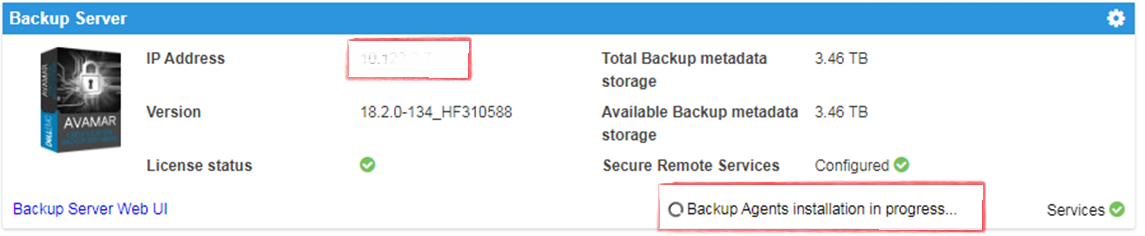
IDPA: L'interfaccia utente mostra che è in corso l'installazione dei backup agent con un cerchio che ruota dopo il deployment
Summary: L'interfaccia utente (UI) di Integrated Data Protection Appliance (IDPA) mostra che l'installazione degli agent è in corso, il programma di installazione è completato. Un'identificazione di esito positivo mancante fa sì che l'interfaccia utente pensi che gli agenti siano in fase di installazione. ...
This article applies to
This article does not apply to
This article is not tied to any specific product.
Not all product versions are identified in this article.
Symptoms
- A
Backup Agents installation in Progressin Appliance Configuration Manager (ACM) viene visualizzato un messaggio. - AVI non mostra pacchetti pronti per l'installazione. La cronologia mostra i pacchetti come completati, mentre in ACM i pacchetti
- A
Backup Agents installation in ProgressViene visualizzato il messaggio:
Cause
Questo problema si verifica dopo un nuovo deployment.
Resolution
- Accedere ad Avamar:
https://<Avamar_IP>/avi
L'interfaccia utente del programma di installazione AVI verificato per Avamar non mostra alcun pacchetto in attesa di essere installato e la cronologia mostra i pacchetti completati.
- Accedere ad Avamar SSH.
Stato verificato di dpnctl stato e tutti i servizi sono attivi e funzionanti correttamente.
Eseguire il comando: dpnctl status
- Accedere all'SSH ACM ed eseguire il seguente comando per cancellare il file
Backup Agents installation in ProgressMessaggio:touch /usr/local/dataprotection/var/av_ucd_install_success
- Riavviare il servizio app web ACM utilizzando i comandi seguenti:
Stop webapp
Arrestare il servizio app web:
Avviare il servizio webapp:
service dataprotection_webapp
Avviare il servizio webapp:
service dataprotection_webapp start
Affected Products
Integrated Data Protection Appliance FamilyProducts
PowerProtect Data Protection Software, Integrated Data Protection Appliance FamilyArticle Properties
Article Number: 000170900
Article Type: Solution
Last Modified: 20 Jan 2026
Version: 4
Find answers to your questions from other Dell users
Support Services
Check if your device is covered by Support Services.