「IDPA:UIにバックアップ エージェントのインストールが進行中と表示され、導入後に円が回転する
Summary: Integrated Data Protection Appliance (IDPA)のユーザー インターフェイス(UI)には、[Agent Install in Progress, Installer complete]と表示されます。成功の識別が見つからないと、エージェントがインストールされていると UI が認識します。
This article applies to
This article does not apply to
This article is not tied to any specific product.
Not all product versions are identified in this article.
Symptoms
- A
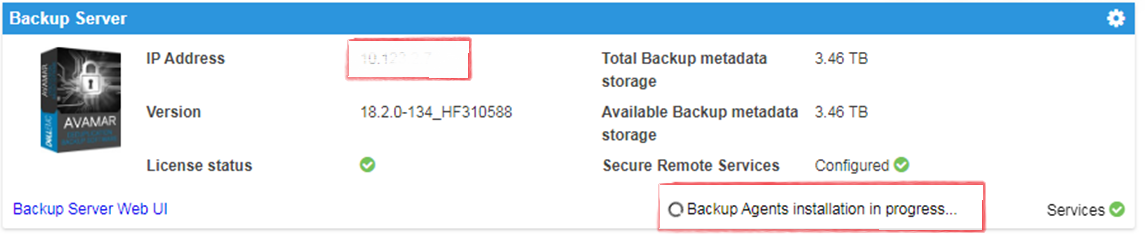
Backup Agents installation in ProgressメッセージがAppliance Configuration Manager (ACM)に表示されます。 - AVIにインストール準備ができているパッケージが表示されません。履歴にはパッケージが完了として表示されますが、ACMでは
- A
Backup Agents installation in Progressメッセージが表示されます。
Cause
この問題は、新規導入後に発生します。
Resolution
- Avamarにログインします。
https://<Avamar_IP>/avi
Avamarの検証済みAVIインストーラーのユーザー インターフェイスには、インストール待ちのパッケージが表示されず、履歴には完了したパッケージが表示されます。
- Avamar SSHにログインします。
検証済みステータス: dpnctl すべてのサービスが正常に動作しています。
次のコマンドを実行します。 dpnctl status
- ACM SSHにログインし、次のコマンドを実行して
Backup Agents installation in Progressメッセージ:touch /usr/local/dataprotection/var/av_ucd_install_success
- 次のコマンドを使用して、ACM webapp serviceを再起動します。
Stop webapp
Webアプリケーション サービスを停止します。
Webアプリ サービスを開始します。
service dataprotection_webapp
Webアプリ サービスを開始します。
service dataprotection_webapp start
Affected Products
Integrated Data Protection Appliance FamilyProducts
PowerProtect Data Protection Software, Integrated Data Protection Appliance FamilyArticle Properties
Article Number: 000170900
Article Type: Solution
Last Modified: 20 Jan 2026
Version: 4
Find answers to your questions from other Dell users
Support Services
Check if your device is covered by Support Services.