Dell Latitude 3410:鍵盤功能鍵指南
Summary: 下列指南列出 Dell Latitude 3410 筆記型電腦可用的鍵盤快速鍵及其執行的功能。
This article applies to
This article does not apply to
This article is not tied to any specific product.
Not all product versions are identified in this article.
Symptoms
鍵盤快速鍵功能
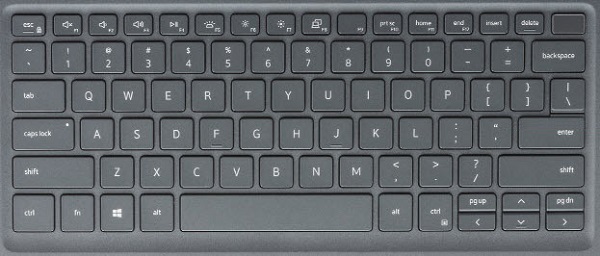
下圖是 Latitude 3410 筆記型電腦上的鍵盤視圖,其中包含可用的按鍵功能。
Cause
下表列出 Latitude 3410 筆記型電腦可用的快速鍵組合功能。
| 按鍵 | 主要行為 | 次要行為 (fn + 按鍵) |
|---|---|---|
| Fn + Esc | Escape |
切換 fn 鍵鎖定 |
| Fn + F1 |
靜音 |
F1 |
| Fn + F2 |
降低音量 |
F2 |
| Fn + F3 |
提高音量 |
F3 |
| Fn + F4 |
麥克風靜音 |
F4 |
| Fn + F5 |
開啟和關閉鍵盤背光。 |
F5 |
| Fn + F6 |
降低亮度 |
F6 |
| Fn + F7 |
增加亮度 |
F7 |
| Fn + F8 |
切換至外部顯示器 |
F8 |
| Fn + F10 |
列印螢幕 |
F10 |
| Fn + F11 |
Home 鍵 |
F11 |
| Fn + 12 |
End 鍵 |
F12 |
| Fn + Ctrl |
開啟應用程式功能表 |
-- |
Resolution
 前往我們的
前往我們的  如需其他文章和資訊,請前往我們的
  您也可以在我們的
Affected Products
Latitude 3410Article Properties
Article Number: 000129898
Article Type: Solution
Last Modified: 05 Jun 2025
Version: 6
Find answers to your questions from other Dell users
Support Services
Check if your device is covered by Support Services.