How to Download and Install McAfee Products Sold at Dell
Summary: Explore how to download and install McAfee products purchased at Dell. This guide covers McAfee LiveSafe, Small Business Security, Business Protection, and McAfee+ Premium. Get started with your McAfee subscription today. ...
Instructions
Affected Products:
- McAfee LiveSafe
- McAfee Small Business Security
- McAfee Business Protection
- McAfee+ Premium
McAfee products use a subscription-based software model that is available either as a 30-day trial or for purchase from Dell.
Reference the instructions under Trial or Purchased for more information.
Trial
Computers purchased through Dell include a McAfee 30-day trial. Customers must activate purchased subscription through Dell using the options noted below.
Purchased
McAfee products can be purchased with a Dell Computer or through the Dell McAfee Store. Reference the appropriate purchase method for the proper installation steps.
 .
.
Dell Computer
If your order confirmation contains the below SKUs
| 634-CYHK | 525-0013 | 525-0318 |
| 634-CYHF | 525-10286 | 525-10633 |
| 634-CYHH | 525-10625 | 525-10288 |
| 634-CYHG | 525-10263 | 525-0015 |
| 634-CYHJ | 525-10292 | 525-10288 |
| 634-CYHL | 525-10624 | 525-10627 |
| 634-CHWH | 525-10302 | 525-10265 |
| 634-CHLN | 650-0028 |
McAfee installation must be completed using either Dell Optimizer, Dell, or Alienware Purchased App or MyAccount.
For example:
- 634-CYFF - McAfee+ Premium 3-year
- 658-BCC0 - MCAfee+ Premium 30-day trial
Reference Dell knowledge base article Dell Optimizer Version 6.x Purchased Apps Information, for additional information related to Dell Optimizer, Dell or Alienware Purchased App download method are available.
Software purchased with the unit outside of Dell Optimizer, Dell or Alienware Purchased App or MyAccount:
On boot, McAfee software is available directly in the Windows system tray. In the Windows Notification Area, click Show hidden files and then double-click the McAfee system tray icon.

You can follow instructions available here to Download and install McAfee products
to redownload the product.
- Validate the email that is tied to a McAfee subscription.
- Dell technical support is unable to validate the email that is used to setup the McAfee subscription, to protect your privacy.
- Contact the vendor directly for assistance at https://service.mcafee.com/
Dell McAfee Store
The following McAfee product subscriptions can be purchased at Dell for computers running Microsoft Windows:
- McAfee Antivirus
- McAfee LiveSafe
- McAfee Total Protection
- McAfee+ Premium
- McAfee Mobile Security
- McAfee Privacy and Identity Guard
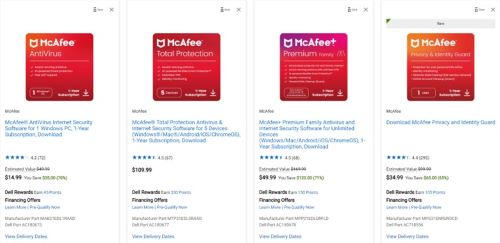
McAfee products that are purchased separately from a Dell computer can be downloaded through Dell Digital Locker with the email that is used at the time of purchase.
to redownload the product.
- For issues accessing your McAfee account:
- Validate the email that is tied to a McAfee subscription.
- Dell technical support is unable to validate the email that is used to setup the McAfee subscription, To protect your privacy. Contact the vendor directly for assistance at https://service.mcafee.com/
- If the McAfee product is missing from your Dell Digital Locker account, reach out to Customer Care for further assistance. For more information, reference How to Get Support for McAfee Products Sold at Dell.