NetWorker:嘗試變更瀏覽時間時,透過 NetWorker 執行的還原 使用者回報錯誤「請指定 AM or PM」。
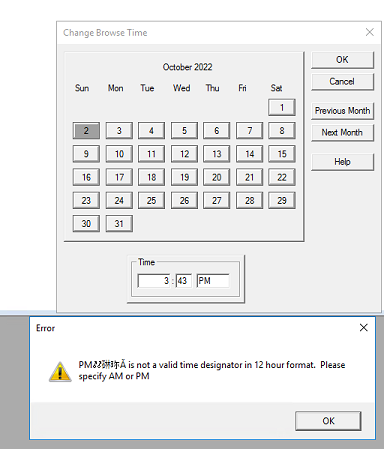
Summary: 正在從 NetWorker 使用者軟體執行復原,嘗試變更瀏覽時間時會出現錯誤,指出:「PM@#$%# 不是 12 小時制的有效時間指定。請指定 AM 或 PM」
This article applies to
This article does not apply to
This article is not tied to any specific product.
Not all product versions are identified in this article.
Symptoms
- 正在使用 NetWorker 使用者程式執行還原。
- 使用 12 小時制變更瀏覽時間時,會出現下列錯誤。
Cause
代碼缺陷。在 Windows Server 2016 上使用 NetWorker 19.7.0.1 用戶端觀察到此問題。NetWorker 19.7 已結束支援壽命 (EOSL)。
Resolution
在 Windows Server 2022 或 2025 上使用 NetWorker 19.11.0 (或更新版本) 用戶端時,不會發現此問題。此問題在目前的 NetWorker 版本和作業系統上不太可能發生。如果遇到此情況,請使用下列因應措施。
因應措施:
- 從 NetWorker 使用者中,選取 檢視 -> 變更瀏覽時間
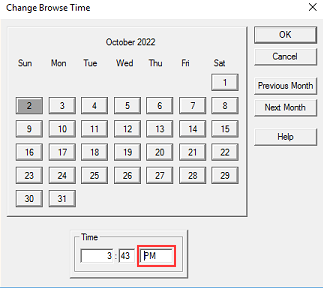
- 指定要將流覽週期設置為的時間(12 小時格式)。在上午或下午之前插入 一個空格 。
- 按一下確定
- 瀏覽時間現在應反映指定的時間。
Affected Products
NetWorker Family, NetWorkerProducts
NetWorker SeriesArticle Properties
Article Number: 000201625
Article Type: Solution
Last Modified: 30 Dec 2025
Version: 3
Find answers to your questions from other Dell users
Support Services
Check if your device is covered by Support Services.