Avamar: 복제를 시작하지 못하고 "작업을 처리할 프록시를 찾을 수 없어 복제를 시작하지 못했습니다."라는 오류 메시지가 표시됩니다.
Summary: Avamar Server를 업그레이드하거나 인증서를 갱신한 후 복제가 시작되지 않고 코드 30978과 함께 설명에 "작업을 처리할 프록시를 찾지 못해 복제를 시작하지 못했습니다."라는 오류 메시지가 표시됩니다.
This article applies to
This article does not apply to
This article is not tied to any specific product.
Not all product versions are identified in this article.
Symptoms
복제가 시작되지 않거나 대기열에 추가되지 않으며, 수동으로 실행하려고 하면 다음 오류가 발생합니다.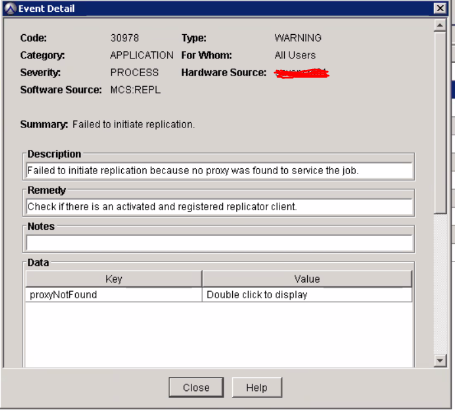
또한 "/usr/local/avamar/var/client/avagent.log" 아래의 avagent 로그가 최신 상태가 아니며 마지막 항목은 서버 업그레이드 전입니다.
인증서 갱신 후 이 오류가 발생한 경우 avagent 로그는 이전 인증서 만료 날짜부터 표시됩니다.
Cause
원인을 파악하려면 추가 조사가 필요하지만 워크플로 중 또는 이후에 Avagent 서비스가 제대로 재시작되지 않은 것 같습니다.
인증서를 갱신하는 경우 avagent는 재시작할 때까지 이전 인증서를 계속 시도합니다.
Resolution
avagent 서비스를 재시작하고 다시 시도하십시오.
-
유틸리티 노드에 admin으로 로그인하고 루트 사용자로 전환합니다.
su -
-
avagent 서비스를 재시작합니다.
service avagent restart
-
이제 avagent가 실행 중인지 확인합니다.
service avagent status
-
avagent 로그를 확인하고 최신 상태인지 확인합니다.
ls -lthr /usr/local/avamar/var/client/avagent.log
-
복제를 다시 실행합니다.
Affected Products
AvamarProducts
AvamarArticle Properties
Article Number: 000182782
Article Type: Solution
Last Modified: 17 Dec 2025
Version: 5
Find answers to your questions from other Dell users
Support Services
Check if your device is covered by Support Services.