VxRail: Virtual-Machine Network Interface Card Vmnic is shown as DOWN
Summary: VxRail: virtual-machine network interface card (Vmnic) is showing as DOWN
This article applies to
This article does not apply to
This article is not tied to any specific product.
Not all product versions are identified in this article.
Symptoms
- Nic status in VxRail Manger UI shows as Down.

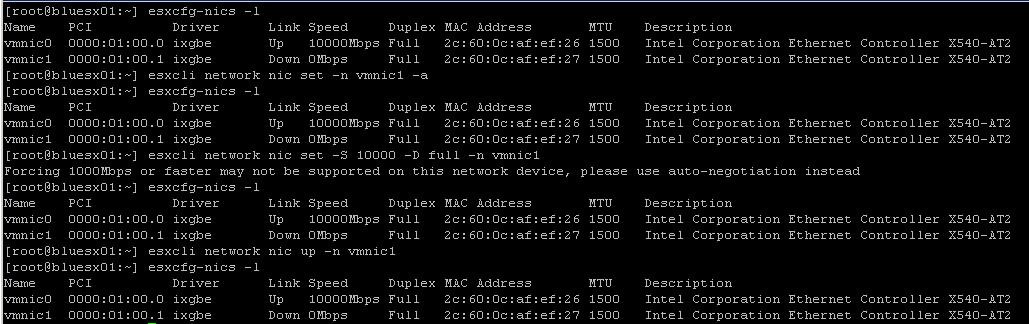
- SSH session to the ESXi host shows the Network Interface Card (NIC) as Down
esxcfg-nics -l - Attempts to set the device to auto-negotiation appears to work successfully, or may show "Invalid Argument"
esxcli network nic set -n vmnic1- Attempts to set speed and duplex shows: "Forcing 10000 Mbps or faster may not be supported on this network device, please use auto-negotiation instead"
esxcli network nic set -S 10000 -D full -n vmnic1- Attempts to up the NIC still show the NIC as down
esxcli network nic up -n vmnic1- Examples:
Cause
Issue with the network or switch or port is the cause.
Troubleshooting:
Place the ESXi host in maintenance mode and swap cables between vmnics. If the vmnic that was showing Down, now shows as Up after swapping the cables, the issue is isolated to the switch or port or the cabling or sfp and must be investigated.
Resolution
Contact the customer network team or switch vendor to investigate issue with components.
Affected Products
VxRail Appliance Series, VxRail D560, VxRail D560F, VxRail E460, VxRail E560, VxRail E560F, VxRail E560N, VxRail E660, VxRail E660N, VxRail E665, VxRail E665F, VxRail E665N, VxRail G560, VxRail G560F, VxRail P470, VxRail P570, VxRail P570F
, VxRail P580N, VxRail P670F, VxRail P670N, VxRail P675F, VxRail P675N, VxRail S470, VxRail S570, VxRail S670, VxRail V470, VxRail V570, VxRail V570F, VXRAIL V670F, VxRail VD-4510C, VxRail VD-4520C, VxRail VE-660, VxRail VE-6615, VxRail VP-760, VxRail VP-7625, VxRail VS-760
...
Article Properties
Article Number: 000018025
Article Type: Solution
Last Modified: 05 Sept 2025
Version: 5
Find answers to your questions from other Dell users
Support Services
Check if your device is covered by Support Services.