如何从 Dell Gaming 和 Alienware 显示器接收音频
Summary: 了解为什么您听不到来自 Dell Gaming 或 Alienware 显示器的声音。了解如何接收来自 Dell Gaming 和 Alienware 显示器的音频。
This article applies to
This article does not apply to
This article is not tied to any specific product.
Not all product versions are identified in this article.
Symptoms
Cause
Dell Gaming 和 Alienware 显示器(Alienware 55 OLED 显示器AW5520QF除外) 没有 内置扬声器。
Resolution
Dell Gaming 和 Alienware 显示器没有声音
需要耳机或外部扬声器才能从 Dell Gaming 和 Alienware 显示器(Alienware 55 OLED 显示器AW5520QF除外)接收音频。
- 通过 HDMI、DisplayPort (DP)、USB Type-C 等(任何可用端口)将计算机连接到显示器。
提醒:单击任务栏中的扬声器图标会将显示器显示为播放设备。即使显示器显示为播放设备,显示器也没有声音,因为它 没有 扬声器。
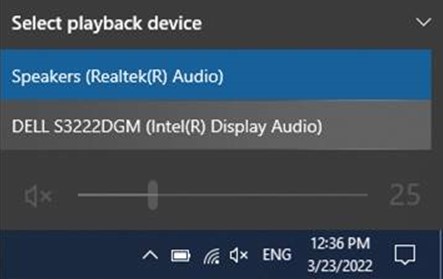
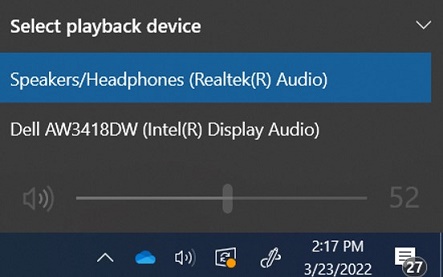
- 将耳机或外部扬声器连接到显示器背面的耳机端口。有关端口的更多信息,请参阅显示器 的用户指南 。
提醒:
- 某些显示器的耳机端口和扬声器端口是分开的。请参阅显示器 的用户指南,以确定要使用的正确端口。
- 戴尔音棒与戴尔游戏显示器 不 兼容。有关详细信息,请参阅文章:戴尔音棒无法安装在 Dell Gaming 显示器支架上。
有关对 Windows 中的声音问题进行故障处理的更多信息,请参阅 解决 Windows 10
有关 Dell Gaming 显示器的列表,请参阅 Dell Gaming 和 Alienware 显示器常见问题。
Affected Products
Alienware 25 Gaming Monitor AW2518H, Alienware 25 Gaming Monitor AW2518Hf, Alienware 34 Monitor AW3418DW, Alienware 34 Monitor AW3418HW, Alienware 34 Curved OLED Monitor AW3423DW, Alienware 25 Gaming Monitor AW2521H
, Alienware 25 Gaming Monitor AW2521HF, Alienware 25 Gaming Monitor AW2521HFA, Alienware 25 Gaming Monitor AW2521HFL, Alienware 25 Gaming Monitor AW2521HFLA, Alienware 27 Gaming Monitor AW2720HF, Alienware 27 Gaming Monitor AW2720HFA, Alienware 27 Gaming Monitor AW2721D, Alienware AW3420DW, Alienware 38 Curved Gaming Monitor AW3821DW, Alienware 55 OLED Monitor AW5520QF, Dell S2417DG, Dell S2419HGF, Dell Gaming S2421HGF, Dell 24 Curved Gaming Monitor S2422HG, Dell 25 Gaming Monitor S2522HG, Dell S2716DG, Dell S2719DGF, Dell 27 Gaming Monitor S2721DGF, Dell S2721DGFA, Dell Gaming S2721HGF, Dell 27 Curved Gaming Monitor S2722DGM, Dell S3220DGF, Dell 32 Curved Gaming Monitor S3222DGM, Dell 32 Curved Gaming Monitor S3222HG, Dell 34 Curved Gaming Monitor S3422DWG, Dell 24 Gaming Monitor G2422HS, Dell 27 Gaming Monitor G2722HS, Dell 27 Gaming Monitor G2723HN, Dell 32 Gaming Monitor G3223D, Dell 32 4K UHD Gaming Monitor G3223Q
...
Products
Alienware 34 Monitor AW3418DW, Alienware 34 Monitor AW3418HW, Alienware 34 Curved OLED Monitor AW3423DW, Alienware AW3420DW, Alienware 38 Curved Gaming Monitor AW3821DW, Alienware 55 OLED Monitor AW5520QF, Dell S2417DG, Dell S2419HGF
, Dell Gaming S2421HGF, Dell 24 Curved Gaming Monitor S2422HG, Dell 25 Gaming Monitor S2522HG, Dell S2716DG, Dell S2719DGF, Dell 27 Gaming Monitor S2721DGF, Dell S2721DGFA, Dell Gaming S2721HGF, Dell 27 Curved Gaming Monitor S2722DGM, Dell S3220DGF, Dell 32 Curved Gaming Monitor S3222DGM, Dell 32 Curved Gaming Monitor S3222HG, Dell 34 Curved Gaming Monitor S3422DWG, Dell 24 Gaming Monitor G2422HS, Dell 27 Gaming Monitor G2722HS, Dell 27 Gaming Monitor G2723HN, Dell 32 Gaming Monitor G3223D, Dell 32 4K UHD Gaming Monitor G3223Q
...
Article Properties
Article Number: 000197984
Article Type: Solution
Last Modified: 17 Oct 2025
Version: 9
Find answers to your questions from other Dell users
Support Services
Check if your device is covered by Support Services.