Dell Unity: local users unable to access CIFS Shares via Local group 'Administrators' Account after a VDM rename (User Correctable)
Summary: Domain users can access the CIFS Shares, but users that are part of the Local Administrator group cannot access the shares after both NAS Server and CIFS server were renamed.
Symptoms
After renaming CIFS server and NAS Server all users belonging to the local administrators group lose SMB share access.
Domain users can access the CIFS Shares, but users that are part of the Local Administator group cannot access the shares.
The Windows Security Tab shows a SID and not the Administrator account: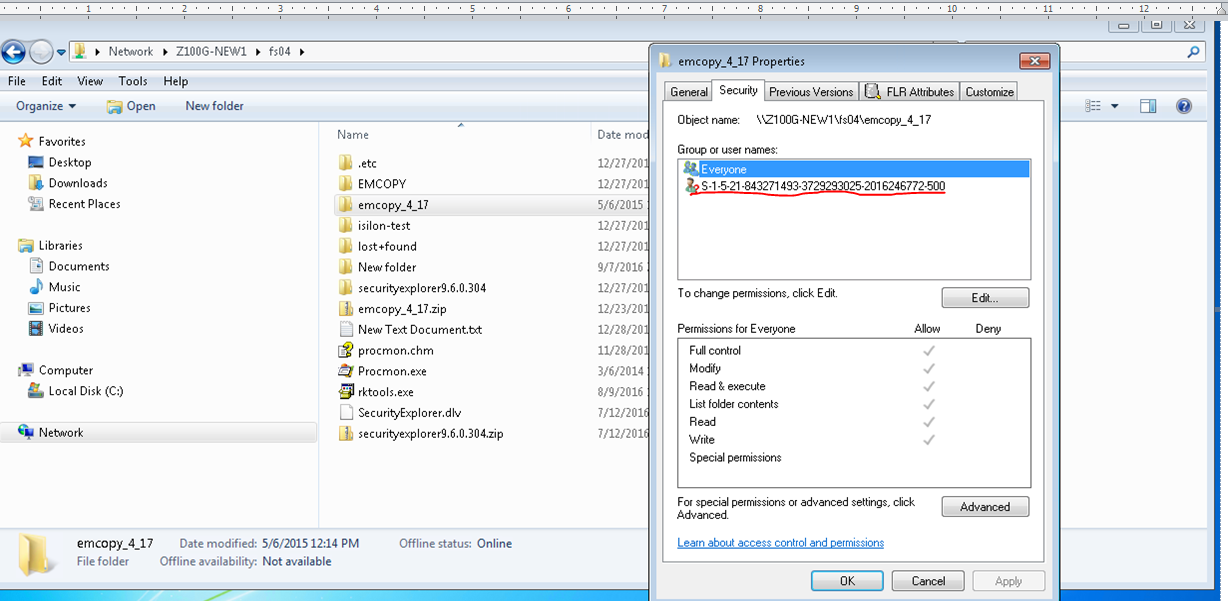
Cause
In the Unisphere NAS Server properties page, never uncheck the Windows sharing. If unchecked it will unjoin the CIFS server, rename the CIFS server and then join the Active Directory again.
If the Windows sharing is unchecked and applied, this will prompt for the Domain Admin username and password. Then if the check box to the Windows Sharing is reapplied, and a new CIFS Server name is entered, this will delete the CIFS server permanently.
.
Resolution
The proper way to rename a CIFS server and not change the SID for the CIFS server:
From Unisphere: NAS Server --> Properties --> sharing protocols
Type in the new name in SMB Computer Name
Type in the Domain privileged username and password and then click apply