NetWorker: Parallelism and Target Sessions
Summary: Performance Optimization with Parallelism and Target Sessions
Instructions
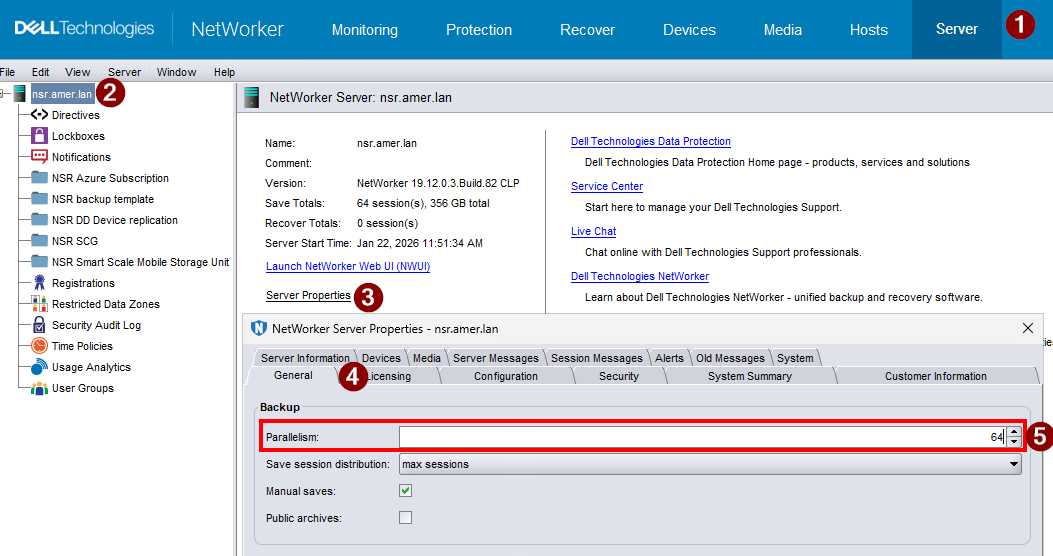
Server Parallelism:
Server parallelism defines the number of simultaneous data streams that the NetWorker server allows. The default and the maximum server parallelism values vary depending on the edition of NetWorker software. Each storage node that you enable and connect to the NetWorker server can increase the parallelism maximum value. The maximum parallelism value for any NetWorker server and storage node combination can vary. The default Server parallelism is 32; you can configure the parallelism up to 1024. Optimally, configure the NetWorker server to process enough data streams to keep all the backup devices in the datazone writing at their maximum speed.
Server parallelism is defined in the NetWorker server properties:
Target Sessions:
Target sessions are the number of sessions that a nsrmmd process on the device handles before another device on the host takes the additional sessions. Use this setting to balance the sessions among nsrmmd processes. If another device is not available, then another nsrmmd process on the same device takes the additional sessions.
Target sessions are defined in the device properties: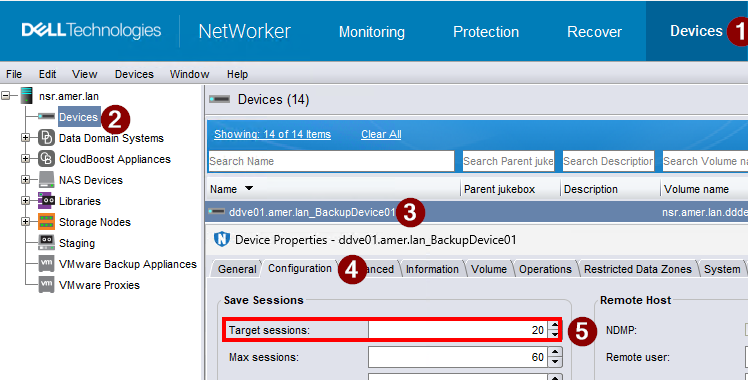
Max Sessions:
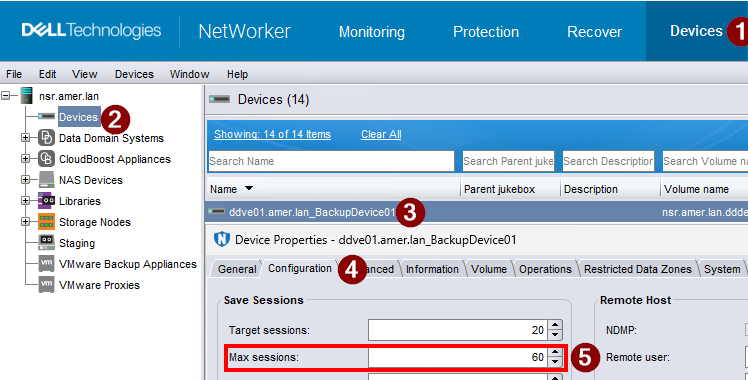
Max sessions are the maximum number sessions that the device may handle. If no additional devices are available on the host, then another available storage host takes the additional sessions, or retries are attempted until sessions become available.
Max sessions are defined in the device properties:
Target and Max Session Recommendations:
| Device Type | Default Target Sessions | Default Max Sessions | Recommended Sessions * | Range |
| Advanced File Type Device (AFTD) | 4 | 32 | 1-32 | 1-1024 |
| AFTD (including Data Domain CIFS/NAT) | 4 | 32 | 1-10 | 1-1024 |
| CloudBoost | 10 | 80 | 1-10 | 1-200 |
| Data Domain (DD Boost) | 20 | 60 | 1-10 | 1-60 |
| DD Smart Scale | 20 | 60 | 1-10 | 1-60 |
| DD Cloud Tier | 20 | 60 | 1-10 | 1-60 |
| Network Data Management Protocol (NDMP) | 4 | 512 | 1-32 | 1-1024 |
| File Type Device (FTD) | 4 | 32 | 1-16 | 1-1024 |
| ProtectPoint | 20 | 120 | 1-10 | 1-1024 |
| Virtual Tape Library (VTL) / Tape | 4 | 32 | 1-16 | 1-512 |
| VTL/Tape (Data Domain/Deduplicated) | 4 | 32 | 1-1 | 1-512 |
Client Parallelism:
Client parallelism defines the number of data streams that a client can use simultaneously during backup. Data streams include backup data streams, savefs processes, and probe jobs. For the NetWorker server client resource, the default value is 12. This higher default value enables the server to complete a larger number of index backups during a Server backup action. For all other clients, the default value is 4.
Client parallelism is defined in the client properties: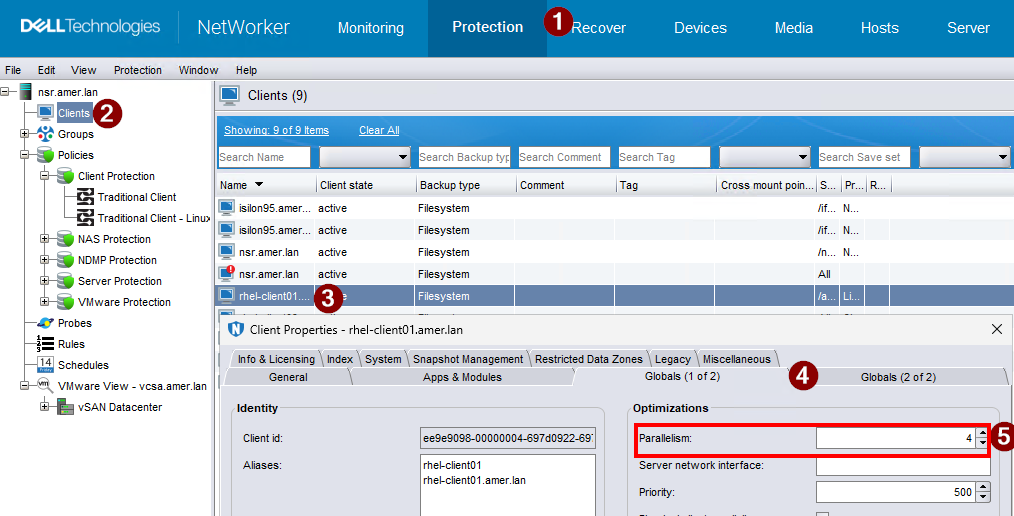
Action Parallelism:
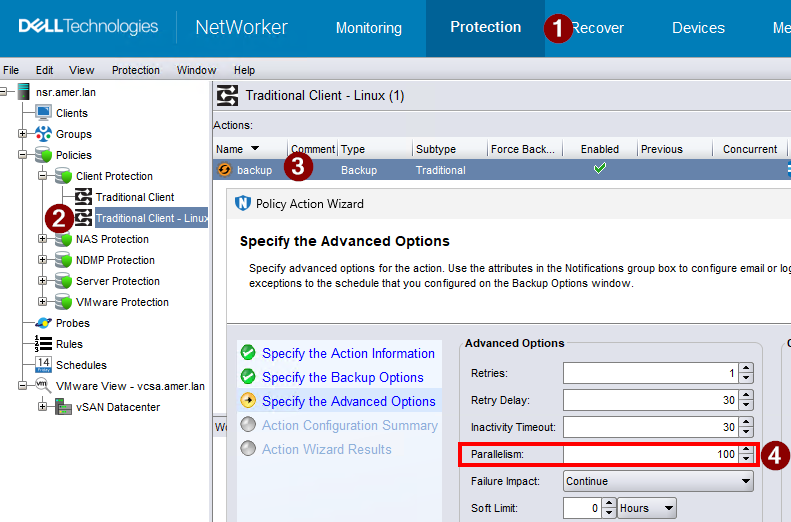
Action parallelism defines the maximum number of simultaneous data streams that can occur on all clients in a group that is associated with the workflow that contains action. For a Backup action, the default parallelism value is 100 and the maximum value is 1000. For a clone action, the default parallelism value is 0 and maximum value is 1000. For all other action types, the default value is 0, or unlimited.
Action parallelism is defined in the action properties:
Follow these guidelines to adjust the Parallelism and Target Sessions attributes for the best server performance:
-
Set the server Parallelism and Target Sessions attributes so that the total of the performance of the disk drives equals the total performance of the tape drives. If you set the Parallelism attribute to a higher value, there is no benefit.
-
To select the right values for the Parallelism and Target Sessions attributes, use the following equation:
Parallelism = Number of Devices * Target Sessions
For example, if you have three tape drives available for backup, and you want each tape drive to accept two save streams, set the value of server parallelism to 6 and the value of target sessions to 2. -
When a NetWorker server is saving many save sets, such as 500 or more, memory consumption and file descriptor consumption can reach values that are close to operating system limitations. In this event, the parallelism must be lowered.
-
Decrease the server Parallelism and Target Sessions attributes to unload an overworked NetWorker server. With the correct settings, the normal operation of the host should not be interrupted by backups or other NetWorker server activities.
-
Add more compute resources to handle a higher parallelism setting.
-
Follow the recommendations defined in the NetWorker version-specific Performance Optimization and Planning Guide. Support for NetWorker | Manuals & Documents (You must sign in with your Dell support account).
Additional Information
Networking and Domain Name System (DNS):
- NetWorker: Best practices for networking configuration
- NetWorker: Name Resolution Troubleshooting Best Practices
NetWorker Ports and communication: