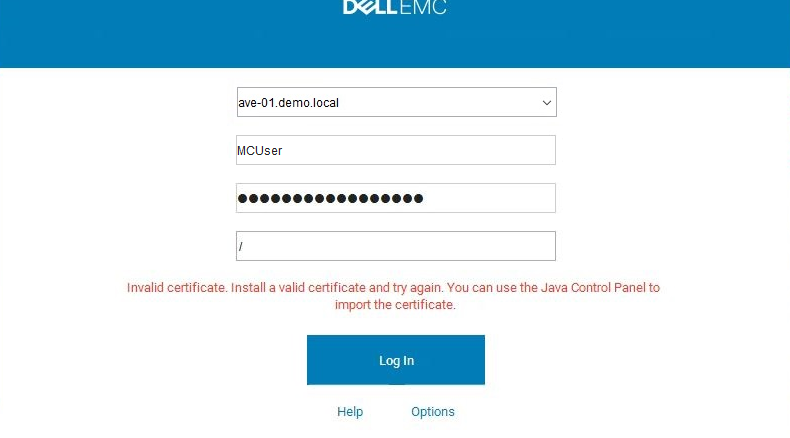
Avamar 錯誤:無效的憑證,安裝有效的憑證並重試,您可以使用 Java 控制台匯入憑證
Summary: 無法登入 Avamar Java 主控台
This article applies to
This article does not apply to
This article is not tied to any specific product.
Not all product versions are identified in this article.
Symptoms
登入 Avamar Administrator GUI 時失敗並顯示錯誤:「無效的憑證,請安裝有效的憑證並再試一次,您可以使用 Java 控制台匯入憑證」
Cause
Avamar 用戶端和 Avamar Server 之間的登入程序使用 Java RMI,這需要可正常運作的 DNS 才能正常運作。
Resolution
在 mcserver 記錄中,您會看到 RMI TCP 連線
08/06-12:08:29.00955 [RMI TCP Connection(647167)-10.xxx.xx.xxx#11555903] sun.rmi.transport.tcp.TCPTransport$ConnectionHandler.run0
FINE:RMI TCP Connection(647167)-10.xxx.xx.xxx: terminated with exception:
java.net.SocketException:在 com.rsa.sslj.x.ap.c(未知來源) 在 com.rsa.sslj.x.ap.a(未知來源) 在 com.rsa.sslj.x.ap.a(未知來源)
在 com.rsa.sslj.x.ap.b(未知來源)
在 com.rsa.sslj.x.ap.b(未知來源
) 在 com.rsa.sslj.x.al.read(
未知來源) 在 java.io.BufferedInputStream.fill(未知來源
)
at java.io.BufferedInputStream.read(Unknown Source)
at java.io.DataInputStream.readInt(Unknown Source)
at sun.rmi.transport.tcp.TCPTransport$ConnectionHandler.run0(Unknown Source)
at sun.rmi.transport.tcp.TCPTransport$ConnectionHandler.lambda$run$0(Unknown Source)
at java.security.AccessController.doPrivileged(Native Method)
at sun.rmi.transport.tcp.TCPTransport$ConnectionHandler.run(Unknown Source)
在 java.util.concurrent.ThreadPoolExecutor.runWorker(未知來源) 在 java.util.concurrent.ThreadPoolExecutor$Worker.run(未知來源)
在 java.lang.Thread.run(未知來源)
在 Avamar 工具節點上,編輯檔案 /usr/local/avamar/var/mc/server_data/prefs/mcserver.xml
搜尋下列輸入鍵,並將值設為 false。
<entry key=“rmi_over_ssl” value=“true” />
重新啟動 MCS 服務
mcserver.sh --restart
注意: 在 RMI SSL 停用後,密碼和應用程式資料將以純文字形式在用戶端和伺服器之間流動
08/06-12:08:29.00955 [RMI TCP Connection(647167)-10.xxx.xx.xxx#11555903] sun.rmi.transport.tcp.TCPTransport$ConnectionHandler.run0
FINE:RMI TCP Connection(647167)-10.xxx.xx.xxx: terminated with exception:
java.net.SocketException:在 com.rsa.sslj.x.ap.c(未知來源) 在 com.rsa.sslj.x.ap.a(未知來源) 在 com.rsa.sslj.x.ap.a(未知來源)
在 com.rsa.sslj.x.ap.b(未知來源)
在 com.rsa.sslj.x.ap.b(未知來源
) 在 com.rsa.sslj.x.al.read(
未知來源) 在 java.io.BufferedInputStream.fill(未知來源
)
at java.io.BufferedInputStream.read(Unknown Source)
at java.io.DataInputStream.readInt(Unknown Source)
at sun.rmi.transport.tcp.TCPTransport$ConnectionHandler.run0(Unknown Source)
at sun.rmi.transport.tcp.TCPTransport$ConnectionHandler.lambda$run$0(Unknown Source)
at java.security.AccessController.doPrivileged(Native Method)
at sun.rmi.transport.tcp.TCPTransport$ConnectionHandler.run(Unknown Source)
在 java.util.concurrent.ThreadPoolExecutor.runWorker(未知來源) 在 java.util.concurrent.ThreadPoolExecutor$Worker.run(未知來源)
在 java.lang.Thread.run(未知來源)
在 Avamar 工具節點上,編輯檔案 /usr/local/avamar/var/mc/server_data/prefs/mcserver.xml
搜尋下列輸入鍵,並將值設為 false。
<entry key=“rmi_over_ssl” value=“true” />
重新啟動 MCS 服務
mcserver.sh --restart
注意: 在 RMI SSL 停用後,密碼和應用程式資料將以純文字形式在用戶端和伺服器之間流動
Affected Products
AvamarArticle Properties
Article Number: 000191264
Article Type: Solution
Last Modified: 22 Sep 2025
Version: 4
Find answers to your questions from other Dell users
Support Services
Check if your device is covered by Support Services.