BIOSでデフォルトをロードしてもセキュア ブート モードが監査モードから展開モードに変更されない
Summary: BIOSでデフォルトをロードした後、セキュア ブート モードが監査モードから展開モードに変更されない理由について説明します。
This article applies to
This article does not apply to
This article is not tied to any specific product.
Not all product versions are identified in this article.
Symptoms
BIOSでデフォルトをロードした後、セキュア ブート モードが監査モードから展開モードに変更されない場合があります。
影響を受けるプラットフォーム:
- Alienware m16 R1 AMD
- Alienware m18 R1 AMD
- Inspiron 14 5425
- Inspiron 14 5435
- Inspiron 14 7425 2-in-1
- Inspiron 14 7435 2-in-1
- Inspiron 16 5625
- Inspiron 16 5635
- Inspiron 16 7635 2-in-1
- Inspiron 7415 2-in-1
- Vostro 16 5635
- Vostro 5625
Cause
このオプションは、元の設計の荷重デフォルト設定では定義されていません。
Resolution
手順に従って、セキュア ブート モードの変更を監査モードから展開モードに手動で変更します。
- PCの電源を入れた後、F2キーを繰り返し押してBIOSセットアップ メニューを起動します。
- [Security]を選択します。
- [Secure Boot]を選択します。
- [Deployed Mode]を選択します。
![[Deployed Mode]を選択します。](https://supportkb.dell.com/img/ka0Do000000i7rkIAA/ka0Do000000i7rkIAA_ja_1.jpeg)
- メッセージを確認し、[ Yes]を選択します。
を選択します。](https://supportkb.dell.com/img/ka0Do000000i7rkIAA/ka0Do000000i7rkIAA_ja_2.jpeg)
- 展開モードに変更されているかどうかを確認します。
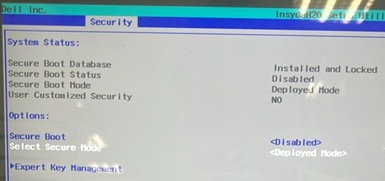
- F10 キーを押します。[Exit Saving Changes]が表示されたら、[Yes]を選択します。
![[Exit Saving Changes]を求められたら、[Yes]を選択します。](https://supportkb.dell.com/img/ka0Do000000i7rkIAA/ka0Do000000i7rkIAA_ja_4.jpeg)
Affected Products
Alienware m16 R1 AMD, Alienware m18 R1 AMD, Inspiron 14 5425, Inspiron 14 5435, Inspiron 7415 2-in-1, Inspiron 14 7425 2-in-1, Inspiron 14 7435 2-in-1, Inspiron 16 5625, Inspiron 16 5635, Inspiron 16 7635 2-in-1, Vostro 5625, Vostro 16 5635Article Properties
Article Number: 000388366
Article Type: Solution
Last Modified: 12 Nov 2025
Version: 1
Find answers to your questions from other Dell users
Support Services
Check if your device is covered by Support Services.