Innlasting av standard i BIOS endrer ikke sikker oppstartsmodus fra revisjonsmodus til distribuert modus
Summary: Finn ut hvorfor sikker oppstartsmodus ikke endres fra revisjonsmodus til distribuert modus etter at standard er lastet inn i BIOS.
This article applies to
This article does not apply to
This article is not tied to any specific product.
Not all product versions are identified in this article.
Symptoms
Det kan hende at sikker oppstartsmodus ikke endres fra revisjonsmodus til distribuert modus etter at standard er lastet inn i BIOS.
Berørte plattformer:
- Alienware m16 R1 AMD
- Alienware m18 R1 AMD
- Inspiron 14 5425
- Inspiron 14 5435
- Inspiron 14 7425 2-i-1
- Inspiron 14 7435 2-i-1
- Inspiron 16 5625
- Inspiron 16 5635
- Inspiron 16 7635 2-i-1
- 2-i-1-enheten Inspiron 7415
- Vostro 16 5635
- Vostro 5625
Cause
Dette alternativet er ikke definert i standardinnstillingen for last inn i den opprinnelige utformingen.
Resolution
Følg trinnene for å endre endringen av sikker oppstartsmodus fra revisjonsmodus til distribuert modus manuelt.
- Trykk på F2-tasten gjentatte ganger etter at du har slått på datamaskinen for å starte opp til BIOS-oppsettmenyen.
- Velg Sikkerhet.
- Velg Sikker oppstart.
- Velg Distribuert modus.
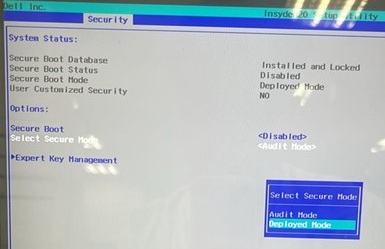
- Bekreft meldingen, og velg Ja.

- Se om det er endret til implementeringsmodus.
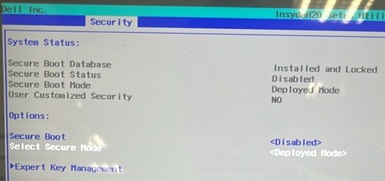
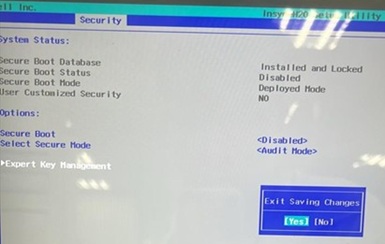
- Trykk F10. Velg Ja når Avslutt lagring av endringer vises.
Affected Products
Alienware m16 R1 AMD, Alienware m18 R1 AMD, Inspiron 14 5425, Inspiron 14 5435, Inspiron 7415 2-in-1, Inspiron 14 7425 2-in-1, Inspiron 14 7435 2-in-1, Inspiron 16 5625, Inspiron 16 5635, Inspiron 16 7635 2-in-1, Vostro 5625, Vostro 16 5635Article Properties
Article Number: 000388366
Article Type: Solution
Last Modified: 12 Nov 2025
Version: 1
Find answers to your questions from other Dell users
Support Services
Check if your device is covered by Support Services.