在 BIOS 中載入預設值並不會將 Secure Boot 模式從稽核模式變更為部署模式
Summary: 瞭解在 BIOS 中載入預設值後,為什麼安全開機模式並未從稽核模式變更為部署模式。
This article applies to
This article does not apply to
This article is not tied to any specific product.
Not all product versions are identified in this article.
Symptoms
在 BIOS 中載入預設值後,Secure Boot 模式可能不會從稽核模式變更為部署模式。
受影響的平台:
- Alienware m16 R1 AMD
- Alienware m18 R1 AMD
- Inspiron 14 5425
- Inspiron 14 5435
- Inspiron 14 7425 二合一
- Inspiron 14 7435 二合一
- Inspiron 16 5625
- Inspiron 16 5635
- Inspiron 16 7635 二合一
- Inspiron 7415 二合一
- Vostro 16 5635
- Vostro 5625
Cause
此選項未在原始設計的載入預設設定中定義。
Resolution
依照步驟手動將 Secure Boot 模式從稽核模式變更為部署模式。
- 開啟電腦後,請重複按下 F2 鍵,以開機至 BIOS 設定功能表。
- 選取安全性。
- 選取 安全開機。
- 選取 部署模式。
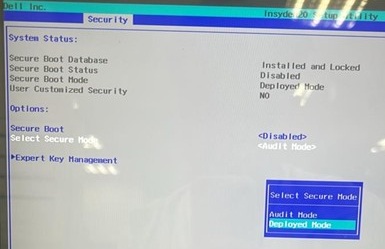
- 確認訊息,然後選取 是。

- 查看是否已變更為 部署模式。
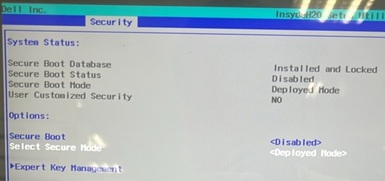
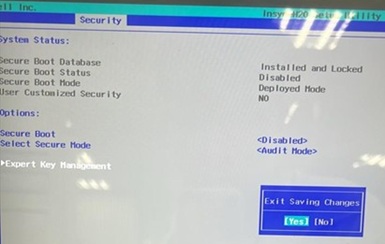
- 按 F10。出現「退出儲存變更」時選取是。
Affected Products
Alienware m16 R1 AMD, Alienware m18 R1 AMD, Inspiron 14 5425, Inspiron 14 5435, Inspiron 7415 2-in-1, Inspiron 14 7425 2-in-1, Inspiron 14 7435 2-in-1, Inspiron 16 5625, Inspiron 16 5635, Inspiron 16 7635 2-in-1, Vostro 5625, Vostro 16 5635Article Properties
Article Number: 000388366
Article Type: Solution
Last Modified: 12 Nov 2025
Version: 1
Find answers to your questions from other Dell users
Support Services
Check if your device is covered by Support Services.