PowerProtect: Die Bereitstellung des vSphere Installation Bundle schlägt mit dem Fehlercode ABV0032 fehl
Summary: Auf dem Broadcom ESXi-Host schlägt die Bereitstellung oder Aktualisierung des vSphere Installation Bundle (VIB) mit dem Fehlercode ABV0032 fehl.
Symptoms
Konfigurationsjobs schlagen bei der Bereitstellung oder Aktualisierung des PowerProtect Data Manager vSphere Installation Bundle für Transparent Snapshot Data Mover (TSDM) mit Fehlermeldungen ähnlich der folgenden fehl:
ABV0032: VM Direct Engine is unable to configure protection for the host "ESXi Host" on vCenter "VCenterName"
Im Abschnitt Fehlerdetails wird eine Fehlermeldung ähnlich der folgenden angezeigt:
Unable to install vSphere Installation Bundle on host "ESXi Host". vCenter task is failed with /usr/sbin/esxupdate returned with exit status: 15
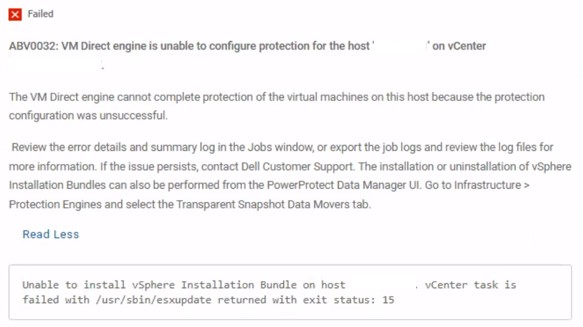
Abbildung 1. ABV0032 Fehlermeldung
Cause
Auf vCenter Server ist ein Storage-Scan erforderlich. Andernfalls werden Fehlermeldungen ähnlich der folgenden in der esxupdate Protokolldatei auf dem Broadcom ESXi-Host:
esxupdate: xxxxxxx: Transaction: INFO: Final list of VIBs being installed: DEL_bootbank_tsdm_19. 18. 0. 3-10EM. 703. 0.0.18644231
esxupdate: xxxxxxx: imageprofile: INFO: Adding VIB DEL_bootbank_tsdm_19. 18.0.3-10EM. 703. 0.0.18644231 to ImageProfile (Updated) ESXi-7. OU3n-21930508-standard
esxupdate: xxxxxxx: esxupdate: ERROR: An esxupdate error exception was caught:
esxupdate: xxxxxxx: esxupdate: ERROR: Traceback (most recent call last) :
File "/lib64/python3.8/site-packages/vmware/esximage/Utils/HostInfo.py", line 217, in getFileSystems
return runCli ( ['storage', 'filesystem', 'list' ], True)
File "/lib64/python3.8/site-packages/esxutils.py", line 220, in runCli
esxupdate: xxxxxxx: esxupdate: ERROR: esxutils. EsxcliError: Errors:
esxupdate: xxxxxxx: esxupdate: ERROR: Error getting data for filesystem on '/vmfs/volumes/xxxxxxxx-xxxxxxxx-xxxx-xxxxxxxxxxx': Cannot open volume: /vmfs/volumes/xxxxxxxx-xxxxxxxx-xxxx-xxxxxxxxxxx, skipping.
esxupdate: xxxxxxx: esxupdate: ERROR:
ERROR:
esxupdate: xxxxxxx: esxupdate:
esxupdate: xxxxxxx: esxupdate: ERROR: During handling of the above exception, another exception occurred:
esxupdate: xxxxxxx: esxupdate: ERROR:
esxupdate: xxxxxxx: esxupdate: ERROR: Traceback (most recent call last) :
File "/usr/sbin/esxupdate", line 222, in main
cmd. Run ()
File "/lib64/python3.8/site-packages/vmware/esx5update/Cmdline.py", line 153, in Run
File "/lib64/python3.8/site-packages/vmware/esximage/Transaction.py", line 852, in InstallVibsFromSources
inst, removed, exitstate = self. installVibs (curprofile,
File "/lib64/python3.8/site-packages/vmware/esximage/Transaction.py", line 1098, in installVibs
exitstate = self. validateAndInstallProfile(
File "/lib64/python3.8/site-packages/vmware/esximage/Transaction.py", line 1267, in validateAndInstallProfile
resVibCache = ReservedVibCache ()
File "/lib64/python3.8/site-packages/vmware/esximage/ImageManager/HostSeeding.py", line 995, in init
self. loadCachedVibs ()
File "/lib64/python3.8/site-packages/vmware/esximage/ImageManager/HostSeeding.py", line 1032, in loadCachedVibs
for fsPath in HostInfo.GetVmfslFileSystems () :
File "/lib64/python3. 8/site-packages/vmware/esximage/Utils/HostInfo.py", line 260, in GetVmfslFileSystems
return [fs['Mount Point'] for fs in getFileSystems ()
File "/lib64/python3.8/site-packages/vmware/esximage/Utils/HostInfo.py", line 220, in getFileSystems
raise Errors. InstallationError (e, None, msg)
esxupdate: xxxxxxx: esxupdate: ERROR: vmware. esximage. Errors. InstallationError: Failed to query file system stats: Errors:
esxupdate: xxxxxxx: esxupdate: ERROR: Error getting data for filesystem on '/vmfs/volumes/xxxxxxxx-xxxxxxxx-xxxx-xxxxxxxxxxx': Cannot open volume: /vmfs/volumes/xxxxxxxx-xxxxxxxx-xxxx-xxxxxxxxxxx, skipping.
esxupdate: xxxxxxx: esxupdate: ERROR:
esxupdate: xxxxxxx: esxupdate: DEBUG: <<<
Resolution
Scannen Sie die Speichergeräte erneut, um das Problem zu beheben.
Dieser Artikel der Broadcom-Wissensdatenbank enthält Anweisungen zum erneuten Ausführen von erneuten Scans des Speichers: Durchführen eines erneuten Scans des Speichers auf einem ESXi-Host (Externer Link, zuletzt geprüft am 14. April 2026)