PowerProtect: vSphere Installation Bundle implementatie mislukt met foutcode ABV0032
Summary: Op de Broadcom ESXi-host mislukt de implementatie of update van de vSphere Installation Bundle (VIB) met foutcode ABV0032.
Symptoms
Configuratietaken mislukken met foutmeldingen die vergelijkbaar zijn met de volgende bij het implementeren of bijwerken van PowerProtect Data Manager vSphere-installatiebundel voor Transparent Snapshot Data Mover (TSDM):
ABV0032: VM Direct Engine is unable to configure protection for the host "ESXi Host" on vCenter "VCenterName"
Een foutbericht zoals het volgende wordt gerapporteerd in het gedeelte met foutdetails:
Unable to install vSphere Installation Bundle on host "ESXi Host". vCenter task is failed with /usr/sbin/esxupdate returned with exit status: 15
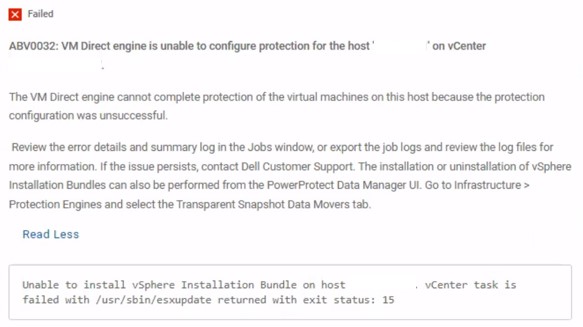
Afbeelding 1. ABV0032-foutmelding
Cause
Op de vCenter-server is storagescan vereist. Zonder dit worden foutmeldingen zoals de volgende gerapporteerd in de esxupdate Logbestand op de Broadcom ESXi-host:
esxupdate: xxxxxxx: Transaction: INFO: Final list of VIBs being installed: DEL_bootbank_tsdm_19. 18. 0. 3-10EM. 703. 0.0.18644231
esxupdate: xxxxxxx: imageprofile: INFO: Adding VIB DEL_bootbank_tsdm_19. 18.0.3-10EM. 703. 0.0.18644231 to ImageProfile (Updated) ESXi-7. OU3n-21930508-standard
esxupdate: xxxxxxx: esxupdate: ERROR: An esxupdate error exception was caught:
esxupdate: xxxxxxx: esxupdate: ERROR: Traceback (most recent call last) :
File "/lib64/python3.8/site-packages/vmware/esximage/Utils/HostInfo.py", line 217, in getFileSystems
return runCli ( ['storage', 'filesystem', 'list' ], True)
File "/lib64/python3.8/site-packages/esxutils.py", line 220, in runCli
esxupdate: xxxxxxx: esxupdate: ERROR: esxutils. EsxcliError: Errors:
esxupdate: xxxxxxx: esxupdate: ERROR: Error getting data for filesystem on '/vmfs/volumes/xxxxxxxx-xxxxxxxx-xxxx-xxxxxxxxxxx': Cannot open volume: /vmfs/volumes/xxxxxxxx-xxxxxxxx-xxxx-xxxxxxxxxxx, skipping.
esxupdate: xxxxxxx: esxupdate: ERROR:
ERROR:
esxupdate: xxxxxxx: esxupdate:
esxupdate: xxxxxxx: esxupdate: ERROR: During handling of the above exception, another exception occurred:
esxupdate: xxxxxxx: esxupdate: ERROR:
esxupdate: xxxxxxx: esxupdate: ERROR: Traceback (most recent call last) :
File "/usr/sbin/esxupdate", line 222, in main
cmd. Run ()
File "/lib64/python3.8/site-packages/vmware/esx5update/Cmdline.py", line 153, in Run
File "/lib64/python3.8/site-packages/vmware/esximage/Transaction.py", line 852, in InstallVibsFromSources
inst, removed, exitstate = self. installVibs (curprofile,
File "/lib64/python3.8/site-packages/vmware/esximage/Transaction.py", line 1098, in installVibs
exitstate = self. validateAndInstallProfile(
File "/lib64/python3.8/site-packages/vmware/esximage/Transaction.py", line 1267, in validateAndInstallProfile
resVibCache = ReservedVibCache ()
File "/lib64/python3.8/site-packages/vmware/esximage/ImageManager/HostSeeding.py", line 995, in init
self. loadCachedVibs ()
File "/lib64/python3.8/site-packages/vmware/esximage/ImageManager/HostSeeding.py", line 1032, in loadCachedVibs
for fsPath in HostInfo.GetVmfslFileSystems () :
File "/lib64/python3. 8/site-packages/vmware/esximage/Utils/HostInfo.py", line 260, in GetVmfslFileSystems
return [fs['Mount Point'] for fs in getFileSystems ()
File "/lib64/python3.8/site-packages/vmware/esximage/Utils/HostInfo.py", line 220, in getFileSystems
raise Errors. InstallationError (e, None, msg)
esxupdate: xxxxxxx: esxupdate: ERROR: vmware. esximage. Errors. InstallationError: Failed to query file system stats: Errors:
esxupdate: xxxxxxx: esxupdate: ERROR: Error getting data for filesystem on '/vmfs/volumes/xxxxxxxx-xxxxxxxx-xxxx-xxxxxxxxxxx': Cannot open volume: /vmfs/volumes/xxxxxxxx-xxxxxxxx-xxxx-xxxxxxxxxxx, skipping.
esxupdate: xxxxxxx: esxupdate: ERROR:
esxupdate: xxxxxxx: esxupdate: DEBUG: <<<
Resolution
Scan storageapparaten opnieuw om het probleem op te lossen.
Dit Broadcom Knowledge Base-artikel bevat instructies voor het uitvoeren van storage-rescans: Een nieuwe scan uitvoeren van de storage op een ESXi-host (Externe link, voor het laatst gecontroleerd op 14 april 2026)