PowerProtect: falha na implementação do pacote de instalação do vSphere com o código de erro ABV0032
Summary: No host do ESXi da Broadcom, falha na implementação ou atualização do vSphere Installation Bundle (VIB), com o código de erro ABV0032.
Symptoms
Os trabalhos de configuração falham com mensagens de erro semelhantes às seguintes ao implementar ou atualizar o pacote de instalação do PowerProtect Data Manager vSphere para o Transparent Snapshot Data Mover (TSDM):
ABV0032: VM Direct Engine is unable to configure protection for the host "ESXi Host" on vCenter "VCenterName"
Uma mensagem de erro semelhante à seguinte é relatada na seção detalhes do erro:
Unable to install vSphere Installation Bundle on host "ESXi Host". vCenter task is failed with /usr/sbin/esxupdate returned with exit status: 15
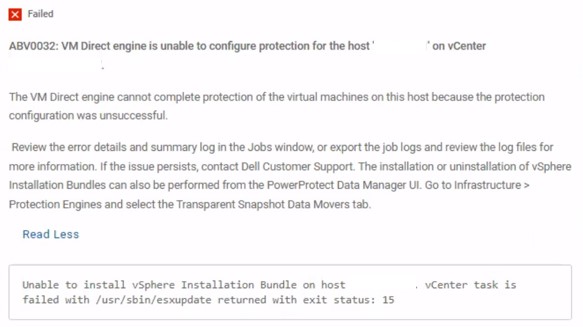
Figura 1. ABV0032 mensagem de erro
Cause
No vCenter Server, a verificação de armazenamento é necessária. Sem isso, mensagens de erro semelhantes às seguintes são relatadas no esxupdate arquivo de log no host do ESXi da Broadcom:
esxupdate: xxxxxxx: Transaction: INFO: Final list of VIBs being installed: DEL_bootbank_tsdm_19. 18. 0. 3-10EM. 703. 0.0.18644231
esxupdate: xxxxxxx: imageprofile: INFO: Adding VIB DEL_bootbank_tsdm_19. 18.0.3-10EM. 703. 0.0.18644231 to ImageProfile (Updated) ESXi-7. OU3n-21930508-standard
esxupdate: xxxxxxx: esxupdate: ERROR: An esxupdate error exception was caught:
esxupdate: xxxxxxx: esxupdate: ERROR: Traceback (most recent call last) :
File "/lib64/python3.8/site-packages/vmware/esximage/Utils/HostInfo.py", line 217, in getFileSystems
return runCli ( ['storage', 'filesystem', 'list' ], True)
File "/lib64/python3.8/site-packages/esxutils.py", line 220, in runCli
esxupdate: xxxxxxx: esxupdate: ERROR: esxutils. EsxcliError: Errors:
esxupdate: xxxxxxx: esxupdate: ERROR: Error getting data for filesystem on '/vmfs/volumes/xxxxxxxx-xxxxxxxx-xxxx-xxxxxxxxxxx': Cannot open volume: /vmfs/volumes/xxxxxxxx-xxxxxxxx-xxxx-xxxxxxxxxxx, skipping.
esxupdate: xxxxxxx: esxupdate: ERROR:
ERROR:
esxupdate: xxxxxxx: esxupdate:
esxupdate: xxxxxxx: esxupdate: ERROR: During handling of the above exception, another exception occurred:
esxupdate: xxxxxxx: esxupdate: ERROR:
esxupdate: xxxxxxx: esxupdate: ERROR: Traceback (most recent call last) :
File "/usr/sbin/esxupdate", line 222, in main
cmd. Run ()
File "/lib64/python3.8/site-packages/vmware/esx5update/Cmdline.py", line 153, in Run
File "/lib64/python3.8/site-packages/vmware/esximage/Transaction.py", line 852, in InstallVibsFromSources
inst, removed, exitstate = self. installVibs (curprofile,
File "/lib64/python3.8/site-packages/vmware/esximage/Transaction.py", line 1098, in installVibs
exitstate = self. validateAndInstallProfile(
File "/lib64/python3.8/site-packages/vmware/esximage/Transaction.py", line 1267, in validateAndInstallProfile
resVibCache = ReservedVibCache ()
File "/lib64/python3.8/site-packages/vmware/esximage/ImageManager/HostSeeding.py", line 995, in init
self. loadCachedVibs ()
File "/lib64/python3.8/site-packages/vmware/esximage/ImageManager/HostSeeding.py", line 1032, in loadCachedVibs
for fsPath in HostInfo.GetVmfslFileSystems () :
File "/lib64/python3. 8/site-packages/vmware/esximage/Utils/HostInfo.py", line 260, in GetVmfslFileSystems
return [fs['Mount Point'] for fs in getFileSystems ()
File "/lib64/python3.8/site-packages/vmware/esximage/Utils/HostInfo.py", line 220, in getFileSystems
raise Errors. InstallationError (e, None, msg)
esxupdate: xxxxxxx: esxupdate: ERROR: vmware. esximage. Errors. InstallationError: Failed to query file system stats: Errors:
esxupdate: xxxxxxx: esxupdate: ERROR: Error getting data for filesystem on '/vmfs/volumes/xxxxxxxx-xxxxxxxx-xxxx-xxxxxxxxxxx': Cannot open volume: /vmfs/volumes/xxxxxxxx-xxxxxxxx-xxxx-xxxxxxxxxxx, skipping.
esxupdate: xxxxxxx: esxupdate: ERROR:
esxupdate: xxxxxxx: esxupdate: DEBUG: <<<
Resolution
Examine novamente os dispositivos de armazenamento para resolver o problema.
Este artigo da base de conhecimento da Broadcom contém instruções sobre como executar novas varreduras de armazenamento: Realizando uma nova varredura do armazenamento em um host do ESXi (Link externo, última verificação realizada em 14 de abril de 2026)