PowerFlex: iDRAC에서 ESXi RDM과 하드 드라이브의 상관관계를 분석하는 방법
Summary: 이 문서에서는 SVM(ScaleIO Virtual Machine)에서 교체해야 하는 물리적 디바이스까지 HBA330 SAS 컨트롤러에서 장애가 발생한 디스크를 찾는 방법에 대해 설명합니다.
This article applies to
This article does not apply to
This article is not tied to any specific product.
Not all product versions are identified in this article.
Instructions
R630 ScaleIO Ready Node HBA330 SAS 컨트롤러만 해당 RDM:
- ScaleIO UI에서 디스크를 식별하고 SDS 디바이스의 현재 경로를 가져옵니다.
예: /dev/sdh
- SSH를 SVM에 연결하고 다음 명령을 실행하여 매핑합니다.
/dev/sdX dev to NAA # mapping:
ls -l /dev/disk/by-id/ |grep wwn
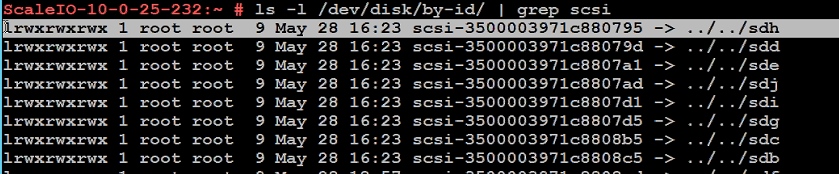
- 해당 디스크의 scli 주소를 기록하거나
NAA #(500*으로 시작). - vCenter에서 해당 ESXi 호스트 를 선택하고 관리 ->스토리지 ->스토리지 디바이스로 이동합니다.
- 있는 각 디스크를 선택하고 Properties 탭( Device Details 섹션 아래)의 Identifier 필드에서 해당 NAA 번호를 검사합니다.
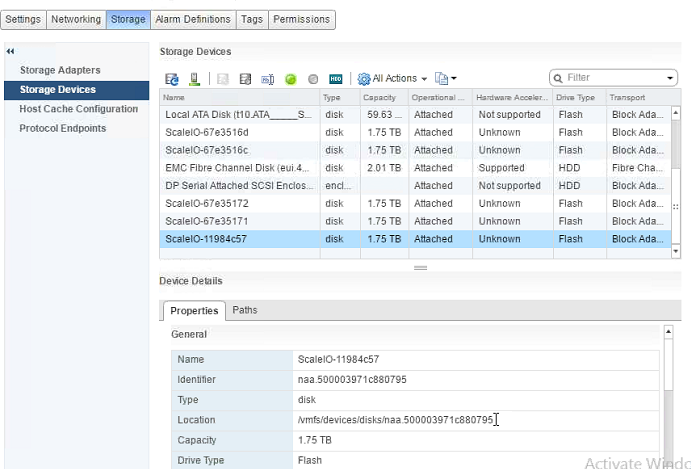
- 식별되면 Device Details 섹션의 Paths 탭을 선택하고 해당 디스크의 Runtime Name을 기록합니다.
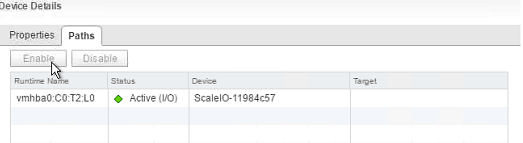
- ESXi 런타임 이름 T-값 번호 지정은 iDRAC처럼 0이 아니라 1부터 시작합니다(예:
vmhba0:C0:T2:L0(Flash Translation Layer)을 사용하는 데이터 저장 애플리케이션과 시스템에서 일반적으로 수행되는 반복 프로그램과 삭제 사이클로 인해 마모되기 쉽습니다. - iDRAC에서 Storage ->Physical Disks로 이동하여 이름이 "인 디스크를 선택합니다.
Solid-State Disk 0:1:X", 여기서 X는 해당 디스크의 ESXi 런타임 이름의 T-값보다 1이 작습니다.
예: (ESXi vmhba0:C0:T2:L0 = iDRAC Solid-State Disk 0:1:1)

Affected Products
PowerFlex rack, ScaleIOProducts
PowerFlex rack, VxFlex Ready Nodes, PowerFlex custom node, PowerFlex appliance R650, PowerFlex appliance R6525, PowerFlex appliance R660, PowerFlex appliance R6625, Powerflex appliance R750, PowerFlex appliance R760, PowerFlex appliance R7625
, PowerFlex custom node, PowerFlex custom node R650, PowerFlex custom node R6525, PowerFlex custom node R660, PowerFlex custom node R6625, PowerFlex custom node R750, PowerFlex custom node R760, PowerFlex custom node R7625, PowerFlex rack HW, PowerFlex rack RCM Software, PowerFlex Software, VxFlex Ready Node, VxFlex Ready Node R640, VxFlex Ready Node R740xd, PowerFlex appliance R640, PowerFlex appliance R740XD, PowerFlex appliance R7525, PowerFlex appliance R840, VxFlex Ready Node R840
...
Article Properties
Article Number: 000004305
Article Type: How To
Last Modified: 20 Nov 2025
Version: 10
Find answers to your questions from other Dell users
Support Services
Check if your device is covered by Support Services.