ECS:VeeamとECSの互換性
Summary: このKB記事では、VeeamとECSの互換性について説明します。
This article applies to
This article does not apply to
This article is not tied to any specific product.
Not all product versions are identified in this article.
Symptoms
ユーザーはVeeamを実行し、Data Domainを使用してデータをECSにアーカイブします。
このKBでは、S3プロトコルを使用したECSでのVeeamの直接実装に関する問題に対処します。
Cause
Veeamはバケットを参照できません。
ECS S3認証情報を使用してVeeamアプリケーションを構成した後、ユーザーはバケットを参照できません。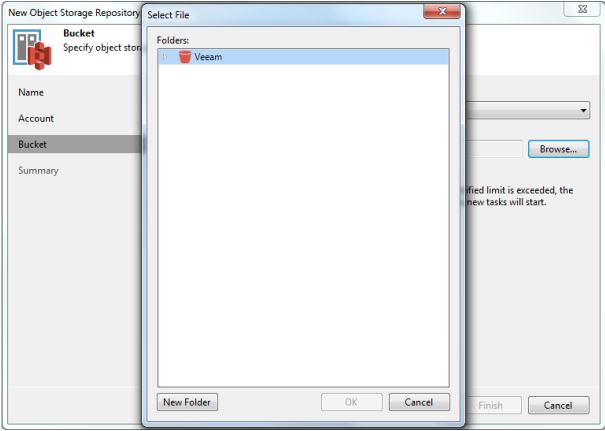
Veeamアプリケーションはこの画面でスタックし、バケットの内容を取得しません。
Resolution
ユーザー設定を確認します。次のスクリーンショットは、ユーザーVeeamアプリケーション:
1からのものです。Backup Infrastructureビューを開きます。インベントリー ペインで、Backup Repositoriesノード を右クリックし、 Add Backup Repositoryを選択します。Add Backup Repository ダイアログで、 Object Storage > S3 Compatibleを選択します。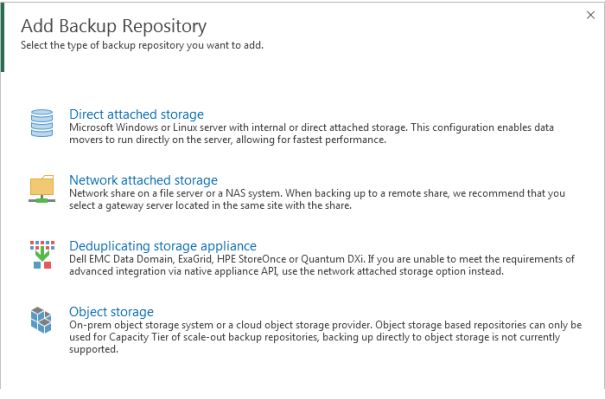
2.S3互換を選択します。 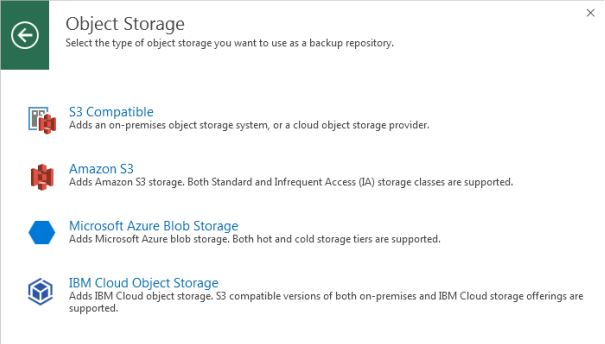
3.適切な情報を入力します。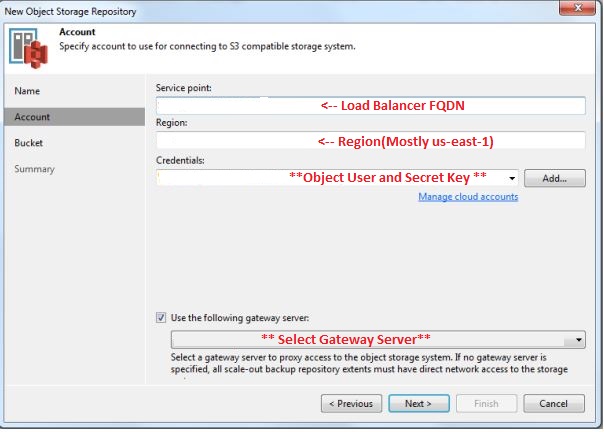
4.[Next]をクリックします。クリックします。](https://supportkb.dell.com/img/ka0Do0000012hLrIAI/ka0Do0000012hLrIAI_ja_5.jpeg)
ここでは、そのオブジェクト ユーザー用に構成されたバケットを確認できます
次に、Veeamサポートは、veeamサーバー(HKLM\SOFTWARE\Veeam\Veeam Backup and Replication\S3RequestRetryTotalTimeoutSec)に追加するレジストリキーを提供する必要があります
これで、ユーザーはバケットを参照できます。
Additional Information
詳細については、Veeamヘルプセンターを参照してください。
Affected Products
ECS ApplianceProducts
ECS Appliance, ECS Appliance Hardware Gen2 U-Series, ECS Appliance Hardware Series, ECS Appliance Software with Encryption, ECS Appliance Software without EncryptionArticle Properties
Article Number: 000045919
Article Type: Solution
Last Modified: 26 Aug 2025
Version: 4
Find answers to your questions from other Dell users
Support Services
Check if your device is covered by Support Services.