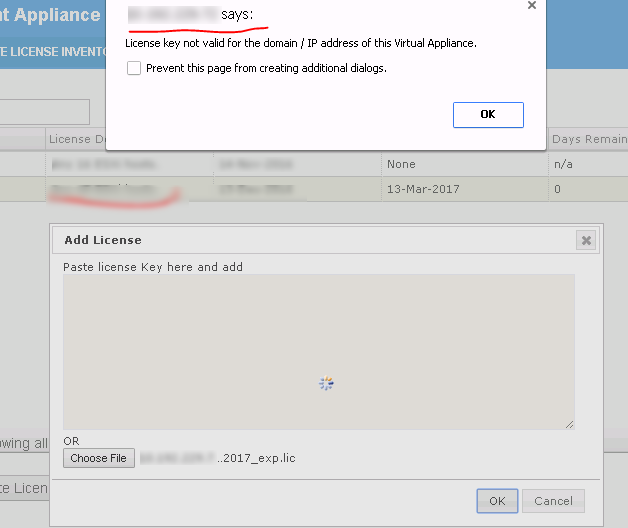
PowerPath Management Appliance reports "License key not valid for the domain / IP address of the virtual appliance" when adding a license
This article applies to
This article does not apply to
This article is not tied to any specific product.
Not all product versions are identified in this article.
Symptoms
PowerPath Management Appliance reports:
"License key not valid for the domain / IP address of the virtual appliance" when adding a license.
/opt/emc/elms/elms_debug.log:
13:30:02 (lmgrd) SLOG: Summary LOG statistics is enabled.
13:30:02 (lmgrd) The license server manager (lmgrd) running as root:
13:30:02 (lmgrd) This is a potential security problem
13:30:02 (lmgrd) and is not recommended.
13:30:02 (lmgrd) ERROR: license files have conflicting port numbers
13:30:02 (lmgrd) -1 and 27010
13:30:02 (lmgrd) Please edit the license files so the port numbers
13:30:02 (lmgrd) on the SERVER line are identical.
13:30:02 (lmgrd) License files include: /etc/emc/licenses/xx.xxx.xxx.xxx_2998766_12-Mar-2017_exp.lic /etc/emc/licenses/SERVED_1479116302886.lic
13:30:02 (lmgrd) Exiting
elms_service.log:
Starting PowerPath VMware license server.
Failed to start PowerPath VMware license server.
Please see /opt/emc/elms/elms_debug.log for the error.
Cause
Licensing file was not created correctly. In the below example the hostname for the vApp host and IP are missing.
Incorrect file example:
#############################################################
# EMC License File
# Activation Date: Mar 12, 2017 09:44:04 AM
# Activated By:
# Type:SERVED
#############################################################
SERVER this_host ANY
Correct file format should be as follows. The file should contain the SERVER (vApp server name) and INTERNET= (IP of vApp host).
These can be confirmed by ssh into the vApp.
#############################################################
# EMC License File
# Activation Date: Mar 13, 2017 07:57:41 AM
# Activated By: Dina Khalil
# Type:SERVED
#############################################################
SERVER (vApp server name) INTERNET=xx.xx.xxx.xx 27010
Incorrect file example:
#############################################################
# EMC License File
# Activation Date: Mar 12, 2017 09:44:04 AM
# Activated By:
# Type:SERVED
#############################################################
SERVER this_host ANY
Correct file format should be as follows. The file should contain the SERVER (vApp server name) and INTERNET= (IP of vApp host).
These can be confirmed by ssh into the vApp.
#############################################################
# EMC License File
# Activation Date: Mar 13, 2017 07:57:41 AM
# Activated By: Dina Khalil
# Type:SERVED
#############################################################
SERVER (vApp server name) INTERNET=xx.xx.xxx.xx 27010
Resolution
Licensing Team re-generated the license file which enabled the license to be added correctly using the PowerPath Management Appliance.
Article Properties
Article Number: 000167439
Article Type: Solution
Last Modified: 14 Oct 2024
Version: 3
Find answers to your questions from other Dell users
Support Services
Check if your device is covered by Support Services.