NVP-vProxy:备份标记为失败,但所有虚拟机均成功“找不到具有 ID”vm-MOREF“的所选 vCenter 容器工作项
Summary: NetWorker VMware Protection (NVP) 备份策略标记为失败,但所有虚拟机 (VM) 均成功。策略摘要中显示错误:在 vCenter 中找不到 ID 为“vm-MOREF”的选定 vCenter 容器工作项目,将跳过该工作项目。
Symptoms
NetWorker VMware Protection (NVP) 集成已通过 vProxy 设备进行配置。
NetWorker Management Console (NMC)的“监视”选项卡显示处于失败状态的 VMware 策略工作流,但所有虚拟机均已成功备份。
VMware 保护组使用与规则的动态关联来配置,以确定哪些虚拟机和容器动态位于组中。
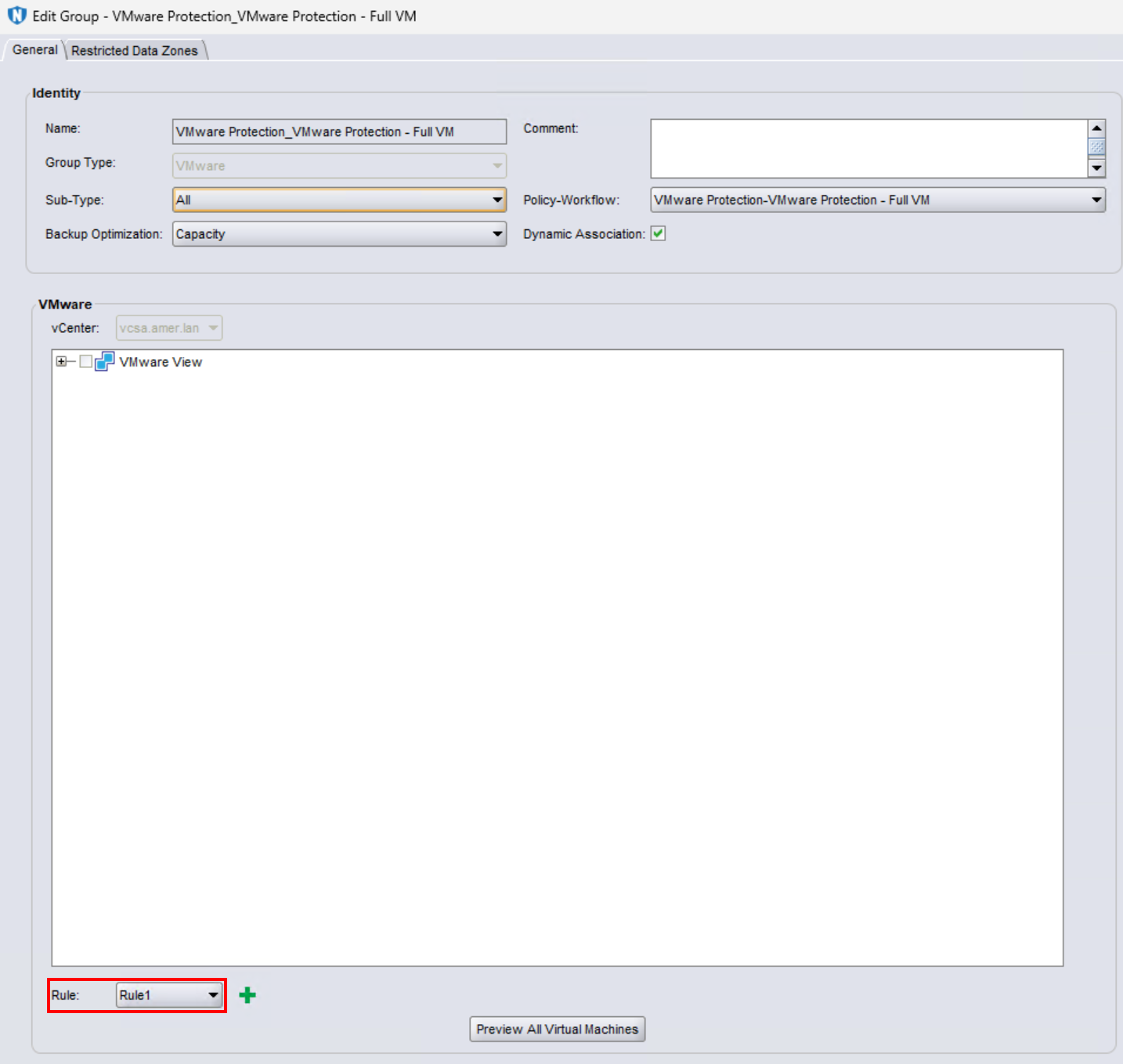
备份摘要显示以下错误:
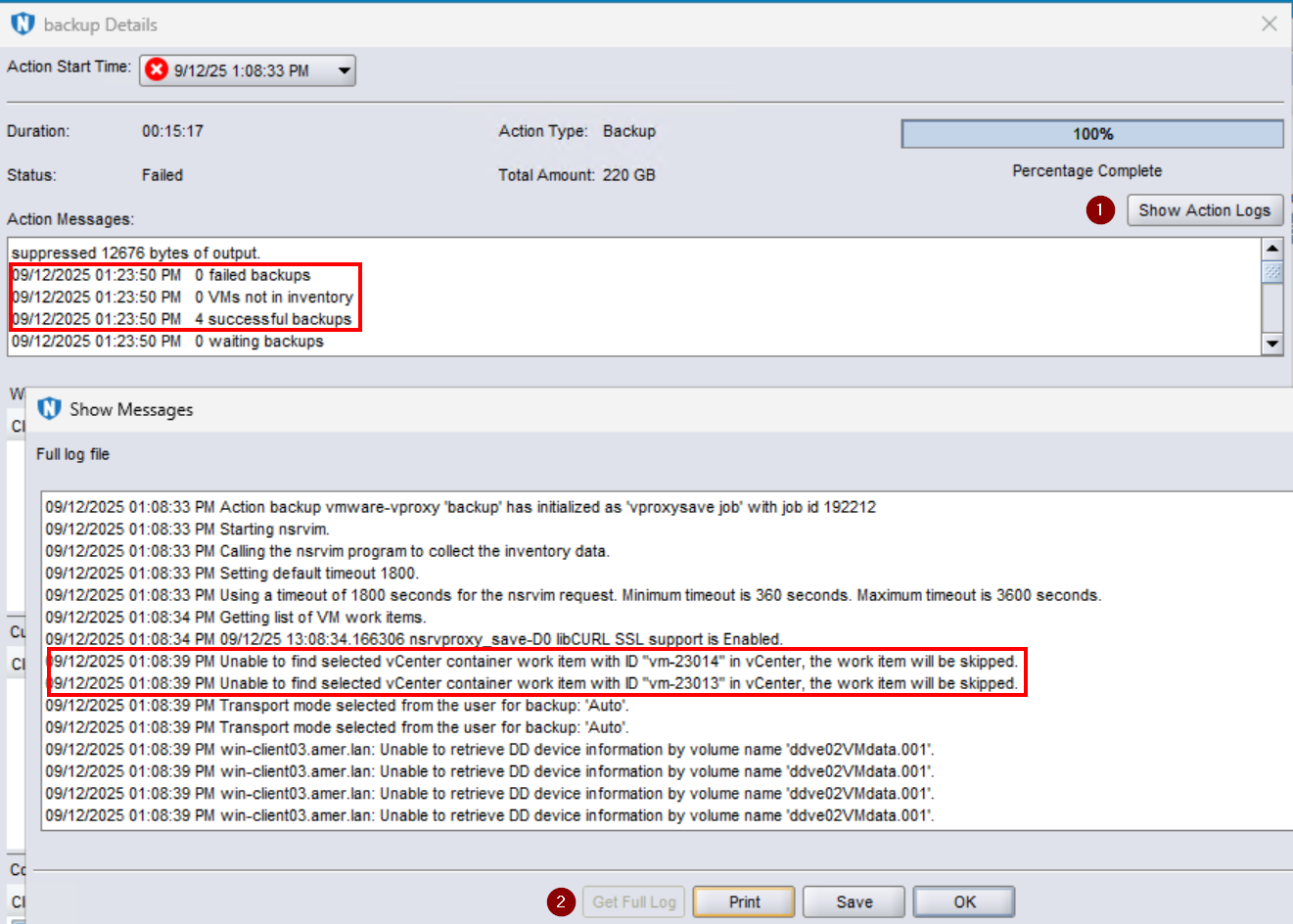
此错误也可在 NetWorker 服务器上的备份操作日志中看到:
- Linux:
/nsr/logs/policy/POLICY_NAME/WORKFLOW_NAME/ACTION_JOBID.raw - Windows(默认):
C:\Program Files\EMC NetWorker\nsr\logs\policy\POLICY_NAME\WORKFLOW_NAME\ACTION_JOBID.raw - NetWorker:如何使用nsr_render_log呈现.raw日志文件
[root@nsr ~]# nsr_render_log "/nsr/logs/policy/VMware Protection/VMware Protection - Full VM/backup_192212.raw"
151761 09/12/2025 01:08:33 PM  1 5 0 3478079296 18737 0 nsr.amer.lan nsrvproxy_save NSR notice Action backup vmware-vproxy 'backup' has initialized as 'vproxysave job' with job id 192212
204343 09/12/2025 01:08:33 PM  0 26 0 3478079296 18737 0 nsr.amer.lan nsrvproxy_save NSR info Starting nsrvim.
185813 09/12/2025 01:08:33 PM  0 0 0 3478079296 18737 0 nsr.amer.lan nsrvproxy_save NSR info Calling the nsrvim program to collect the inventory data.
185814 09/12/2025 01:08:33 PM  0 0 0 3478079296 18737 0 nsr.amer.lan nsrvproxy_save NSR info Setting default timeout 1800.
185818 09/12/2025 01:08:33 PM  0 0 0 3478079296 18737 0 nsr.amer.lan nsrvproxy_save NSR info Using a timeout of 1800 seconds for the nsrvim request. Minimum timeout is 360 seconds. Maximum timeout is 3600 seconds.
204344 09/12/2025 01:08:34 PM  0 26 0 3478079296 18737 0 nsr.amer.lan nsrvproxy_save NSR info Getting list of VM work items.
0 09/12/2025 01:08:34 PM  1 5 0 3478079296 18737 0 nsr.amer.lan nsrvproxy_save NSR notice 09/12/25 13:08:34.166306 nsrvproxy_save-D0 libCURL SSL support is Enabled.
165099 09/12/2025 01:08:39 PM  3 0 0 3478079296 18737 0 nsr.amer.lan nsrvproxy_save NSR error Unable to find selected vCenter container work item with ID "vm-23014" in vCenter, the work item will be skipped.
165099 09/12/2025 01:08:39 PM  3 0 0 3478079296 18737 0 nsr.amer.lan nsrvproxy_save NSR error Unable to find selected vCenter container work item with ID "vm-23013" in vCenter, the work item will be skipped.
205578 09/12/2025 01:08:39 PM  1 5 0 3478079296 18737 0 nsr.amer.lan nsrvproxy_save NSR notice Transport mode selected from the user for backup: 'Auto'.
205578 09/12/2025 01:08:39 PM  1 5 0 3478079296 18737 0 nsr.amer.lan nsrvproxy_save NSR notice Transport mode selected from the user for backup: 'Auto'.
...
Cause
该错误消息报告 VMware 托管对象参考 (MoRef) ID。这些 ID 与 VMware 模板虚拟机相关联。
可使用以下两种方法之一进行识别:
vProxy vmconfig:
- 打开与 vCenter 上的一个 vProxy 的 SSH 会话,然后以管理员身份登录。
- 切换到 root:
sudo su - - 转至 vProxy bin 目录:
cd /opt/emc/vproxy/bin - 加载 vProxy 环境变量文件:
source /opt/emc/vproxy/unit/vproxy.env - 运行以下命令,将 VALUES 替换为您环境中的相应值:
./vmconfig -c info -k "vm-MOREF" -l moref -p 'Password-for-vCenter' -u username-for-vCenter -v vcentername
示例:
nsr-vproxy:~ # cd /opt/emc/vproxy/bin
nsr-vproxy:/opt/emc/vproxy/bin # source /opt/emc/vproxy/unit/vproxy.env
nsr-vproxy:/opt/emc/vproxy/bin # ./vmconfig -c info -k "vm-23013" -l moref -p '!Password1' -u networker_user@vsphere.local -v vcsa.amer.lan
VM Config
vCenter: "vcsa.amer.lan", User: "networker_user@vsphere.local", Password: "!Password1", Lookup Mode: "moref", Lookup Key: "vm-23013", HypervisorMode: "vSphere", Command: "info"
Logged into vCenter 'vcsa.amer.lan'.
Connected to session on vCenter 'vcsa.amer.lan' Version '8.0.3 build-24322831, API:8.0.3.0', Uuid:e5390e5f-912e-4818-ad6e-ea9b878ff57d.
Found virtual machine 'win-template' with MORef 'vm-23013'.
vm-23013: Name: "win-template".
vm-23013: CBT Enabled: false.
vm-23013: Migration Enabled: false.
vm-23013: Backup Locked: false.
Disconnected from session on vCenter 'vcsa.amer.lan'.
Logged out from vCenter 'vcsa.amer.lan'.
VMware 托管对象浏览器 (MOB):
- 打开网页浏览器并输入以下 URL,并将 值S 替换为特定于您的环境的值:
https://VCENTER_ADDRESS/mob/?moid=VM-MOREF - 出现提示时,输入您的 vCenter 用户凭据。
示例:
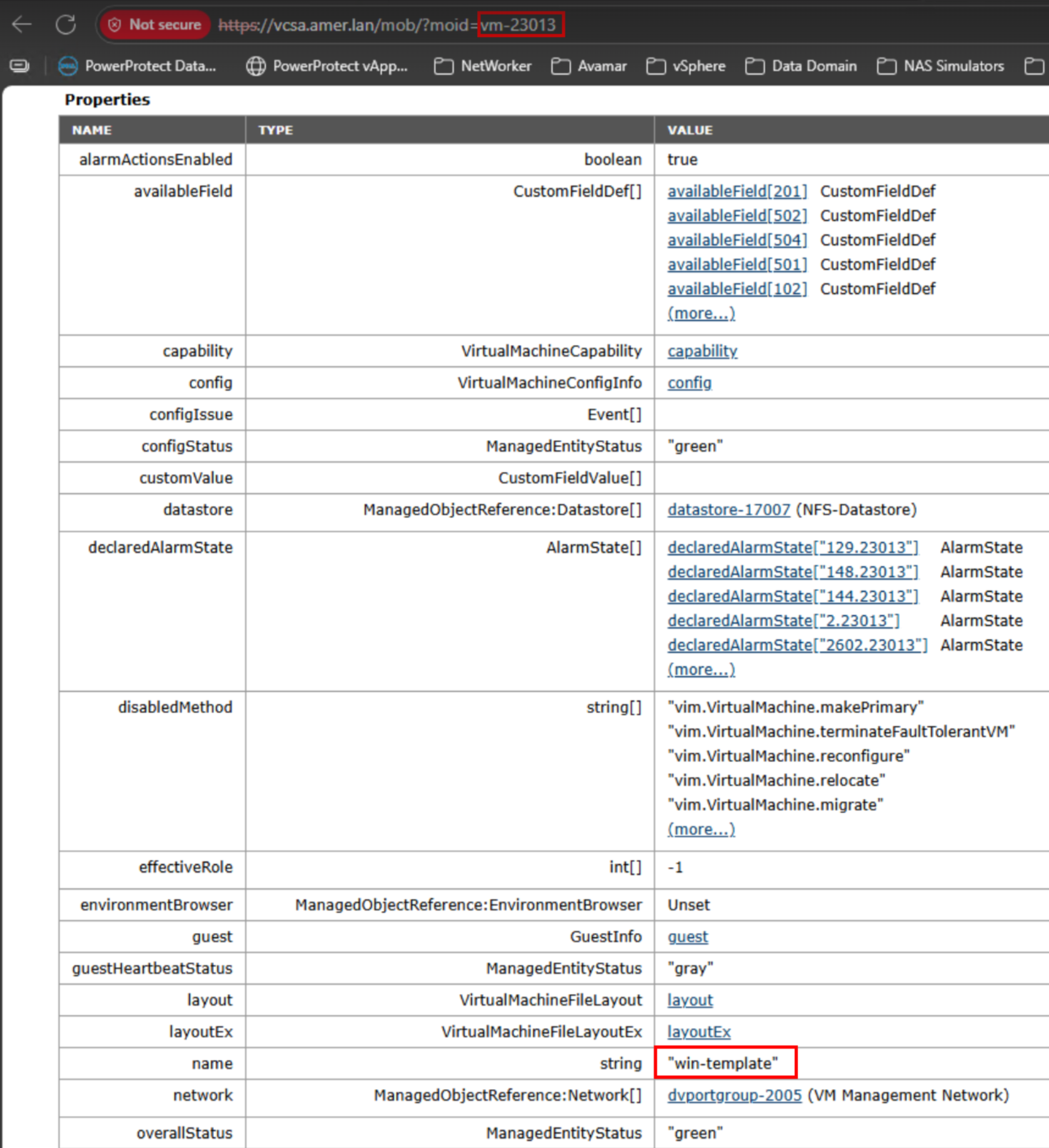
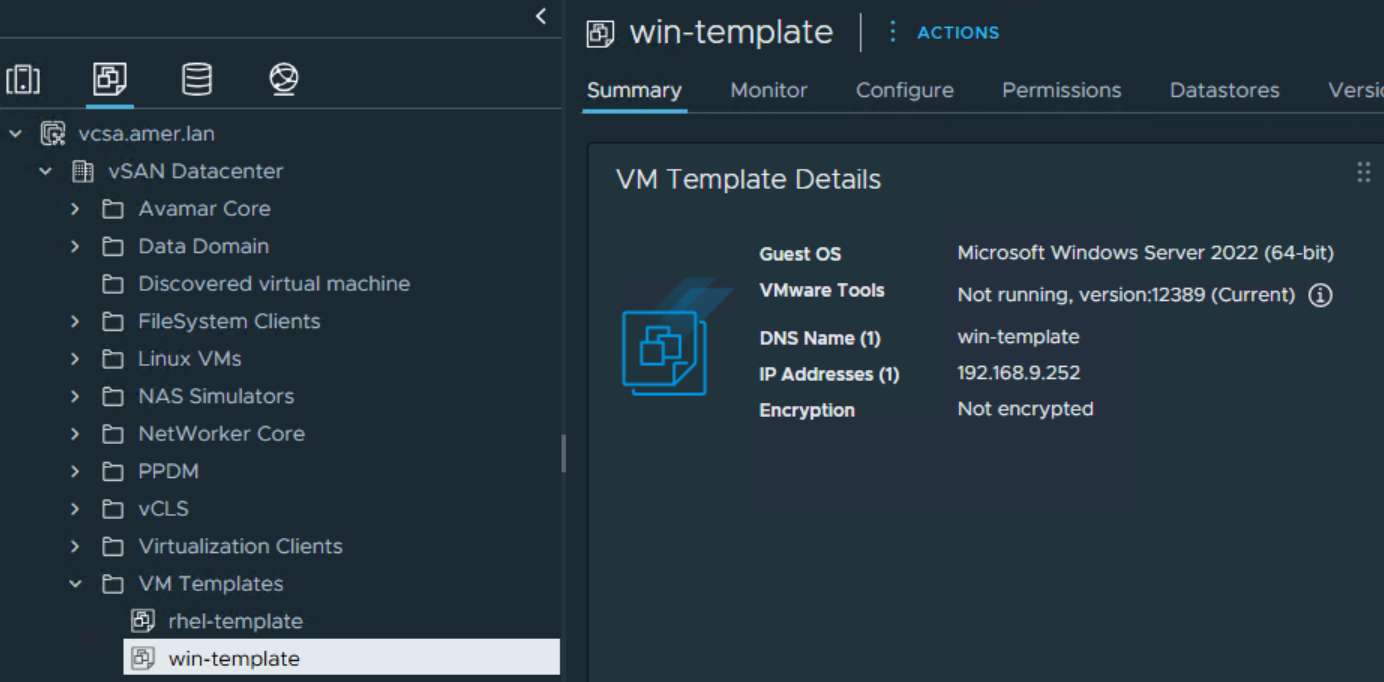
在 NetWorker 保护组中配置的规则会在备份时动态选取虚拟机。由于存在包含虚拟机模板的规则集,因此会选取 VMware 模板虚拟机。例如:
- 有一个
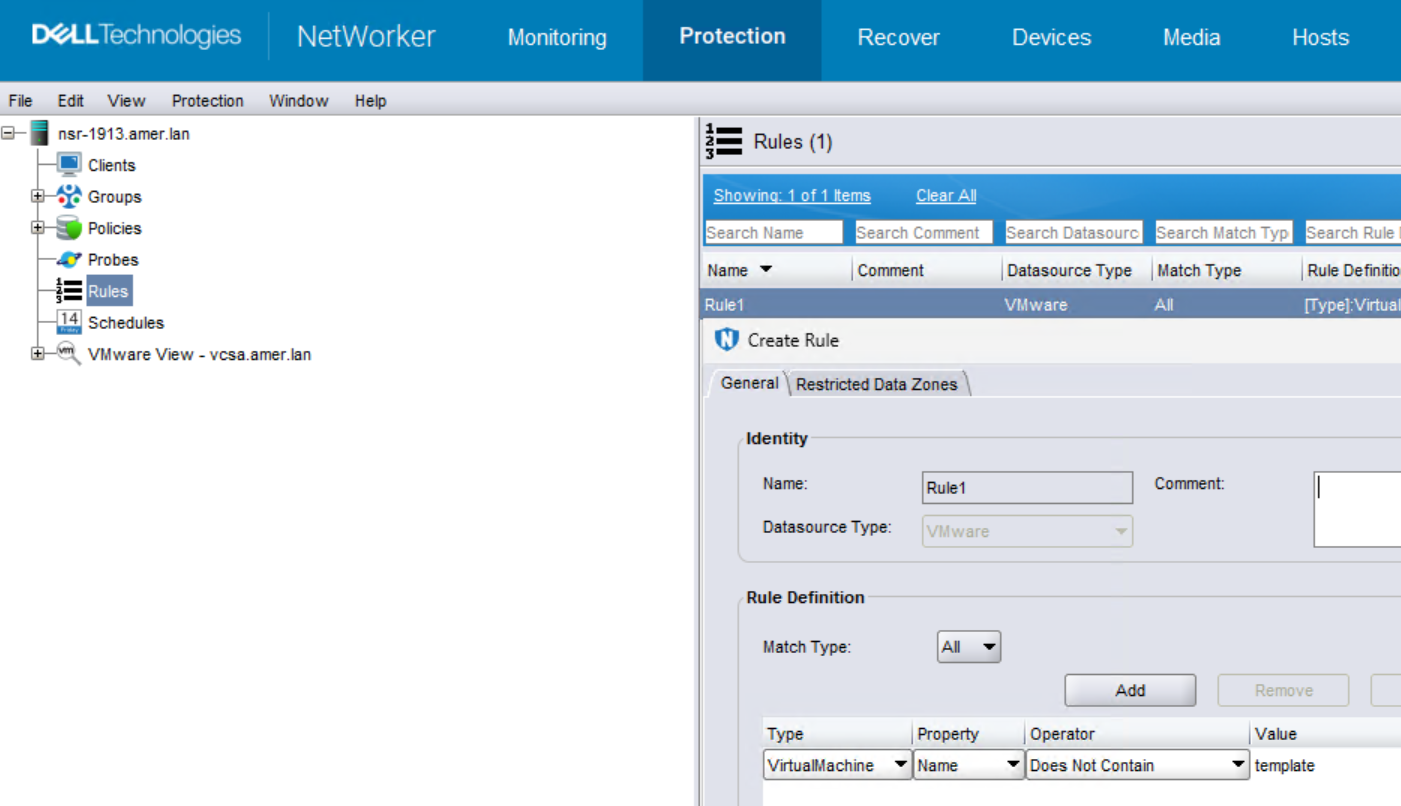
VirtualMachine基于名称的规则集,以包括包含特定字符串的虚拟机。模板字符串匹配。 - 有一个
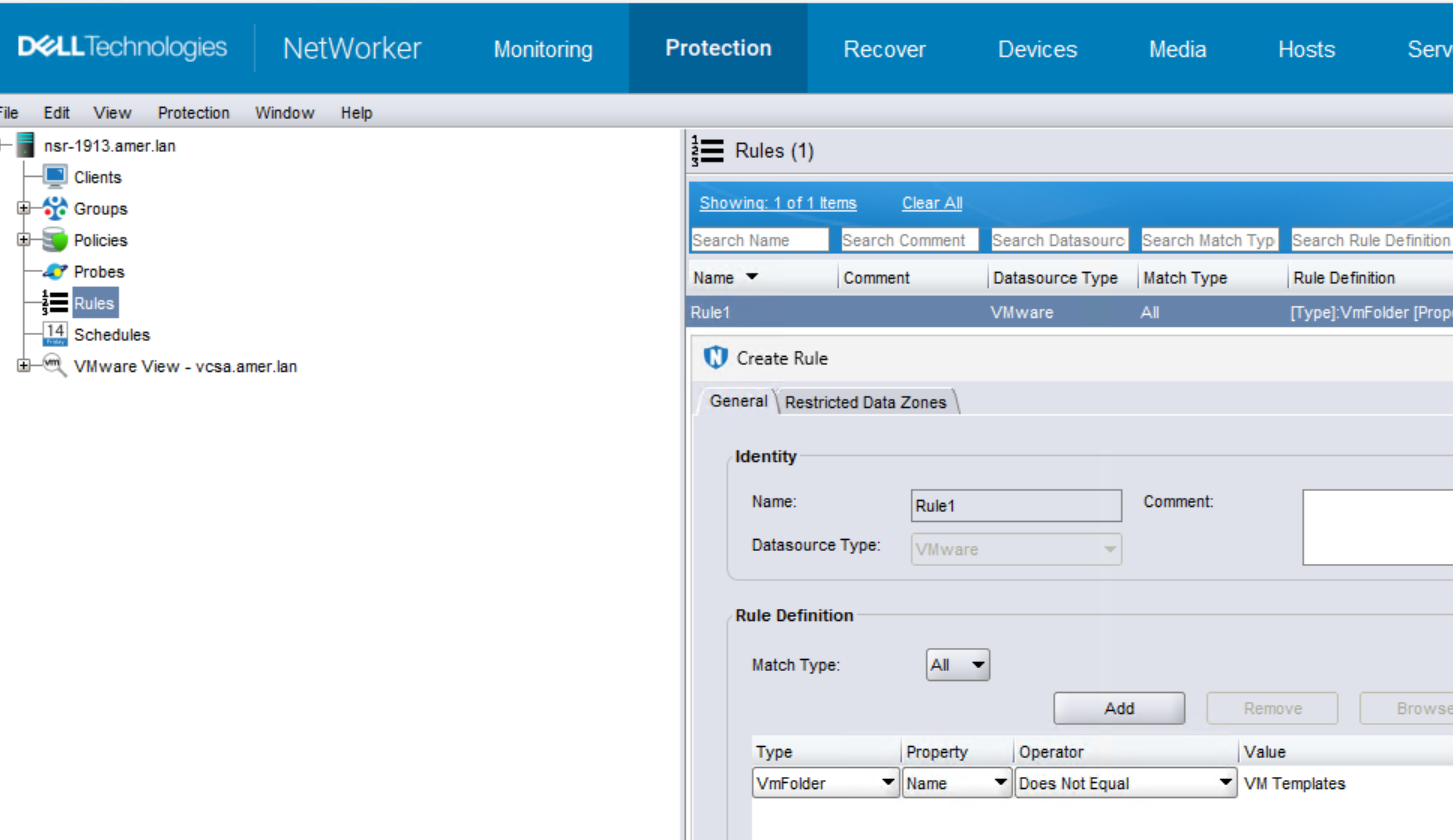
VmFolder基于名称的规则集,用于排除 VMware 中的某些“虚拟机和模板”文件夹。虚拟机模板不在 VMware 文件夹中,并且会作为工作流的一部分选取。
NetWorker 不支持 VMware 模板的备份。工作流警告称已跳过虚拟机,因为它不受支持。工作流被标记为失败,以便可以采取纠正操作以将其从基于规则的选择中删除。
Resolution
必须从动态选择中排除虚拟机模板。
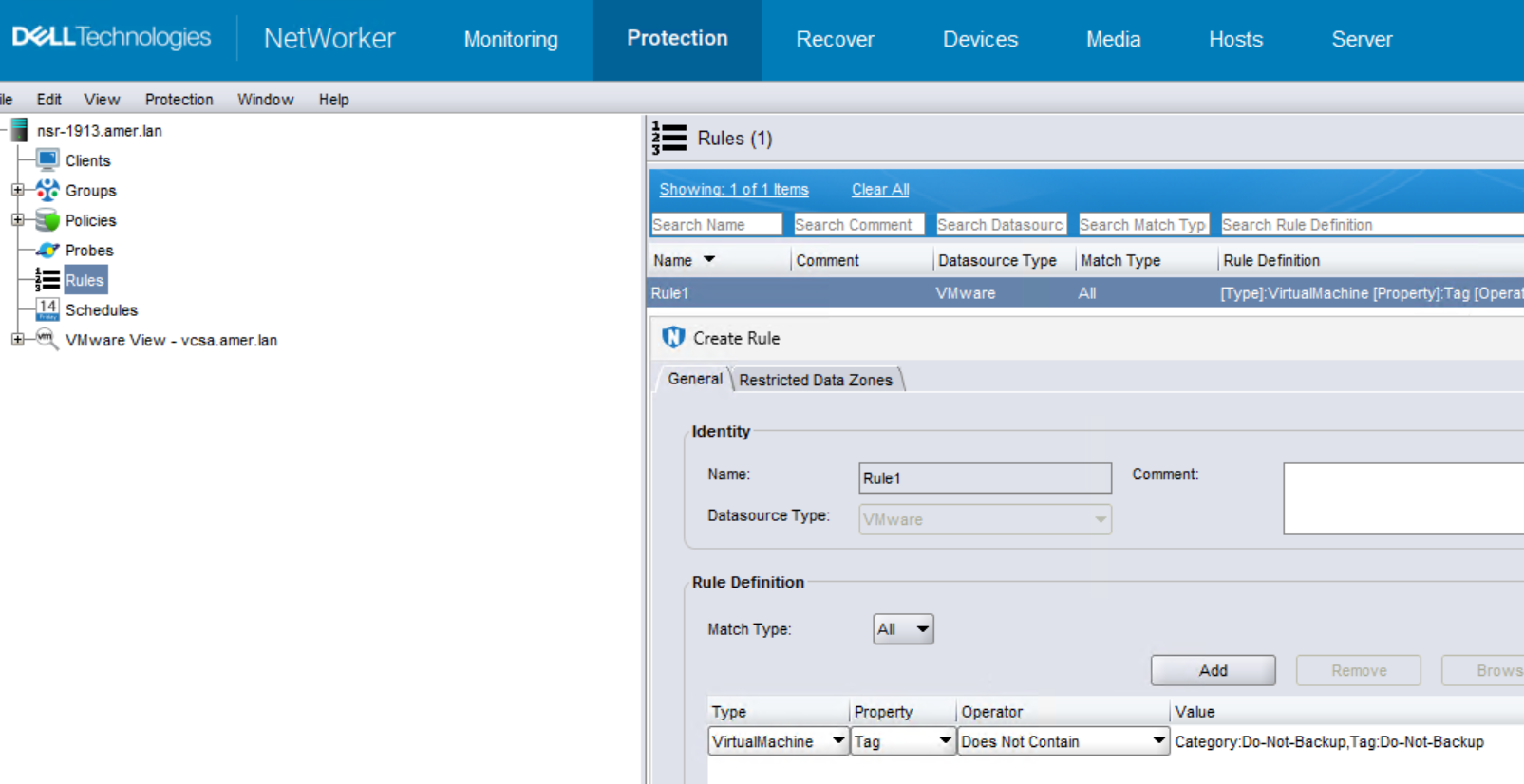
更新 NetWorker 保护组使用的“规则”。以下是如何从动态选择中删除模板的一些示例。可以配置一个或多个规则,具体取决于 VMware 环境以及您想要如何管理基于动态规则的选择。用于阻止模板的方法由 VMware 和 NetWorker 管理员决定。
- 将 VMware 模板移动到 VMware 中的特定文件夹。在 NetWorker 中创建基于 名称的 规则,以在备份中不包括该文件夹。
- 模板虚拟机是否包含通用字符串(例如:template)。创建基于 名称的 规则,以不包括包含该字符串的虚拟机。
- 在 VMware 中,创建一个类别标签并将该标签分配给模板虚拟机。这必须由 VMware 管理员完成。在 NetWorker 中,创建基于 标记 的规则,以不包括具有该标记的虚拟机或模板。
动态选择不再选取模板后,工作流将被标记为成功或失败,具体取决于虚拟机备份完成状态。
Additional Information
当所有虚拟机会话都成功时,虚拟机工作流显示为失败还有其他其他潜在原因,请参阅: