NVE:安裝失敗,並顯示「錯誤:無法驗證密碼原則」
Summary: 在設定有密碼原則違規的 NetWorker Services 時,NetWorker Virtual Edition (NVE) 安裝進度失敗。
This article applies to
This article does not apply to
This article is not tied to any specific product.
Not all product versions are identified in this article.
Symptoms
成功部署 OVA 後,正在設定 NetWorker Virtual Edition (NVE) 環境。NetWorker Installation Manager (avigui) 可用來輸入各種帳戶密碼的 NetWorker 組態詳細資料。設定安裝進度在步驟中失敗 NetWorker Authc Service with "Error: Could not validating password policy."
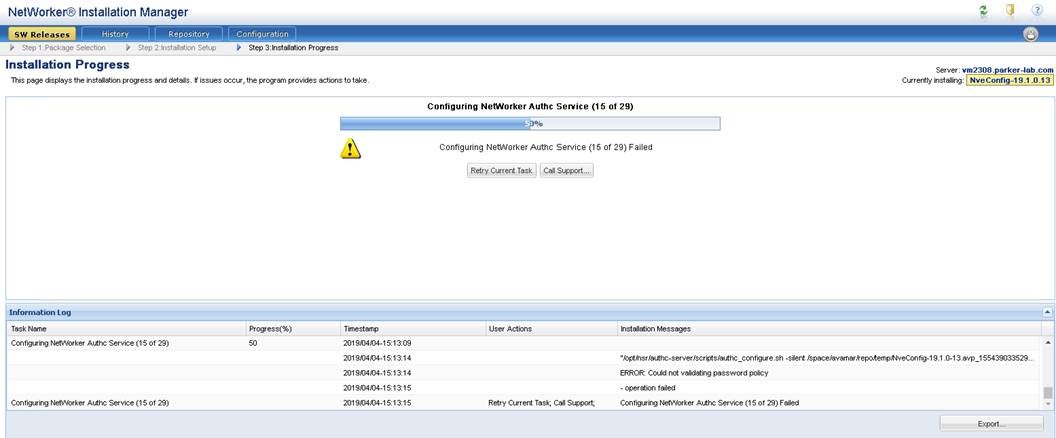
圖 1:NVE avinstaller 介面顯示安裝會在 50% 停止。
Cause
「驗證系統管理員密碼」包含等號 (=),對於 NVE 密碼複雜度檢查來說並非有效的特殊字元。 「驗證管理員密碼」說明詳細說明中會指出此需求:
Enter the password for the Authc Service admin user (nine or more characters with at least one digit, one lowercase, one uppercase, and one character that is not a digit, lowercase, uppercase, or equal sign).
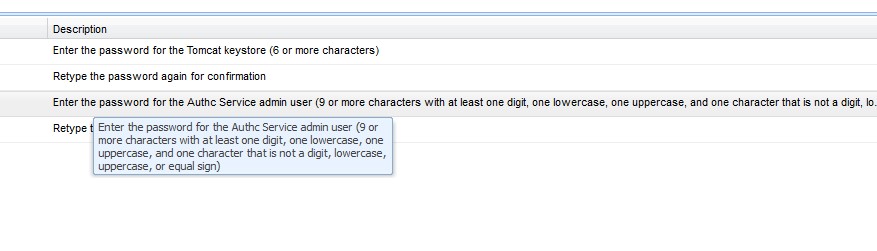
圖 2:身份驗證服務的密碼要求
Resolution
在 vSphere 環境中重新部署 NVE OVA,並確定使用正確的密碼要求。
- 九個或更多字元
- 至少一個數字
- 小寫字母
- 大寫字母
- 一個特殊字元 (請勿在密碼中使用等號 (=)。
Article Properties
Article Number: 000170284
Article Type: Solution
Last Modified: 27 Oct 2025
Version: 4
Find answers to your questions from other Dell users
Support Services
Check if your device is covered by Support Services.