NVE: Installation fails with "Error: Could not validating password policy"
Summary: The NetWorker Virtual Edition (NVE) installation progress fails when configuring the NetWorker Services with a password policy violation.
This article applies to
This article does not apply to
This article is not tied to any specific product.
Not all product versions are identified in this article.
Symptoms
The NetWorker Virtual Edition (NVE) environment is being configured after a successful deployment of the OVA. The NetWorker Installation Manager (avigui) is used to enter the NetWorker Configuration details for the various account passwords. The installation progress fails on step when configuring the NetWorker Authc Service with "Error: Could not validating password policy."
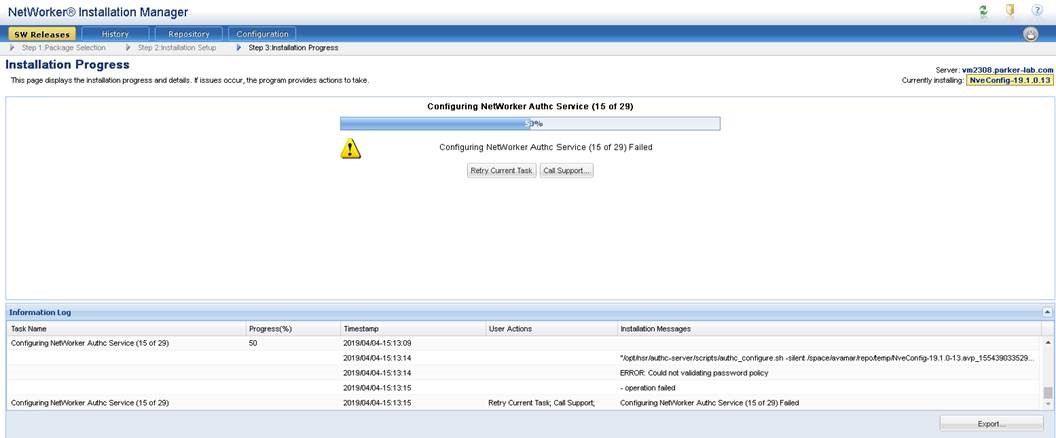
Figure 1: NVE avinstaller interface shows install stops at 50%.
Cause
The "Authc Admin Password" contains an equal (=) sign and it is not a valid special character for the NVE password complexity check. The requirement is indicated in the "Authc Admin Password" description details:
Enter the password for the Authc Service admin user (nine or more characters with at least one digit, one lowercase, one uppercase, and one character that is not a digit, lowercase, uppercase, or equal sign).
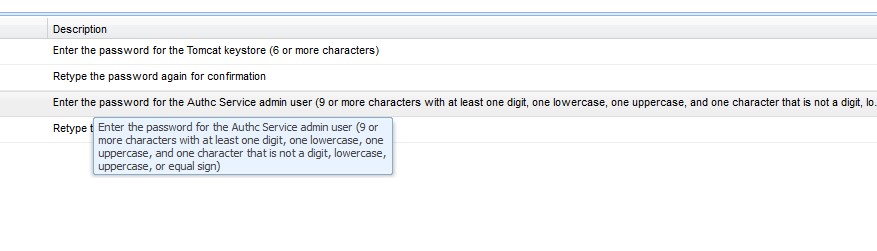
Figure 2: Password requirements for the authentication service
Resolution
Redeploy the NVE OVA in the vSphere environment and ensure to use the correct password requirements.
- Nine or more characters
- At least one number
- Lowercase letter
- Uppercase letter
- One special character (do not use the equal (=) sign in the password).
Article Properties
Article Number: 000170284
Article Type: Solution
Last Modified: 27 Oct 2025
Version: 4
Find answers to your questions from other Dell users
Support Services
Check if your device is covered by Support Services.