Dell Networking:使用 VLTi 介面的 VLT 環境中的 OS10 PBR 錯誤路由
Summary: 使用者在使用 Dell OS10 交換器的虛擬連結中繼 (VLT) 環境中遇到原則式路由 (PBR) 問題。使用 VLTi 介面將流量路由至 VLT 次要交換器時,會導致「通訊」錯誤。此問題已透過在 VLT 網域上停用 PBR 解決。解決方法是使用兩個訪問控制清單 (ACL) 重組路由映射配置以分隔流量路徑。
This article applies to
This article does not apply to
This article is not tied to any specific product.
Not all product versions are identified in this article.
Symptoms
資訊收集
使用這些命令進行即時故障診斷:
show mac address-table
show ip arp
show ip route
show running-config route-map
show running-config access-list
show running-config vlt
請考慮創建 ACL 以匹配流量(源/目標),並驗證流量是否採用預期路徑。
收集支援套裝以進行進一步分析。
問題識別
- 當使用 VLTi 介面的非對稱流量時,通訊會失敗。
- 可能會觀察到超過上線時間 (TTL) 的消息。
- 當流量僅使用一個 VLT 對等交換器時,流量會正常運作。
Cause
根本原因
在非對稱通信中,當流量通過交換機 1 上的 VLTi 路由時,交換機 2 可能會將流量發送到錯誤的目標,從而導致通信問題。這是因為 PBR 與交換器 2 的 VLTi 介面上的流量相符。
Resolution
Dell SmartFabric OS10 使用者指南 10.6.0 版
- 停用 VLT 網域上的 PBR:
ip pbr disable
ipv6 pbr disable
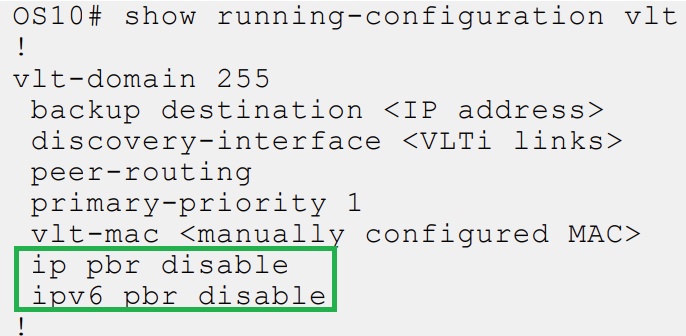
因應措施
- 使用兩個 ACL 重新設定路由映射:
- ACL1:允許使用傳統路由的子網路項目。
- ACL2:ip 允許過濾任何流量。
- 路線圖:
route-map ToDefaultRoute deny 10
  match ip address ACL1
route-map ToFwPbr permit 20
  match ip address ACL2
  set ip next-hop next-hop IP
Affected Products
SmartFabric OS10 SoftwareArticle Properties
Article Number: 000357162
Article Type: Solution
Last Modified: 20 Aug 2025
Version: 1
Find answers to your questions from other Dell users
Support Services
Check if your device is covered by Support Services.