Dell Unity: Receive Error Code "0x6400b88" after a Password Reset with the NMI Button
Summary: After the admin and service passwords are reset using the Non-Maskable Interrupt (NMI) button, and Unisphere is accessed, the user is prompted to change the password. A message window with "Error Code: 0x6400b88" is displayed. ...
Symptoms
After following the process to reset the password with the NMI button, accessing Unisphere receives a request to change the password. You cannot change the password in Unisphere. After entering the password and providing confirmation, a message window appears: "Customer may not log in using SSH (the default password does not work)."
Cause
Management Service (ECOM) in one of the Storage Processor's (SPs) is not responding. Perform a physical ECOM failover, and then try to connect using SSH.
If a user tries to connect in Unisphere, they could receive the same message.
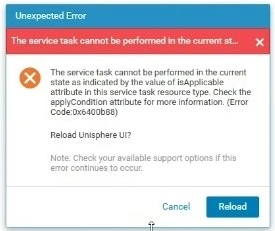
"Message window Error Code: 0x6400b88"
When the service password is changed, a message is received that the other SP is unavailable.

SSH message: "Peer password changed once the SP reboots into Normal Mode."
Resolution
Sequentially reboot both SPs, then run the command again to change the password using SSH.
If this does not resolve the issue, it may be necessary to perform a full shut-down.