SRM公司 |由于容量单位不同,导致 Data Domain 总磁盘容量不匹配
Summary: 由于数据以不同单位报告而不显示各自的单位,因此无法正确显示磁盘的总容量。
This article applies to
This article does not apply to
This article is not tied to any specific product.
Not all product versions are identified in this article.
Symptoms
解决方案包 — Dell Data Domain — Total Disk Capacity报告显示差异。
受影响的报告路径:
Report Library -> Dell Data Domain -> Summary -> Table View ->Disk Capacity (TiB)
Report Library -> Dell Data Domain -> Inventory -> Arrays ->Disk Capacity (TiB)
Report Library -> Dell Data Domain -> Inventory -> Disks ->Capacity (TiB)
Cause
磁盘容量 (TiB) 的值设置在报告中设置为自动转换公式,这会将 GiB 值转换为自动,而不是所需的 TiB。当单位不同时,总和不正确。
Resolution
将Value Settings单位从Auto更改为TiB,以便以TiB Unit正确显示总容量。
步骤:
- 单击右上角的 Modifications (条形图)图标,然后选择 -> Edit Reports
- 在Edit Mode页面上,单击树节点上的Report Library -> Dell Data Domain - Summary -> Table View -> Arrays>
-
- Report Details:表-> 值:磁盘容量 (TiB) —> 值设置
- 缩放模式 -> 按单位
- 将单位 —> GiB 更改为TiB,而不是自动
- 保存
- 对以下报告也重复步骤 a 和 b:
- Report Library -> Dell Data Domain -> Inventory -> Arrays
- Report Details:表-> 值:磁盘容量 (TiB) —>值设置
- Report Library -> Dell Data Domain ->Inventory -> Disks
- Report Details:表-> 值:容量 (TiB)—> 值设置
之前:
之后: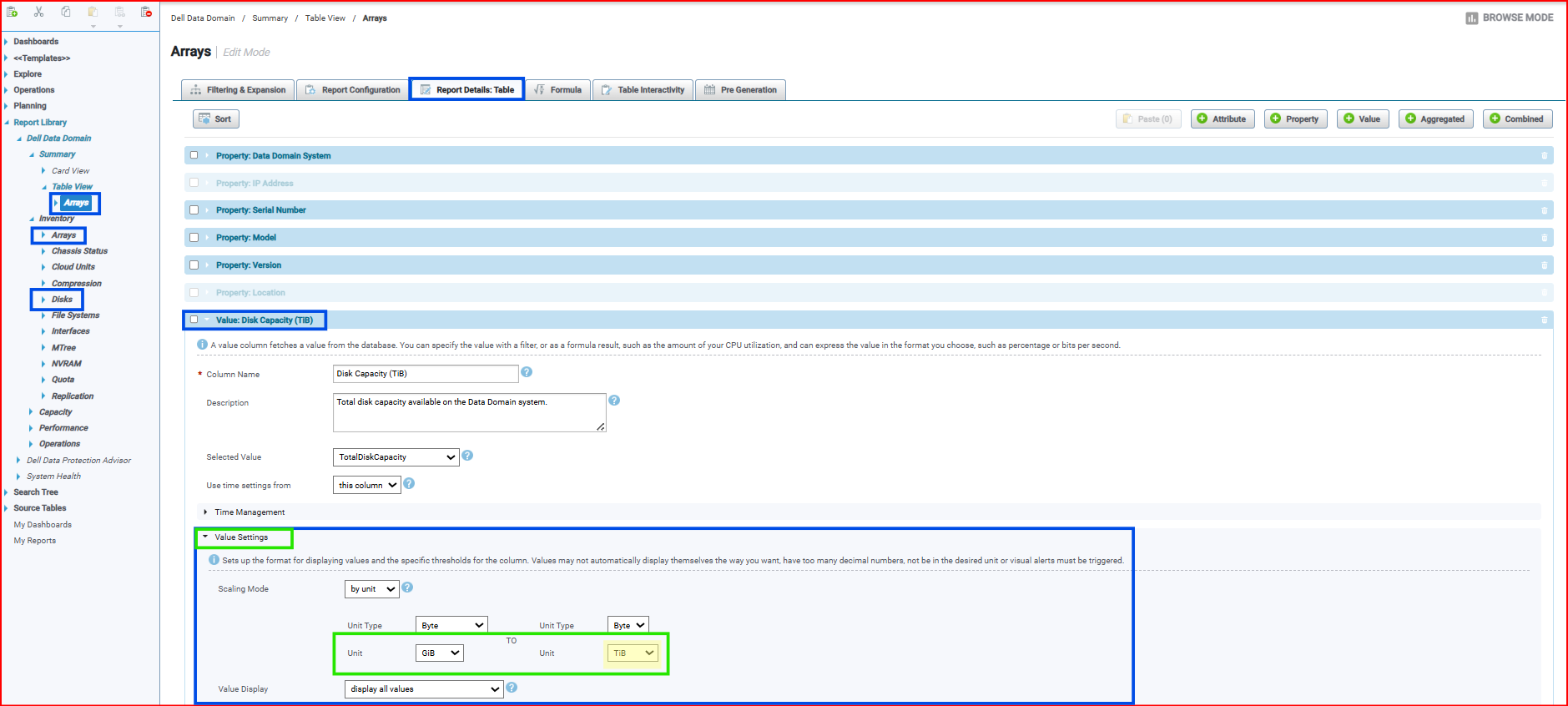
Additional Information
在 SRM 6.0.0.0 及更高版本中,“Scaling Value Settings”已从“Auto”默认为 TiB。
Affected Products
SRMArticle Properties
Article Number: 000371292
Article Type: Solution
Last Modified: 22 Sept 2025
Version: 1
Find answers to your questions from other Dell users
Support Services
Check if your device is covered by Support Services.