PowerScale OneFS:SMBホーム共有にユーザー名拡張変数を使用すると、断続的に関連エラーが発生します
Summary: ユーザー名の拡張されたホーム ディレクトリーにファイルを保存すると、コンピューター アカウントも共有に接続しているがファイルが見つからない場合に断続的に失敗します。
This article applies to
This article does not apply to
This article is not tied to any specific product.
Not all product versions are identified in this article.
Symptoms
変数パス拡張変数またはユーザー名拡張変数(%U)を使用して自動的に作成されたホーム ディレクトリーの下にあるファイルを保存、変更、または名前変更しようとすると、ファイルがそのパスに存在しなくなった、または類似した内容を示すエラーが断続的に表示されることがあります。その後、ファイルが消え、ページが更新された後に再び表示される場合があります。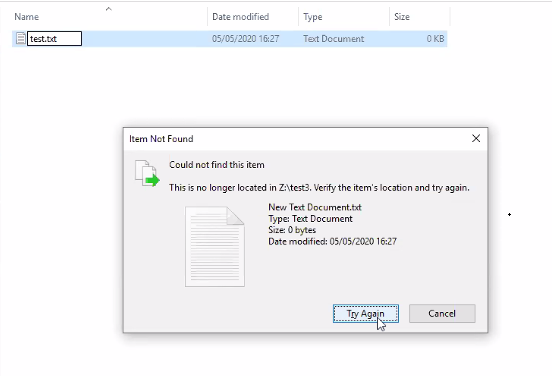
Cause
ユーザー名拡張変数(%U)を使用して構成されたSMB共有は、共有に接続するユーザーごとにホーム ディレクトリーが自動的に作成されることを意味します。これは、コンピューター アカウントかユーザー アカウントかは関係ありません。
PowerScale-1# isi smb shares list --zone=SMBzone
Share Name  Path
-------------------------------------
homedir     /ifs/home/%U
-------------------------------------
Total: 1

PowerScale-1# ls -l /ifs/home/
total 5
drwx------     2 user0                   Isilon Users              27 May 15 11:32 user0
drwx------     3 EXAMPLE\dell-rabie-pc$  EXAMPLE\domain computers  28 May 15 11:36 dell-rabie-pc$ <<----- Computer account
drwx------     3 EXAMPLE\paul            EXAMPLE\domain users      28 May 15 11:36 paul           <<----- User account using computer "dell-rabie-pc$"
次のパケット キャプチャでは、 ユーザーpaul が共有 \\homedir\profilesに ファイルを作成し、 \\homedir\profiles\paul\に展開します。コンピューター アカウントは、同じファイルを見つけようとし、同じ共有 \\homedir\profilesに接続していると考えます。\\homdir\profiles\dell-rabie-pc$\の下を探しているため、ファイルが見つかりません。\\homedir\profiles\paul\testは\\homdir\profiles\dell-rabie-pc$\testと同じではありません。
6600 48.216535 10.148.x.x   10.45.x.x SMB2 166 Session Setup Request, NTLMSSP_AUTH, User: EXAMPLE\paul    <<----- User account using computer "dell-rabie-pc$"
6661 48.216535 10.45.x.x   10.148.x.x SMB2 146 Session Setup Response
6662 48.800589 10.148.x.x   10.45.x.x SMB2 166 Tree Connect Request Tree: \\homedir\profiles
6663 48.801463 10.45.x.x   10.148.x.x SMB2 138 Tree Connect Response
6646 48.213583 10.148.x.x   10.45.x.x SMB2 422 Create Request File: test3\test\New Text Document.txt
6650 48.215117 10.45.x.x   10.148.x.x SMB2 374 Create Response File: test3\test\New Text Document.txt
6659 48.216535 10.148.x.x   10.45.x.x SMB2 166 Session Setup Request, NTLMSSP_AUTH, User: EXAMPLEdell-rabie-pc$ <<----- Computer account
6660 48.216535 10.45.x.x   10.148.x.x SMB2 146 Session Setup Response
6813 48.800589 10.148.x.x   10.45.x.x SMB2 166 Tree Connect Request Tree: \\homedir\profiles
6814 48.801463 10.45.x.x   10.148.x.x SMB2 138 Tree Connect Response
6819 48.802674 10.148.x.x   10.45.x.x SMB2 266 Create Request File: test3\test\New Text Document.txt
6820 48.803106 10.45.x.x   10.148.x.x SMB2 131 Create Response, Error: STATUS_OBJECT_PATH_NOT_FOUND

In frames 6646 and 6650, the file is created successfully. Frame 6819 shows a request to access "New Text Document.txt",  but frame 6820 shows that the file was not found.
Further inspection of the information in frame 6819, shows that the create request came from the computer account and not the user account:
6819 48.802674 10.148.x.x   10.45.x.x SMB2 266 Create Request File: test3\test\New Text Document.txt
Session Id: 0x07b5cf4100d5a9be
    [Account: dell-rabie-pc$ Acct:dell-rabie-pc$]
    [Domain: DDMI Domain:EXAMPLE]
    [Host: dell-rabie-pc Host:dell-rabie-pc]
Resolution
この問題は、可変パス拡張を使用して自動的に作成されないホーム ディレクトリーを使用している場合は発生しません。
対処方法:
- 「domain computers」グループによる共有へのアクセスを拒否できる場合は、ファイルが見つからないというエラーを防ぐことができます。これは、最初にテストの設定で実行して、考えられる悪影響を確認する必要があります。
# isi smb shares view varexp
                                     Share Name: varexp
                                           Path: /ifs/varexp-home/%U
                                    Description:
                     Client-side Caching Policy: manual
Automatically expand user names or domain names: True
Automatically create home directories for users: True
                                      Browsable: True
Permissions:
Account                  Account Type  Run as Root  Permission Type  Permission
--------------------------------------------------------------------------------
EXAMPLE\domain computers group         0            deny             full
Everyone                 wellknown     0            allow            full
--------------------------------------------------------------------------------
Total: 2
2.クライアントがnot foundイベントをキャッシュしないようにします。 ただし、パフォーマンスが低下する可能性があります。
これらの設定の変更に関する質問や懸念事項については、Microsoft サポートにお問い合わせください
レジストリー エントリーを追加するには、次の手順を実行します。
- Windowsの検索バーに「regedit」と入力します
- 以下の場所に移動します。Computer\HKEY_LOCAL_MACHINE\SYSTEM\CurrentControlSet\Services\LanmanWorkstation\Parameters
- 上記の場所で、新しいDWORD値を作成します(新しい>DWORD値を右クリックし>)
- 以下のレジスター名を指定します。新しく作成された値は、デフォルトではゼロです
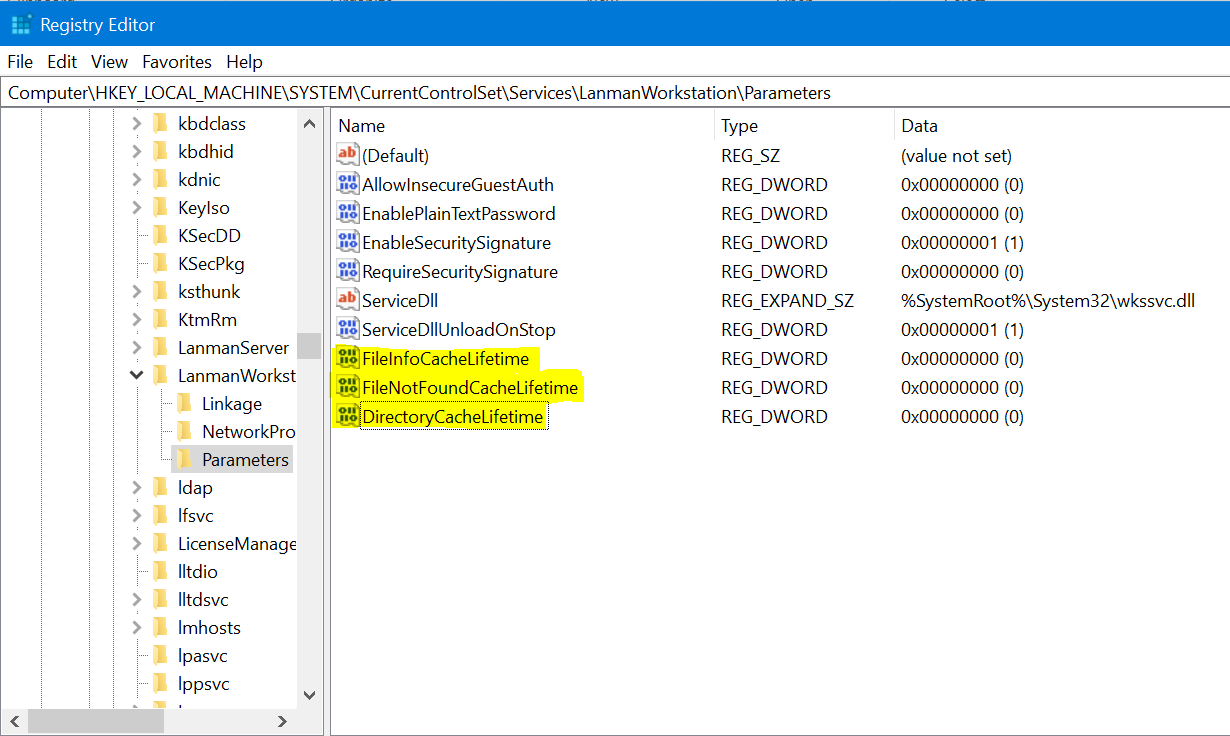
FileNotFoundCacheLifetime Dword=0 >> The file not found cache timeout period.
共有ルートではなくサブディレクトリーに存在する場合でも問題が解決しない場合は、上記のエントリーとともに次のレジストリーを追加します。
FileInfoCacheLifetime Dword=0                               >> The file information cache timeout period.
DirectoryCacheLifetime Dword=0                            >> This is the directory cache timeout.
レジストリー エントリーは次のように表示されます。
Additional Information
- ファイル情報キャッシュを無効にすると、クライアントのパフォーマンスに大きな影響を与え、サーバーに送信されるメタデータ要求の数が増加する可能性があります。
- レジストリ値の詳細については、以下を参照してください。
https://docs.microsoft.com/en-us/windows-server/administration/performance-tuning/role/file-server/
Affected Products
Isilon, PowerScale OneFSProducts
Storage, Enterprise Storage, Isilon, Isilon, PowerScale OneFSArticle Properties
Article Number: 000079025
Article Type: Solution
Last Modified: 16 Dec 2025
Version: 4
Find answers to your questions from other Dell users
Support Services
Check if your device is covered by Support Services.