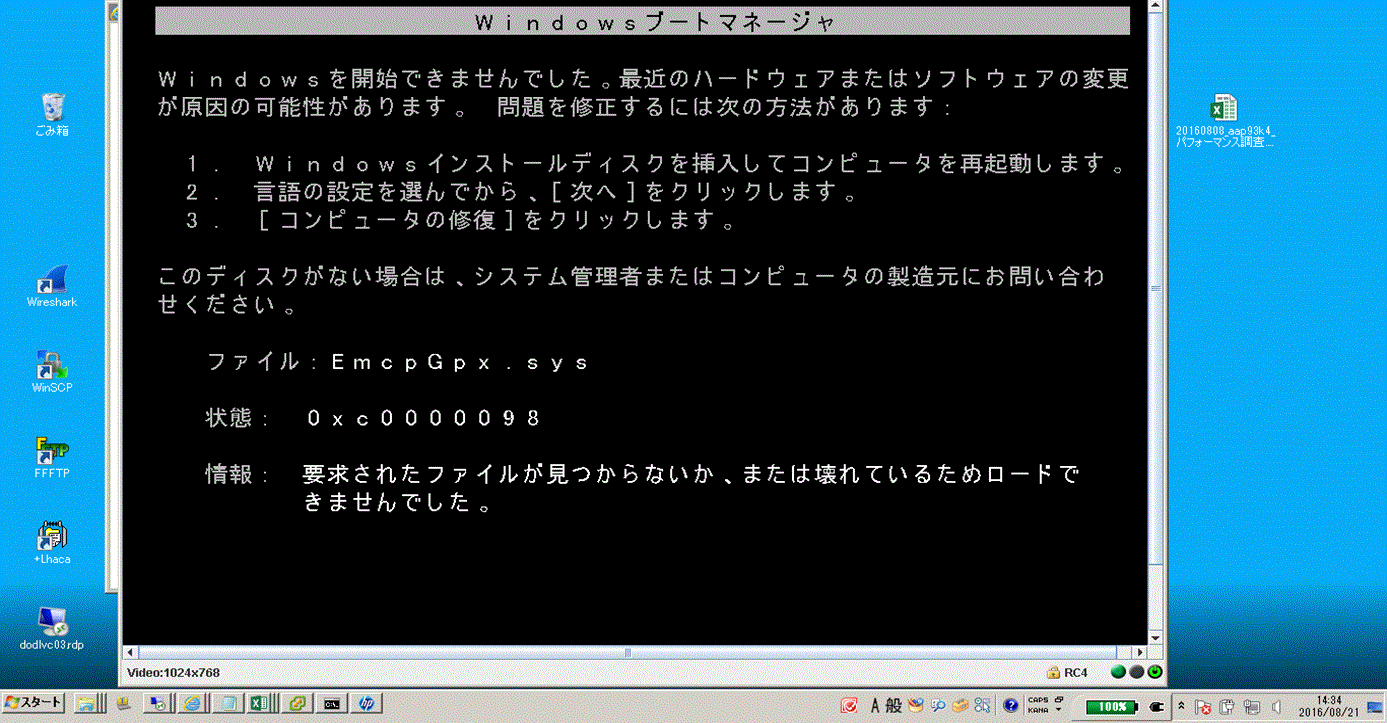
PowerPath:PowerPath 5.5から6.0にアップグレードした後、Windowsホストが「EmcpGpx.sys at 0xc0000098」というエラーで起動しない
Summary: PowerPath 6.0にアップグレードした後、ホストを起動できません。
This article applies to
This article does not apply to
This article is not tied to any specific product.
Not all product versions are identified in this article.
Symptoms
PowerPath 6.0にアップグレードした後、ホストを起動できません。
セーフモードも機能しません。
Cause
何がEmcpMpx.sysとEmcpBase.sysを保持しているかを正確に判断するには、Procmon、Process Explorer、およびhandle.exeが必要です。
=== HOST\XXXXXXXX_SETUPAPI.DEV.LOG ===
     sig:                Using catalog 'C:\Windows\system32\CatRoot\{F750E6C3-38EE-11D1-85E5-00C04FC295EE}\oem34.CAT'.
     cpy:                Source File 'C:\Windows\system32\DRIVERS\SET9996.tmp' is NOT signed NT5 Crypto.
     cpy:                DrpGetFileProt Status=0 dwClass=5
     cpy:                MoveFile: 'C:\Windows\system32\DRIVERS\SET9996.tmp'
     cpy:                      to: 'C:\Windows\system32\DRIVERS\EmcpMpx.sys'
!!!  cpy:                MoveFile: FAILED!
!!!  cpy:                Error 5: Access is denied.
     cpy:                DrpSetRegFileProt 'C:\Windows\system32\DRIVERS\EmcpMpx.sys' Status=0 Class=OEM Legacy
!    cpy:                Targetfile 'C:\Windows\system32\DRIVERS\EmcpMpx.sys' marked to be moved from 'C:\Windows\system32\DRIVERS\SET9996.tmp' on next reboot.

     sig:                Using catalog 'C:\Windows\system32\CatRoot\{F750E6C3-38EE-11D1-85E5-00C04FC295EE}\oem32.CAT'.
     cpy:                Source File 'C:\Windows\system32\DRIVERS\SET8165.tmp' is NOT signed NT5 Crypto.
     cpy:                DrpGetFileProt Status=0 dwClass=5
     cpy:                MoveFile: 'C:\Windows\system32\DRIVERS\SET8165.tmp'
     cpy:                      to: 'C:\Windows\system32\DRIVERS\EmcpBase.sys'
!!!  cpy:                MoveFile: FAILED!
!!!  cpy:                Error 5: Access is denied.
     cpy:                DrpSetRegFileProt 'C:\Windows\system32\DRIVERS\EmcpBase.sys' Status=0 Class=OEM Legacy
!    cpy:                Targetfile 'C:\Windows\system32\DRIVERS\EmcpBase.sys' marked to be moved from 'C:\Windows\system32\DRIVERS\SET8165.tmp' on next reboot.
Resolution
セーフ モードは機能しませんが、前回正常起動時の構成は機能する可能性があります。その場合は、LKGCで起動してから、ホストを再起動します。問題が解消されます。
Additional Information
オペレーティング システムを起動できなかった理由は、EmcpBaseとEmcpMpxのアップデートに失敗したためです。起動時に、オペレーティング システムは古いバージョンのEmcpBaseとEmcpMpxをまだ使用しています。これらのsysファイルを使用してEmcpGpxに到達すると、異なるバージョン(より新しい)であるため、古いバージョンを探しているために破損または欠落していると考えて失敗します。
Affected Products
PowerPath for WindowsProducts
PowerPath for WindowsArticle Properties
Article Number: 000171330
Article Type: Solution
Last Modified: 19 Feb 2024
Version: 3
Find answers to your questions from other Dell users
Support Services
Check if your device is covered by Support Services.