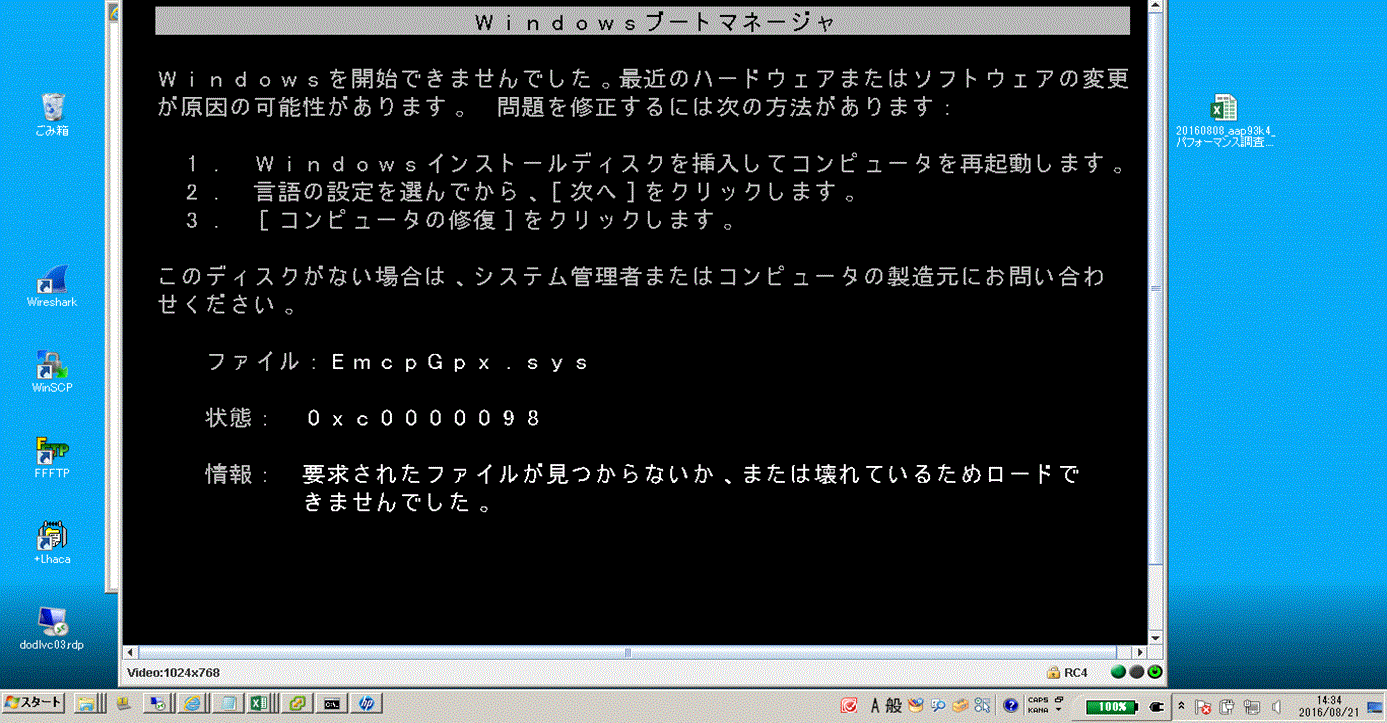
PowerPath:Windows 主機無法開機,並出現錯誤「將 PowerPath 5.5 升級至 6.0 後,0xc0000098時EmcpGpx.sys」
Summary: 升級至 PowerPath 6.0 後,無法啟動主機。
This article applies to
This article does not apply to
This article is not tied to any specific product.
Not all product versions are identified in this article.
Symptoms
升級至 PowerPath 6.0 後,無法啟動主機。
安全模式也無法運作。
Cause
Procmon、Process Explorer 和 handle.exe 對於準確判斷什麼在保持EmcpMpx.sys和EmcpBase.sys是必要的。
=== HOST\XXXXXXXX_SETUPAPI.DEV.LOG ===
     sig:                Using catalog 'C:\Windows\system32\CatRoot\{F750E6C3-38EE-11D1-85E5-00C04FC295EE}\oem34.CAT'.
     cpy:                Source File 'C:\Windows\system32\DRIVERS\SET9996.tmp' is NOT signed NT5 Crypto.
     cpy:                DrpGetFileProt Status=0 dwClass=5
     cpy:                MoveFile: 'C:\Windows\system32\DRIVERS\SET9996.tmp'
     cpy:                      to: 'C:\Windows\system32\DRIVERS\EmcpMpx.sys'
!!!  cpy:                MoveFile: FAILED!
!!!  cpy:                Error 5: Access is denied.
     cpy:                DrpSetRegFileProt 'C:\Windows\system32\DRIVERS\EmcpMpx.sys' Status=0 Class=OEM Legacy
!    cpy:                Targetfile 'C:\Windows\system32\DRIVERS\EmcpMpx.sys' marked to be moved from 'C:\Windows\system32\DRIVERS\SET9996.tmp' on next reboot.

     sig:                Using catalog 'C:\Windows\system32\CatRoot\{F750E6C3-38EE-11D1-85E5-00C04FC295EE}\oem32.CAT'.
     cpy:                Source File 'C:\Windows\system32\DRIVERS\SET8165.tmp' is NOT signed NT5 Crypto.
     cpy:                DrpGetFileProt Status=0 dwClass=5
     cpy:                MoveFile: 'C:\Windows\system32\DRIVERS\SET8165.tmp'
     cpy:                      to: 'C:\Windows\system32\DRIVERS\EmcpBase.sys'
!!!  cpy:                MoveFile: FAILED!
!!!  cpy:                Error 5: Access is denied.
     cpy:                DrpSetRegFileProt 'C:\Windows\system32\DRIVERS\EmcpBase.sys' Status=0 Class=OEM Legacy
!    cpy:                Targetfile 'C:\Windows\system32\DRIVERS\EmcpBase.sys' marked to be moved from 'C:\Windows\system32\DRIVERS\SET8165.tmp' on next reboot.
Resolution
安全模式無法運作,但「最後已知良好的組態」可能有效。如果是這種情況,請開機進入 LKGC,然後再次重新開機主機。問題消失了。
Additional Information
作業系統無法開機的原因是無法更新 EmcpBase 和 EmcpMpx。開機時,作業系統仍在使用舊版的 EmcpBase 和 EmcpMpx。當它使用這些系統檔並到達 EmcpGpx 時,因為它是不同的版本(較新版本),因此無法相信已損壞或丟失,因為它正在尋找舊版本。
Affected Products
PowerPath for WindowsProducts
PowerPath for WindowsArticle Properties
Article Number: 000171330
Article Type: Solution
Last Modified: 19 Feb 2024
Version: 3
Find answers to your questions from other Dell users
Support Services
Check if your device is covered by Support Services.