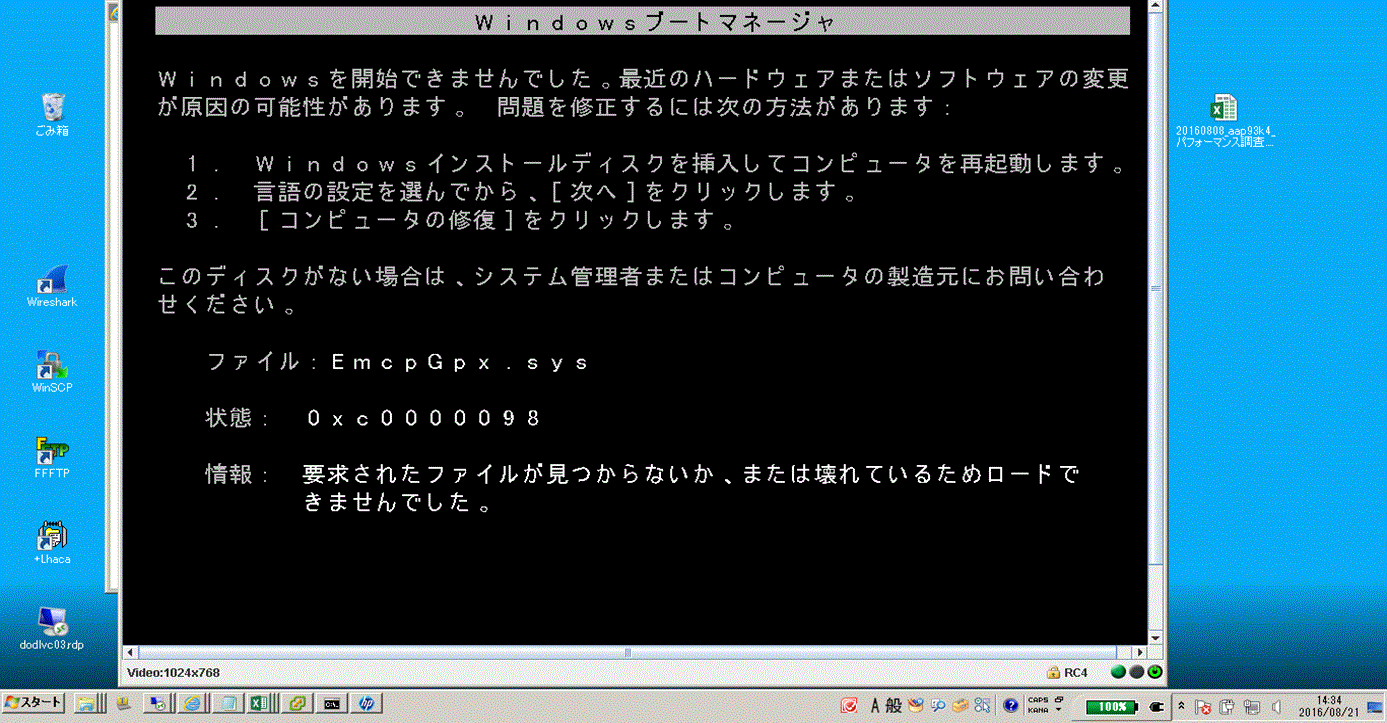
PowerPath:Windows 主机无法启动,并显示错误“将 PowerPath 5.5 升级到 6.0 后EmcpGpx.sys 0xc0000098”
Summary: 升级到 PowerPath 6.0 后无法启动主机。
This article applies to
This article does not apply to
This article is not tied to any specific product.
Not all product versions are identified in this article.
Symptoms
升级到 PowerPath 6.0 后无法启动主机。
安全模式也不起作用。
Cause
Procmon、进程资源管理器和 handle.exe 对于准确判断是什么在持有EmcpMpx.sys和EmcpBase.sys是必要的。
=== HOST\XXXXXXXX_SETUPAPI.DEV.LOG ===
     sig:                Using catalog 'C:\Windows\system32\CatRoot\{F750E6C3-38EE-11D1-85E5-00C04FC295EE}\oem34.CAT'.
     cpy:                Source File 'C:\Windows\system32\DRIVERS\SET9996.tmp' is NOT signed NT5 Crypto.
     cpy:                DrpGetFileProt Status=0 dwClass=5
     cpy:                MoveFile: 'C:\Windows\system32\DRIVERS\SET9996.tmp'
     cpy:                      to: 'C:\Windows\system32\DRIVERS\EmcpMpx.sys'
!!!  cpy:                MoveFile: FAILED!
!!!  cpy:                Error 5: Access is denied.
     cpy:                DrpSetRegFileProt 'C:\Windows\system32\DRIVERS\EmcpMpx.sys' Status=0 Class=OEM Legacy
!    cpy:                Targetfile 'C:\Windows\system32\DRIVERS\EmcpMpx.sys' marked to be moved from 'C:\Windows\system32\DRIVERS\SET9996.tmp' on next reboot.

     sig:                Using catalog 'C:\Windows\system32\CatRoot\{F750E6C3-38EE-11D1-85E5-00C04FC295EE}\oem32.CAT'.
     cpy:                Source File 'C:\Windows\system32\DRIVERS\SET8165.tmp' is NOT signed NT5 Crypto.
     cpy:                DrpGetFileProt Status=0 dwClass=5
     cpy:                MoveFile: 'C:\Windows\system32\DRIVERS\SET8165.tmp'
     cpy:                      to: 'C:\Windows\system32\DRIVERS\EmcpBase.sys'
!!!  cpy:                MoveFile: FAILED!
!!!  cpy:                Error 5: Access is denied.
     cpy:                DrpSetRegFileProt 'C:\Windows\system32\DRIVERS\EmcpBase.sys' Status=0 Class=OEM Legacy
!    cpy:                Targetfile 'C:\Windows\system32\DRIVERS\EmcpBase.sys' marked to be moved from 'C:\Windows\system32\DRIVERS\SET8165.tmp' on next reboot.
Resolution
安全模式不起作用,但最后一次已知的正确配置可能会起作用。如果是这种情况,请在 LKGC 中启动,然后再次重新启动主机。问题消失。
Additional Information
操作系统无法启动的原因是 EmcpBase 和 EmcpMpx 更新失败。在启动时,操作系统仍在使用旧版本的 EmcpBase 和 EmcpMpx。当它使用这些 sys 文件并且到达 EmcpGpx 时,因为它是不同的版本(较新),它无法相信它已损坏或丢失,因为它正在寻找旧版本。
Affected Products
PowerPath for WindowsProducts
PowerPath for WindowsArticle Properties
Article Number: 000171330
Article Type: Solution
Last Modified: 19 Feb 2024
Version: 3
Find answers to your questions from other Dell users
Support Services
Check if your device is covered by Support Services.