RecoverPoint für virtuelle Maschinen: Prozessabstürze auf vRPAs, die Auswirkungen auf die Replikation haben
Summary: Konsistenzgruppen (CGs) mit Fehlerstatus als RecoverPoint Appliances (RPAs) können nicht auf Repository- (KVOL) und Journal-Volumes (JVOL) zugreifen.
Symptoms
In RecoverPoint for VMs (RP4VMs)-Umgebungen können Konsistenzgruppen (Consistency Groups, CGs) in einen Fehlerstatus versetzt werden, da die RPAs nicht auf das Repository und die Journal-Volumes zugreifen können.
Fehler in der Dashboard- oder Systemstatusausgabe:
Mögliche Fehler in Kontroll-/Replikationsprotokollen:
2020/02/12 23:40:02.275 - #0 - 13659/13550 - MultiPath: errno=0 PathImporter::importFinished: got MPI error: SanDiscoveryBoxMgrProxy connection lost (maybe storage process died?) a_res.error = 1
2020/02/12 23:40:02.275 - #2 - 13631/13550 - MultiPath: MPVolumeConnectingState::handleImportedPaths: requesting non-optimized:  a_volume = 0x483a04edc455f87e (StorageType=RP_VSTORAGE, revision=
2020/02/12 23:40:02.275 - #0 - 13631/13550 - MultiPath: errno=0 PathImporter::importFinished: got MPI error: SanDiscoveryBoxMgrProxy connection lost (maybe storage process died?) a_res.error = 1
2020/02/12 23:40:02.275 - #2 - 13631/13550 - MultiPath: MPVolumeConnectingState::handleImportedPaths: requesting all:  a_volume = 0x483a04edc455f87e (StorageType=RP_VSTORAGE, revision=
2020/02/12 23:40:02.275 - #0 - 13631/13550 - MultiPath: errno=0 PathImporter::importFinished: got MPI error: SanDiscoveryBoxMgrProxy connection lost (maybe storage process died?) a_res.error = 1
2020/02/12 23:40:02.275 - #2 - 13631/13550 - MultiPath: MultiIOSender::finish: IO error m_volume.getGuid() = 0x483a04edc455f87e &m_io = 0x7f5ef4887950 this = 0x7f5ef4887940 a_status = general error MPVolumeConnectingState
Das RPA-Kernel-Protokoll (extrahiert
*/files/var/log/kern.log) zeigt Out of memory killing des Replikationsprozesses:
Nov 26 13:36:40 localhost kernel: [4545420.314953] Out of memory: Kill process 4842 (replication) score 530 or sacrifice child
Nov 26 13:36:40 localhost kernel: [4545420.354484] Out of memory: Kill process 4842 (replication) score 530 or sacrifice child
Cause
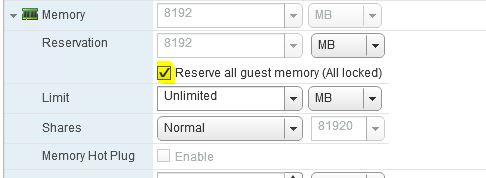
Die RPA-Prozesse stürzen aufgrund von unzureichendem Arbeitsspeicher ab. Auf RPA-VMs war nicht der gesamte Arbeitsspeicher reserviert.
Resolution
Problemumgehung:
Starten Sie die RPAs neu.
Auflösung:
Überprüfen Sie, ob auf allen RPAs der gesamte Gastspeicher reserviert ist.
Klicken Sie unter vSphere mit der rechten Maustaste auf die vRPA-VM > Einstellungen bearbeiten ... > Erweitern Sie den Abschnitt >Arbeitsspeicher, wählen Sie Alle Gastspeicher reservieren (Alle gesperrt)> und klicken Sie auf OK.