RecoverPoint for Virtual Machines:vRPA 上的程序當機,對複寫造成影響
Summary: 在錯誤狀態為 RecoverPoint 應用裝置 (RPA) 的一致性群組 (CG) 無法存取儲存庫 (KVOL) 和日誌 (JVOL) 磁碟區。
This article applies to
This article does not apply to
This article is not tied to any specific product.
Not all product versions are identified in this article.
Symptoms
在 RecoverPoint for VM (RP4VMs) 環境中,一致性群組 (CG) 可能會進入錯誤狀態,因為 RPA 無法存取儲存庫和日誌磁碟區。
儀表板或系統狀態輸出中的錯誤:
錯誤:日誌卷 [複製、PROD、IOFilter_JVOL_00044] 無法存取:RPA 2
控制/複寫記錄中可能發生的錯誤:
2020/02/12 23:40:02.275 - #0 - 13659/13550 - MultiPath: errno=0 PathImporter::importFinished: got MPI error: SanDiscoveryBoxMgrProxy connection lost (maybe storage process died?) a_res.error = 1
2020/02/12 23:40:02.275 - #2 - 13631/13550 - MultiPath: MPVolumeConnectingState::handleImportedPaths: requesting non-optimized:  a_volume = 0x483a04edc455f87e (StorageType=RP_VSTORAGE, revision=
2020/02/12 23:40:02.275 - #0 - 13631/13550 - MultiPath: errno=0 PathImporter::importFinished: got MPI error: SanDiscoveryBoxMgrProxy connection lost (maybe storage process died?) a_res.error = 1
2020/02/12 23:40:02.275 - #2 - 13631/13550 - MultiPath: MPVolumeConnectingState::handleImportedPaths: requesting all:  a_volume = 0x483a04edc455f87e (StorageType=RP_VSTORAGE, revision=
2020/02/12 23:40:02.275 - #0 - 13631/13550 - MultiPath: errno=0 PathImporter::importFinished: got MPI error: SanDiscoveryBoxMgrProxy connection lost (maybe storage process died?) a_res.error = 1
2020/02/12 23:40:02.275 - #2 - 13631/13550 - MultiPath: MultiIOSender::finish: IO error m_volume.getGuid() = 0x483a04edc455f87e &m_io = 0x7f5ef4887950 this = 0x7f5ef4887940 a_status = general error MPVolumeConnectingState
存儲日誌顯示日誌記錄在當前時間之前停止(進程未運行)。
另一個症狀可能是複製過程重新啟動。
RPA 核心記錄 (已解壓縮
RPA 核心記錄 (已解壓縮
*/files/var/log/kern.log) 顯示 Out of memory killing 複寫程序:
Nov 26 13:36:40 localhost kernel: [4545420.314953] Out of memory: Kill process 4842 (replication) score 530 or sacrifice child
Nov 26 13:36:40 localhost kernel: [4545420.354484] Out of memory: Kill process 4842 (replication) score 530 or sacrifice child
Cause
RPA 程序因記憶體不足而當機。RPA VM 並未保留所有記憶體。
Resolution
因應措施:
將 RPA 重新開機。
解決方案:
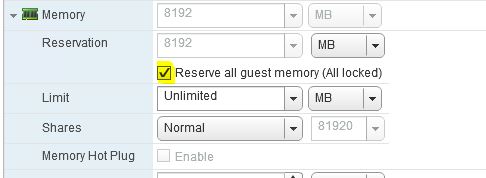
驗證所有 RPA 是否都保留了所有客戶機記憶體。
在 vSphere 下,以滑鼠右鍵按一下 vRPA VM > 編輯設定... > 展開 記憶體 區 > 段 選取 保留所有客體記憶體 (全部鎖定),>然後按一下確定。
Affected Products
RecoverPointProducts
RecoverPoint, RecoverPoint for Virtual MachinesArticle Properties
Article Number: 000071407
Article Type: Solution
Last Modified: 06 Jan 2026
Version: 5
Find answers to your questions from other Dell users
Support Services
Check if your device is covered by Support Services.