Alienware Aurora R15 電源模式設定
Summary: 瞭解在 Alienware Aurora R15 的「設定」中的電源模式 (最佳電源效率、平衡和最佳效能)。
This article applies to
This article does not apply to
This article is not tied to any specific product.
Not all product versions are identified in this article.
Symptoms
瀏覽舊版電源計劃時,可能只能找到一個電源計劃。舊版電源計劃也稱為“控制面板”中的“電源選項”。從 「控制面板」,然後到 「所有控制面板項目」,然後到 「電源選項」,即可找到此選項。可用的舊版電源計劃為 「已平衡」。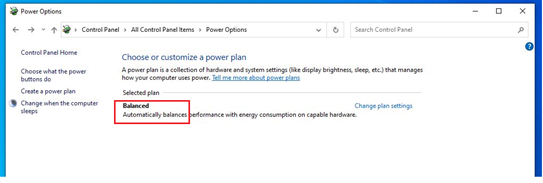
受影響的平台:
- Alienware Aurora R15
- Alienware Aurora R15 AMD
受影響的作業系統:
- Windows 11
Cause
在 2021 年 6 月,Dell 變更為僅出貨使用一個舊版電源方案的電腦。
Resolution
因應措施:
電源模式有三種電源模式 (最佳電源效率、平衡和最佳效能)。您可以前往設定,然後前往系統,然後前往電源,即可找到電源模式。您可以按照此路徑找到選項。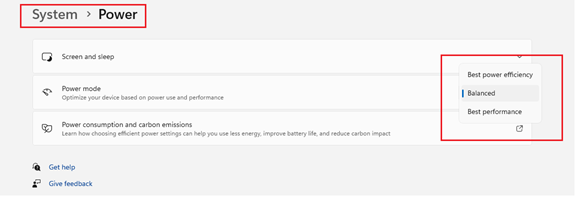
Affected Products
Alienware Aurora R15 AMD, Alienware Aurora R15Article Properties
Article Number: 000207381
Article Type: Solution
Last Modified: 24 Apr 2025
Version: 3
Find answers to your questions from other Dell users
Support Services
Check if your device is covered by Support Services.