도착 시 Alienware 무선 게이밍 헤드셋 AW720H, AW725H 또는 AW920H를 켤 수 없음
Summary: 이 문서에서는 도착 시 Alienware 무선 게이밍 헤드셋을 켜는 방법에 대한 정보를 제공합니다.
This article applies to
This article does not apply to
This article is not tied to any specific product.
Not all product versions are identified in this article.
Symptoms
Alienware 무선 게이밍 헤드셋 사용자가 도착 후 헤드셋을 켤 수 없다고 보고할 수 있습니다.
영향을 받는 모델:
- Alienware 듀얼 모드 무선 게이밍 헤드셋 AW720H
- Alienware Tri-Mode 무선 게이밍 헤드셋 AW725H
- Alienware 3중 모드 무선 게이밍 헤드셋 AW920H
Cause
헤드셋은 운송 중 우발적인 활성화로부터 배터리를 보호하기 위해 배송 모드에 있습니다.
Resolution
컴퓨터가 켜져 있는지 확인합니다. 아래 단계에 따라 충전 케이블을 사용하여 헤드셋을 연결합니다. 이렇게 하면 배송 모드가 종료되고 헤드셋이 켜집니다.
헤드셋을 충전하려면 USB-A-USB-C 케이블의 USB-C 끝을 헤드셋의 USB-C 포트에 연결합니다. 다른 쪽 끝을 컴퓨터의 USB 포트에 연결합니다(AW720H의 경우 그림 1, AW920H의 경우 그림 2).
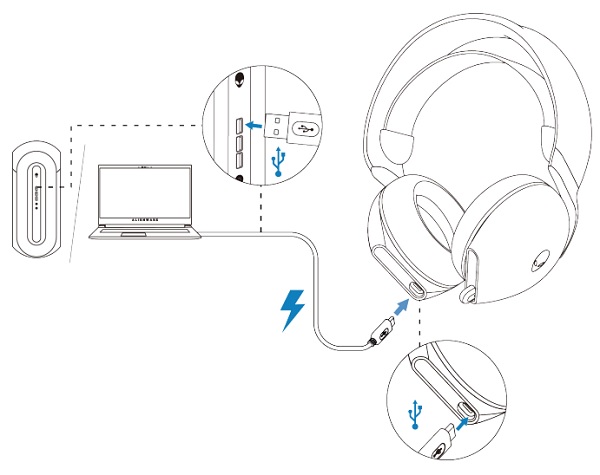
(그림 1. Alienware 듀얼 모드 무선 게이밍 헤드셋 AW720H 충전)

(그림 2. Alienware Tri-Mode 무선 게이밍 헤드셋 AW920H 충전)
참고: 자세한 내용은 사용자 설명서를 참조하십시오.
Affected Products
Alienware Tri-Mode Wireless Gaming Headset AW725H, Alienware Tri-Mode Wireless Gaming Headset AW920H, Alienware Dual Mode Wireless Gaming Headset AW720HProducts
Alienware, Inspiron Desktop, OptiPlex, Vostro, XPS, G Series, G Series, Alienware, Inspiron, Latitude, Vostro, XPS, XPS Tablets, Fixed Workstations, Mobile WorkstationsArticle Properties
Article Number: 000213964
Article Type: Solution
Last Modified: 19 Apr 2025
Version: 7
Find answers to your questions from other Dell users
Support Services
Check if your device is covered by Support Services.