Dell Unity: Oprettelse af UEMCLI kvotetræ mislykkes med 0x100b1b2 fejl
Summary: Hvis kommandosyntaksen ikke er korrekt, kan oprettelsen af kvotetræet mislykkes med fejlkode 0x100b1b2.
This article applies to
This article does not apply to
This article is not tied to any specific product.
Not all product versions are identified in this article.
Symptoms
13:19:41 service@(none) spb:~> uemcli /quota/tree create -fs fs1 -path /qtree1 -softLimit 922M -hardLimit 1024M
Storage system address: 127.0.0.1
Storage system port: 443
HTTPS connection

Operation failed. Error code: 0x100b1b2
The specified storage resource not found. (Error Code:0x100b1b2)
Cause
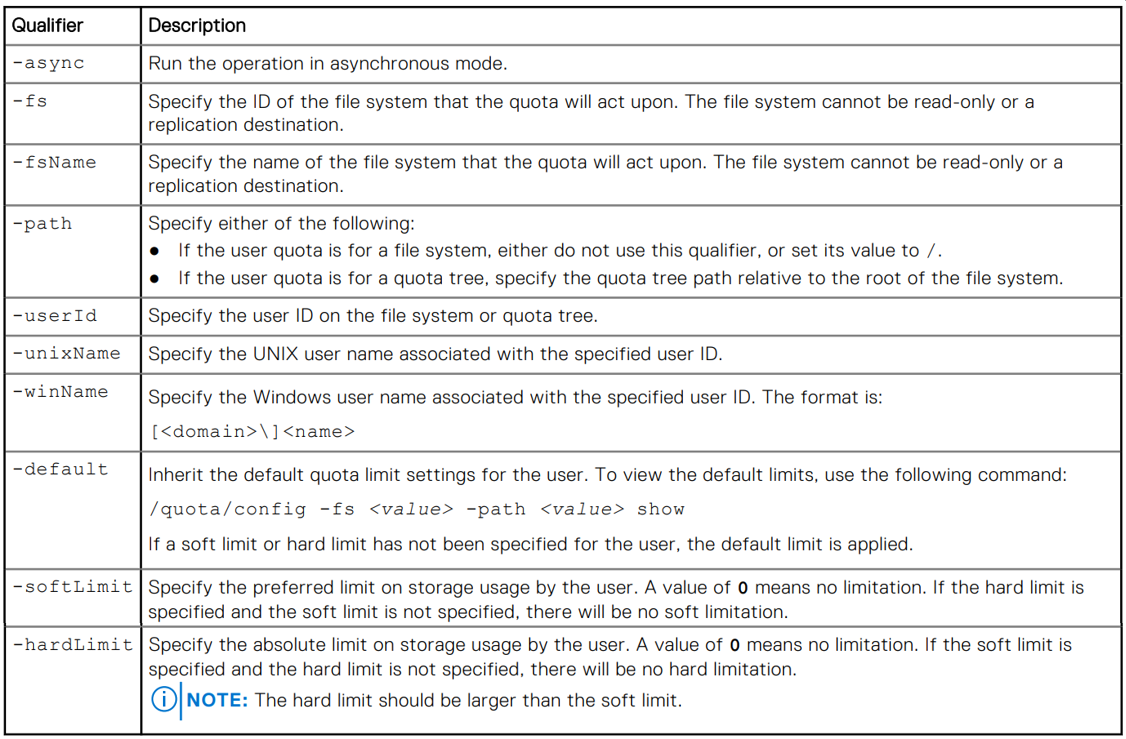
Kommandostrukturen er ikke korrekt. I ovenstående eksempel bruger brugeren filsystemet name og ikke ID af filsystemet til -fs Kvalifikationskamp.
Følgende tabel indeholder en komplet liste over de tilgængelige kvalifikationskampe og deres formål.
Resolution
Kontroller, at kommandostrukturen er korrekt.
I ovenstående eksempel skal du kontrollere filsystemet ID ved at bruge følgende kommando og derefter bruge dette nummer til -fs kvalifikator, når kvotetræet oprettes.
13:31:30 service@(none) spb:~> uemcli /stor/prov/fs show
Storage system address: 127.0.0.1
Storage system port: 443
HTTPS connection

3:    ID                   = res_12
      Name                 = fs1
      Description          = fs1
      Health state         = OK_BUT (7)
      File system          = fs_9
      Server               = nas_5
      Storage pool ID      = pool_3
      Storage pool         = hfa Nas gold pool
      Format               = UFS64
      Protocol             = cifs
      Access policy        = windows
      Folder rename policy = forbiddenSmb
      Locking policy       = mandatory
      Size                 = 5607616675840 (5.1T)
      Size used            = 5018909868032 (4.5T)
      Maximum size         = 70368744177664 (64.0T)
      Protection size used = 11357536256 (10.5G)
13:36:52 service@(none) spb:~> uemcli /quota/tree create -fs res_12 -path /qtree1 -softLimit 1843M -hardLimit 2048M
Storage system address: 127.0.0.1
Storage system port: 443
HTTPS connection

Operation completed successfully.
13:37:23 service@(none) spb:~> uemcli /quota/tree -fs res_12 show -detail
Storage system address: 127.0.0.1
Storage system port: 443
HTTPS connection

3:    Path              = /qtree1
      Description       =
      Space used        = 15908864 (15.1M)
      Soft limit        = 1932525568 (1.7G)
      Hard limit        = 2147483648 (2.0G)
      Grace period left = 00s
      State             = OK
Additional Information
Se brugervejledningen til Dell Unity Family Unisphere Command Line Interface version 5.5.1 (juli 2025)
Syntaksen for kommandoen Kvotetræ starter på side 356.
Affected Products
Dell EMC Unity, Dell EMC Unity Family |Dell EMC Unity All Flash, Dell EMC Unity HybridArticle Properties
Article Number: 000028280
Article Type: Solution
Last Modified: 11 Nov 2025
Version: 5
Find answers to your questions from other Dell users
Support Services
Check if your device is covered by Support Services.