Dell EMC Unity: ESRS-parathedskontrol mislykkes "Du har muligvis angivet ugyldige Dell EMC-supportloginoplysninger... (Fejlkode:0x6400b82)" (Kan rettes af brugeren)
Summary: Dell EMC Unity ESRS integreret support-legitimationsoplysninger og supportkontrakt mislykkes. Du har muligvis angivet ugyldige Dell EMC-supportloginoplysninger. Det kan du kontrollere under "Settings -> Support Configuration -> Dell EMC Support Credentials" i Unisphere eller ved hjælp af kommandoen uemcli "/sys/support/account". (Fejlkode:0x6400b82) ...
This article applies to
This article does not apply to
This article is not tied to any specific product.
Not all product versions are identified in this article.
Symptoms
Adgangskoden til supportlegitimationsoplysninger er ændret, og den indeholder nu specialtegn i starten/slutningen.
Understøttelsesadgangskoden til brugernavnet, som blev brugt til at konfigurere integreret ESRS, indeholdt specialtegn [&,*,$,?,etc] ved start/slutning.
Advarsel :
Du har muligvis angivet ugyldige Dell EMC-supportloginoplysninger. Det kan du kontrollere under "Settings -> Support Configuration -> Dell EMC Support Credentials" i Unisphere, eller ved hjælp af kommandoen uemcli "/sys/support/account". (Fejlkode:0x6400b82)
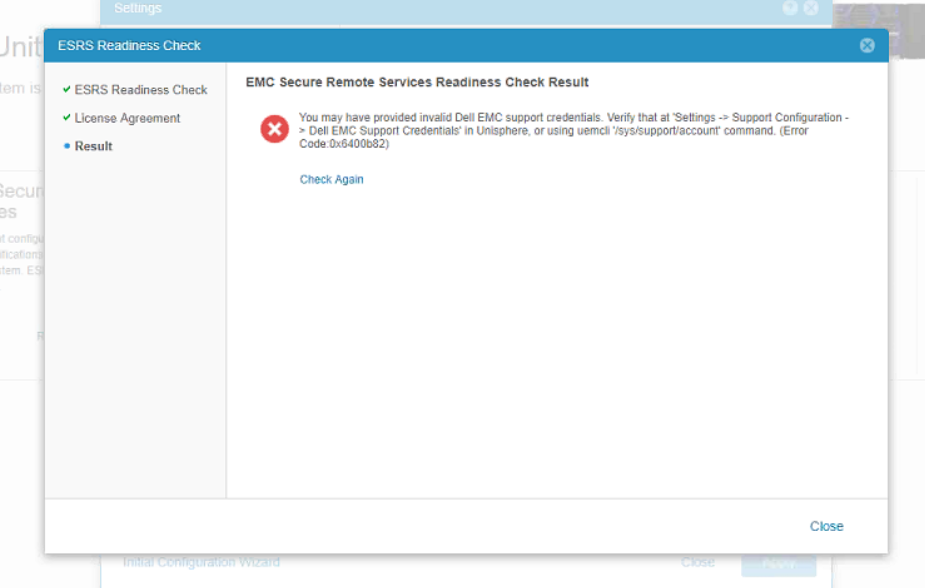
Understøttelsesadgangskoden til brugernavnet, som blev brugt til at konfigurere integreret ESRS, indeholdt specialtegn [&,*,$,?,etc] ved start/slutning.
For Unity Operating Environment (OE) version 4.x eller nyere.
Kunne ikke konfigurere supportlegitimationsoplysninger og supportkontrakt.
Advarsel :
Du har muligvis angivet ugyldige Dell EMC-supportloginoplysninger. Det kan du kontrollere under "Settings -> Support Configuration -> Dell EMC Support Credentials" i Unisphere, eller ved hjælp af kommandoen uemcli "/sys/support/account". (Fejlkode:0x6400b82)
Cause
Supportoplysninger har specialtegn [like&,*,$,?,etc] til stede i starten / slutningen af adgangskoden.
Dette bruges til at konfigurere integreret ESRS.
Specialtegn understøttes ikke i start/slut af den integrerede ESRS-adgangskode.
Dette bruges til at konfigurere integreret ESRS.
Specialtegn understøttes ikke i start/slut af den integrerede ESRS-adgangskode.
Resolution
Når adgangskoden er nulstillet, skal du følge nedenstående trin:
- Log på supportwebstedet [support.emc.com] med de nye legitimationsoplysninger
- Fra Unity Unisphere skal du opdatere supportoplysningerne
- Prøv at konfigurere ESRS igen. Krav til og konfiguration af Secure Remote Services
Additional Information
Dette indhold er oversat til andre sprog:
| https://downloads.dell.com/TranslatedPDF/PT-BR_KB535007.pdf |
| https://downloads.dell.com/TranslatedPDF/ZH-CN_KB535007.pdf |
| https://downloads.dell.com/TranslatedPDF/AR-EG_KB535007.pdf |
| https://downloads.dell.com/TranslatedPDF/DE_KB535007.pdf |
| https://downloads.dell.com/TranslatedPDF/ES_KB535007.pdf |
| https://downloads.dell.com/TranslatedPDF/FR_KB535007.pdf |
| https://downloads.dell.com/TranslatedPDF/KO_KB535007.pdf |
| https://downloads.dell.com/TranslatedPDF/JA_KB535007.pdf |
| https://downloads.dell.com/TranslatedPDF/IT_KB535007.pdf |
| https://downloads.dell.com/TranslatedPDF/NL_KB535007.pdf |
| https://downloads.dell.com/TranslatedPDF/PT_KB535007.pdf |
| https://downloads.dell.com/TranslatedPDF/RU_KB535007.pdf |
| https://downloads.dell.com/TranslatedPDF/SV_KB535007.pdf |
Affected Products
Dell EMC Unity FamilyProducts
Dell EMC Unity 300F, Dell EMC Unity Family |Dell EMC Unity All Flash, Dell EMC Unity Family, Dell EMC Unity HybridArticle Properties
Article Number: 000055409
Article Type: Solution
Last Modified: 14 Jan 2026
Version: 5
Find answers to your questions from other Dell users
Support Services
Check if your device is covered by Support Services.