Dell EMC Unity: ESRS-beredskapskontroll mislykkes "Du kan ha oppgitt ugyldig Dell EMC-støttelegitimasjon ... (Feilkode:0x6400b82)" (kan korrigeres av brukeren)
Summary: Kvalifikasjon og støttekontrakt for Dell EMC Unity ESRS integrert støtte mislykkes. Du kan ha oppgitt ugyldig Dell EMC-støttelegitimasjon. Kontroller at under "Settings -> Support Configuration -> Dell EMC Support Credentials" i Unisphere, eller ved hjelp av uemcli "/sys/support/account"-kommandoen. (Feilkode:0x6400b82) ...
This article applies to
This article does not apply to
This article is not tied to any specific product.
Not all product versions are identified in this article.
Symptoms
Passordet for støttelegitimasjonen er endret, og det inneholder nå spesialtegn ved start/slutt
.Støttelegitimasjonspassordet for brukernavn som ble brukt til å konfigurere integrert ESRS, inneholdt spesialtegn [ &, *, $ ,?,etc ] ved start / slutt.
Varsel :
Du kan ha oppgitt ugyldig Dell EMC-støttelegitimasjon. Kontroller at under "Innstillinger -> Støttekonfigurasjon -> Dell EMC Support Credentials" i Unisphere, eller ved hjelp av uemcli "/sys/support/account"-kommandoen. (Feilkode:0x6400b82)
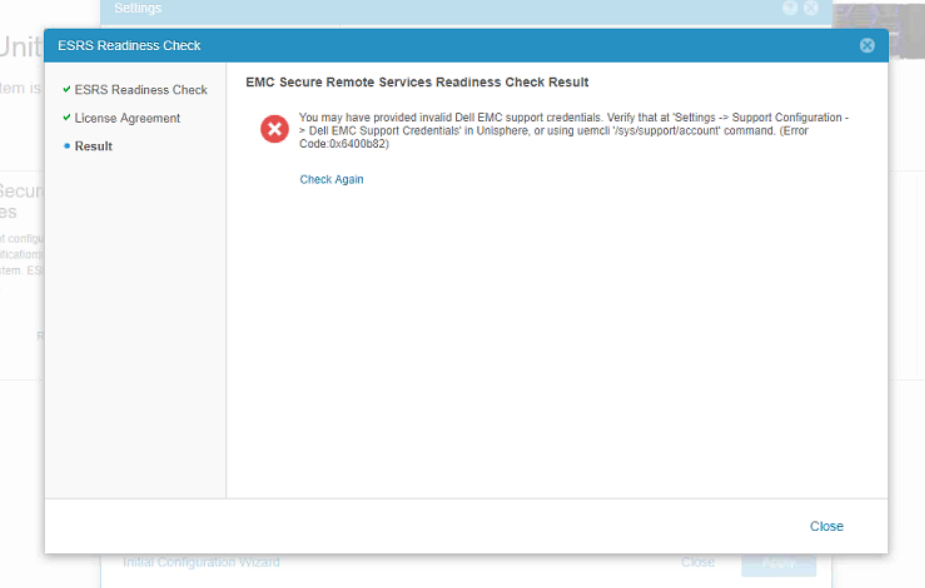
.Støttelegitimasjonspassordet for brukernavn som ble brukt til å konfigurere integrert ESRS, inneholdt spesialtegn [ &, *, $ ,?,etc ] ved start / slutt.
For Unity Operating Environment (OE) versjon 4.x eller nyere.
Kan ikke konfigurere kundestøttelegitimasjon og støttekontrakt.
Varsel :
Du kan ha oppgitt ugyldig Dell EMC-støttelegitimasjon. Kontroller at under "Innstillinger -> Støttekonfigurasjon -> Dell EMC Support Credentials" i Unisphere, eller ved hjelp av uemcli "/sys/support/account"-kommandoen. (Feilkode:0x6400b82)
Cause
Brukerstøttelegitimasjon har spesialtegn [som &,*,$,?,osv.] ved starten/slutten av passordet.
Dette brukes til å konfigurere integrert ESRS.
Spesialtegn støttes ikke ved starten/slutten av det integrerte ESRS-passordet.
Dette brukes til å konfigurere integrert ESRS.
Spesialtegn støttes ikke ved starten/slutten av det integrerte ESRS-passordet.
Resolution
Når passordet er tilbakestilt, følg trinnene nedenfor:
- Logg på støttesiden [support.emc.com] med den nye påloggingsinformasjonen
- Fra Unity Unisphere Oppdatere støttelegitimasjonen
- Prøv å konfigurere ESRS på nytt. Krav og konfigurasjon for Secure Remote Services
Additional Information
Dette innholdet er oversatt til andre språk:
| https://downloads.dell.com/TranslatedPDF/PT-BR_KB535007.pdf |
| https://downloads.dell.com/TranslatedPDF/ZH-CN_KB535007.pdf |
| https://downloads.dell.com/TranslatedPDF/AR-EG_KB535007.pdf |
| https://downloads.dell.com/TranslatedPDF/DE_KB535007.pdf |
| https://downloads.dell.com/TranslatedPDF/ES_KB535007.pdf |
| https://downloads.dell.com/TranslatedPDF/FR_KB535007.pdf |
| https://downloads.dell.com/TranslatedPDF/KO_KB535007.pdf |
| https://downloads.dell.com/TranslatedPDF/JA_KB535007.pdf |
| https://downloads.dell.com/TranslatedPDF/IT_KB535007.pdf |
| https://downloads.dell.com/TranslatedPDF/NL_KB535007.pdf |
| https://downloads.dell.com/TranslatedPDF/PT_KB535007.pdf |
| https://downloads.dell.com/TranslatedPDF/RU_KB535007.pdf |
| https://downloads.dell.com/TranslatedPDF/SV_KB535007.pdf |
Affected Products
Dell EMC Unity FamilyProducts
Dell EMC Unity 300F, Dell EMC Unity Family |Dell EMC Unity All Flash, Dell EMC Unity Family, Dell EMC Unity HybridArticle Properties
Article Number: 000055409
Article Type: Solution
Last Modified: 17 Oct 2025
Version: 4
Find answers to your questions from other Dell users
Support Services
Check if your device is covered by Support Services.