PowerScale OneFS: Onregelmatige fouten met betrekking tot bestanden niet gevonden bij het gebruik van gebruikersnaamuitbreidingsvariabelen voor SMB-thuisshares
Summary: Onregelmatige fouten bij het opslaan van een bestand in een uitgevouwen startmap van een gebruikersnaam wanneer de computeraccount ook verbinding maakt met de share maar het bestand niet kan vinden. ...
This article applies to
This article does not apply to
This article is not tied to any specific product.
Not all product versions are identified in this article.
Symptoms
Wanneer u het bestand probeert op te slaan, te wijzigen of te hernoemen in de basismappen die automatisch zijn gemaakt met behulp van variabele paduitbreidingsvariabelen of gebruikersnaamuitbreidingsvariabelen (%U), kan er af en toe een foutmelding worden weergegeven dat het bestand zich niet langer in dat pad of iets dergelijks bevindt. Het bestand kan dan verdwijnen en weer verschijnen nadat de pagina is vernieuwd.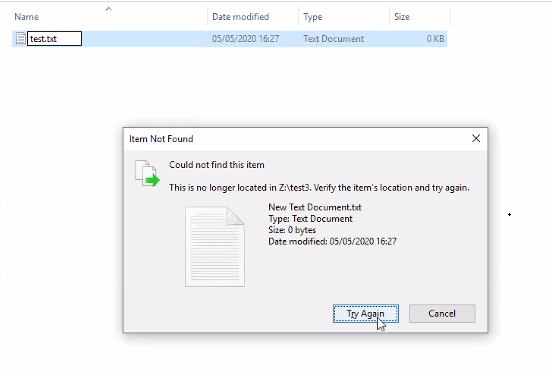
Cause
Een SMB-share die is geconfigureerd met een gebruikersnaamuitbreidingsvariabele (%U) betekent dat de home directory automatisch wordt gemaakt voor elke gebruiker die verbinding maakt met de share. Dit is ongeacht of dat een computer- of gebruikersaccount is:
PowerScale-1# isi smb shares list --zone=SMBzone
Share Name  Path
-------------------------------------
homedir     /ifs/home/%U
-------------------------------------
Total: 1

PowerScale-1# ls -l /ifs/home/
total 5
drwx------     2 user0                   Isilon Users              27 May 15 11:32 user0
drwx------     3 EXAMPLE\dell-rabie-pc$  EXAMPLE\domain computers  28 May 15 11:36 dell-rabie-pc$ <<----- Computer account
drwx------     3 EXAMPLE\paul            EXAMPLE\domain users      28 May 15 11:36 paul           <<----- User account using computer "dell-rabie-pc$"
In de volgende packet capture maakt de gebruiker paul een bestand in de share \\homedir\profiles dat wordt uitgebreid naar \\homedir\profiles\paul\. Het computeraccount probeert hetzelfde bestand te vinden en denkt dat het verbinding maakt met dezelfde share \\homedir\profiles. Het bestand zoekt onder \\homdir\profiles\dell-rabie-pc$\, dus het bestand is niet gevonden. \\homedir\profiles\paul\test is niet hetzelfde als \\homdir\profiles\dell-rabie-pc$\test.
6600 48.216535 10.148.x.x   10.45.x.x SMB2 166 Session Setup Request, NTLMSSP_AUTH, User: EXAMPLE\paul    <<----- User account using computer "dell-rabie-pc$"
6661 48.216535 10.45.x.x   10.148.x.x SMB2 146 Session Setup Response
6662 48.800589 10.148.x.x   10.45.x.x SMB2 166 Tree Connect Request Tree: \\homedir\profiles
6663 48.801463 10.45.x.x   10.148.x.x SMB2 138 Tree Connect Response
6646 48.213583 10.148.x.x   10.45.x.x SMB2 422 Create Request File: test3\test\New Text Document.txt
6650 48.215117 10.45.x.x   10.148.x.x SMB2 374 Create Response File: test3\test\New Text Document.txt
6659 48.216535 10.148.x.x   10.45.x.x SMB2 166 Session Setup Request, NTLMSSP_AUTH, User: EXAMPLEdell-rabie-pc$ <<----- Computer account
6660 48.216535 10.45.x.x   10.148.x.x SMB2 146 Session Setup Response
6813 48.800589 10.148.x.x   10.45.x.x SMB2 166 Tree Connect Request Tree: \\homedir\profiles
6814 48.801463 10.45.x.x   10.148.x.x SMB2 138 Tree Connect Response
6819 48.802674 10.148.x.x   10.45.x.x SMB2 266 Create Request File: test3\test\New Text Document.txt
6820 48.803106 10.45.x.x   10.148.x.x SMB2 131 Create Response, Error: STATUS_OBJECT_PATH_NOT_FOUND

In frames 6646 and 6650, the file is created successfully. Frame 6819 shows a request to access "New Text Document.txt",  but frame 6820 shows that the file was not found.
Further inspection of the information in frame 6819, shows that the create request came from the computer account and not the user account:
6819 48.802674 10.148.x.x   10.45.x.x SMB2 266 Create Request File: test3\test\New Text Document.txt
Session Id: 0x07b5cf4100d5a9be
    [Account: dell-rabie-pc$ Acct:dell-rabie-pc$]
    [Domain: DDMI Domain:EXAMPLE]
    [Host: dell-rabie-pc Host:dell-rabie-pc]
Resolution
Dit probleem doet zich niet voor bij het gebruik van home directory's die niet automatisch worden gemaakt met behulp van variabele paduitbreiding.
Tijdelijke oplossing:
- Als u de groep "domain computers" de toegang tot de share kunt ontzeggen, voorkomt dit dat het bestand niet wordt gevonden-fouten. Dit moet eerst in een testomgeving worden gedaan om eventuele negatieve effecten te verifiëren:
# isi smb shares view varexp
                                     Share Name: varexp
                                           Path: /ifs/varexp-home/%U
                                    Description:
                     Client-side Caching Policy: manual
Automatically expand user names or domain names: True
Automatically create home directories for users: True
                                      Browsable: True
Permissions:
Account                  Account Type  Run as Root  Permission Type  Permission
--------------------------------------------------------------------------------
EXAMPLE\domain computers group         0            deny             full
Everyone                 wellknown     0            allow            full
--------------------------------------------------------------------------------
Total: 2
2. Hiermee kunt u voorkomen dat de client de gebeurtenis niet gevonden in het cachegeheugen plaatst, hoewel dit de prestaties kan verminderen:
Als u vragen of opmerkingen hebt over het wijzigen van deze instellingen, kunt u contact opnemen met Microsoft Support.
Voer de volgende stappen uit om de registervermeldingen toe te voegen:
- Typ 'regedit' in de zoekbalk van Windows
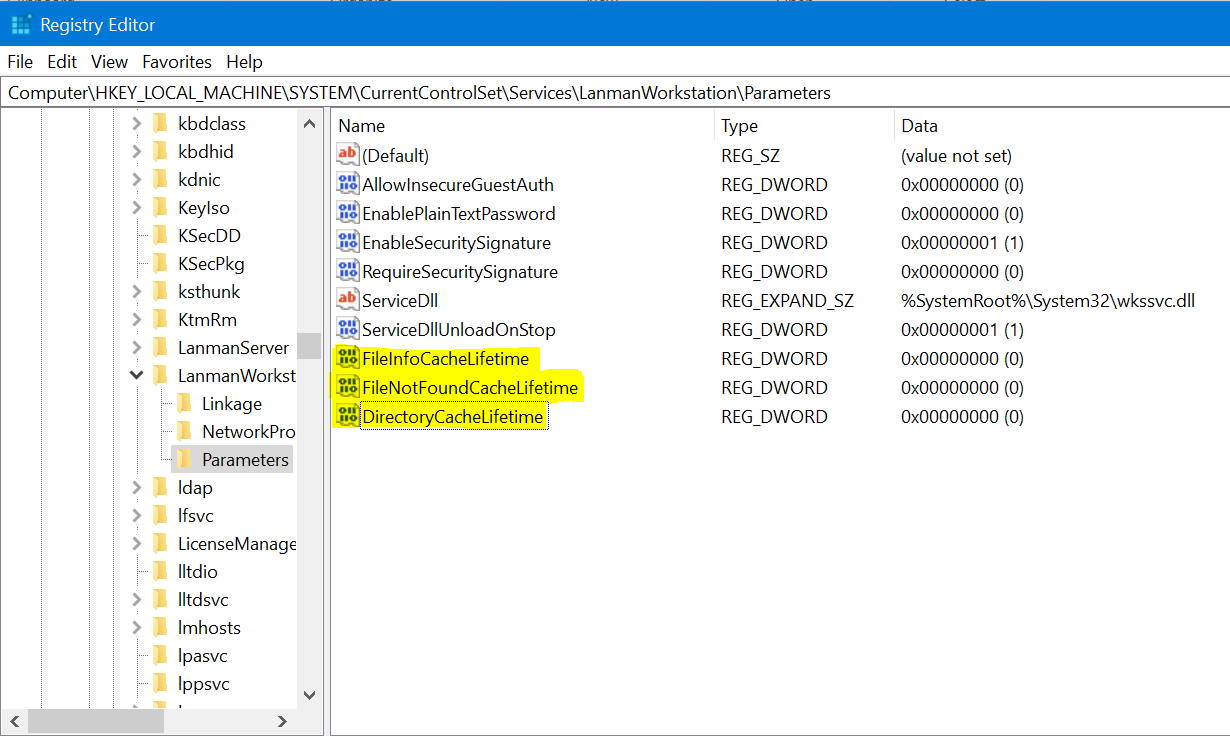
- Navigeer naar de onderstaande locatie: Computer\HKEY_LOCAL_MACHINE\SYSTEM\CurrentControlSet\Services\LanmanWorkstation\Parameters
- Maak op de bovenstaande locatie een nieuwe DWORD-waarde (klik met de rechtermuisknop op > nieuwe > DWORD-waarde)
- Geef de onderstaande registernaam op. De nieuw gecreëerde waarde is standaard nul
FileNotFoundCacheLifetime Dword=0 >> The file not found cache timeout period.
Als het probleem blijft bestaan of zich voordoet, zelfs in een submap en niet bij de hoofdmap van de share, voegt u de volgende registerbestanden toe samen met de bovenstaande vermelding:
FileInfoCacheLifetime Dword=0                               >> The file information cache timeout period.
DirectoryCacheLifetime Dword=0                            >> This is the directory cache timeout.
De registervermeldingen zien er als volgt uit:
Additional Information
- Het uitschakelen van de bestandsinformatiecache kan een aanzienlijk effect hebben op de prestaties van de client en een toename laten zien in het aantal metadataaanvragen dat naar de server wordt verzonden.
- Meer informatie over de registerwaarden vindt u hier:
https://docs.microsoft.com/en-us/windows-server/administration/performance-tuning/role/file-server/
Affected Products
Isilon, PowerScale OneFSProducts
Storage, Enterprise Storage, Isilon, Isilon, PowerScale OneFSArticle Properties
Article Number: 000079025
Article Type: Solution
Last Modified: 16 Dec 2025
Version: 4
Find answers to your questions from other Dell users
Support Services
Check if your device is covered by Support Services.