PowerScale OneFS: SMB ev paylaşımları için kullanıcı adı genişletme değişkenleri kullanılırken aralıklı dosya bulunamadı ile ilgili hatalar
Summary: Bilgisayar hesabı da paylaşıma bağlandığında ancak dosyayı bulamadığında kullanıcı adı genişletilmiş giriş dizinine dosya kaydetme sırasında oluşan aralıklı hatalar.
This article applies to
This article does not apply to
This article is not tied to any specific product.
Not all product versions are identified in this article.
Symptoms
Değişken yol genişletme veya kullanıcı adı genişletme değişkenleri (%U) kullanılarak otomatik olarak oluşturulan ana dizinler altındaki dosyayı kaydetmeye, değiştirmeye veya yeniden adlandırmaya çalışırken, zaman zaman dosyanın artık o yolda veya benzeri bir yolda bulunmadığını belirten bir hata alabilirsiniz. Sayfa yenilendikten sonra dosya kaybolabilir ve yeniden görünebilir.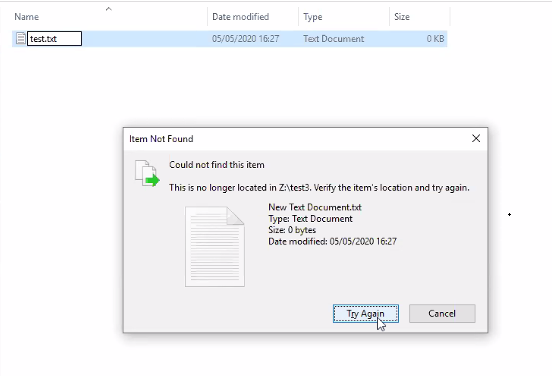
Cause
Kullanıcı adı genişletme değişkeni (%U) ile yapılandırılmış bir SMB paylaşımı, paylaşıma bağlanan her kullanıcı için ana dizinin otomatik olarak oluşturulacağı anlamına gelir. Bu, bir bilgisayar veya kullanıcı hesabı olup olmamasından bağımsızdır:
PowerScale-1# isi smb shares list --zone=SMBzone
Share Name  Path
-------------------------------------
homedir     /ifs/home/%U
-------------------------------------
Total: 1

PowerScale-1# ls -l /ifs/home/
total 5
drwx------     2 user0                   Isilon Users              27 May 15 11:32 user0
drwx------     3 EXAMPLE\dell-rabie-pc$  EXAMPLE\domain computers  28 May 15 11:36 dell-rabie-pc$ <<----- Computer account
drwx------     3 EXAMPLE\paul            EXAMPLE\domain users      28 May 15 11:36 paul           <<----- User account using computer "dell-rabie-pc$"
Aşağıdaki paket yakalamada paul kullanıcısı, \\homedir\profiles paylaşımında \\homedir\profiles\paul\ olarak genişletilen bir dosya oluşturur. Bilgisayar hesabı aynı dosyayı bulmaya çalışıyor ve aynı \\homedir\profiles paylaşımına bağlandığını düşünüyor. Dosya \\homdir\profiles\dell-rudie-pc$\ altına bakıyor, bu nedenle dosya bulunamadı. \\homedir\profiles\paul\test, \\homdir\profiles\dell-rabie-pc$\test ile aynı değil.
6600 48.216535 10.148.x.x   10.45.x.x SMB2 166 Session Setup Request, NTLMSSP_AUTH, User: EXAMPLE\paul    <<----- User account using computer "dell-rabie-pc$"
6661 48.216535 10.45.x.x   10.148.x.x SMB2 146 Session Setup Response
6662 48.800589 10.148.x.x   10.45.x.x SMB2 166 Tree Connect Request Tree: \\homedir\profiles
6663 48.801463 10.45.x.x   10.148.x.x SMB2 138 Tree Connect Response
6646 48.213583 10.148.x.x   10.45.x.x SMB2 422 Create Request File: test3\test\New Text Document.txt
6650 48.215117 10.45.x.x   10.148.x.x SMB2 374 Create Response File: test3\test\New Text Document.txt
6659 48.216535 10.148.x.x   10.45.x.x SMB2 166 Session Setup Request, NTLMSSP_AUTH, User: EXAMPLEdell-rabie-pc$ <<----- Computer account
6660 48.216535 10.45.x.x   10.148.x.x SMB2 146 Session Setup Response
6813 48.800589 10.148.x.x   10.45.x.x SMB2 166 Tree Connect Request Tree: \\homedir\profiles
6814 48.801463 10.45.x.x   10.148.x.x SMB2 138 Tree Connect Response
6819 48.802674 10.148.x.x   10.45.x.x SMB2 266 Create Request File: test3\test\New Text Document.txt
6820 48.803106 10.45.x.x   10.148.x.x SMB2 131 Create Response, Error: STATUS_OBJECT_PATH_NOT_FOUND

In frames 6646 and 6650, the file is created successfully. Frame 6819 shows a request to access "New Text Document.txt",  but frame 6820 shows that the file was not found.
Further inspection of the information in frame 6819, shows that the create request came from the computer account and not the user account:
6819 48.802674 10.148.x.x   10.45.x.x SMB2 266 Create Request File: test3\test\New Text Document.txt
Session Id: 0x07b5cf4100d5a9be
    [Account: dell-rabie-pc$ Acct:dell-rabie-pc$]
    [Domain: DDMI Domain:EXAMPLE]
    [Host: dell-rabie-pc Host:dell-rabie-pc]
Resolution
Bu sorun, değişken yol genişletmesi kullanılarak otomatik olarak oluşturulmayan ana dizinler kullanılırken meydana gelmez.
Geçici Çözüm:
- "Etki alanı bilgisayarları" grubunun paylaşıma erişimini reddedebilirseniz bu, dosya bulunamadı hatalarını önler. Bu, olası olumsuz etkiyi doğrulamak için önce bir test ortamında yapılmalıdır:
# isi smb shares view varexp
                                     Share Name: varexp
                                           Path: /ifs/varexp-home/%U
                                    Description:
                     Client-side Caching Policy: manual
Automatically expand user names or domain names: True
Automatically create home directories for users: True
                                      Browsable: True
Permissions:
Account                  Account Type  Run as Root  Permission Type  Permission
--------------------------------------------------------------------------------
EXAMPLE\domain computers group         0            deny             full
Everyone                 wellknown     0            allow            full
--------------------------------------------------------------------------------
Total: 2
2. İstemcinin bulunamadı olayını önbelleğe almasını devre dışı bırakın ancak bu, performansı düşürebilir:
Bu ayarları değiştirmeyle ilgili sorularınız veya endişeleriniz için lütfen Microsoft Desteği'ne başvurun.
Kayıt defteri girdilerini eklemek için aşağıdaki adımları uygulayın:
- Windows arama çubuğuna 'regedit' yazın
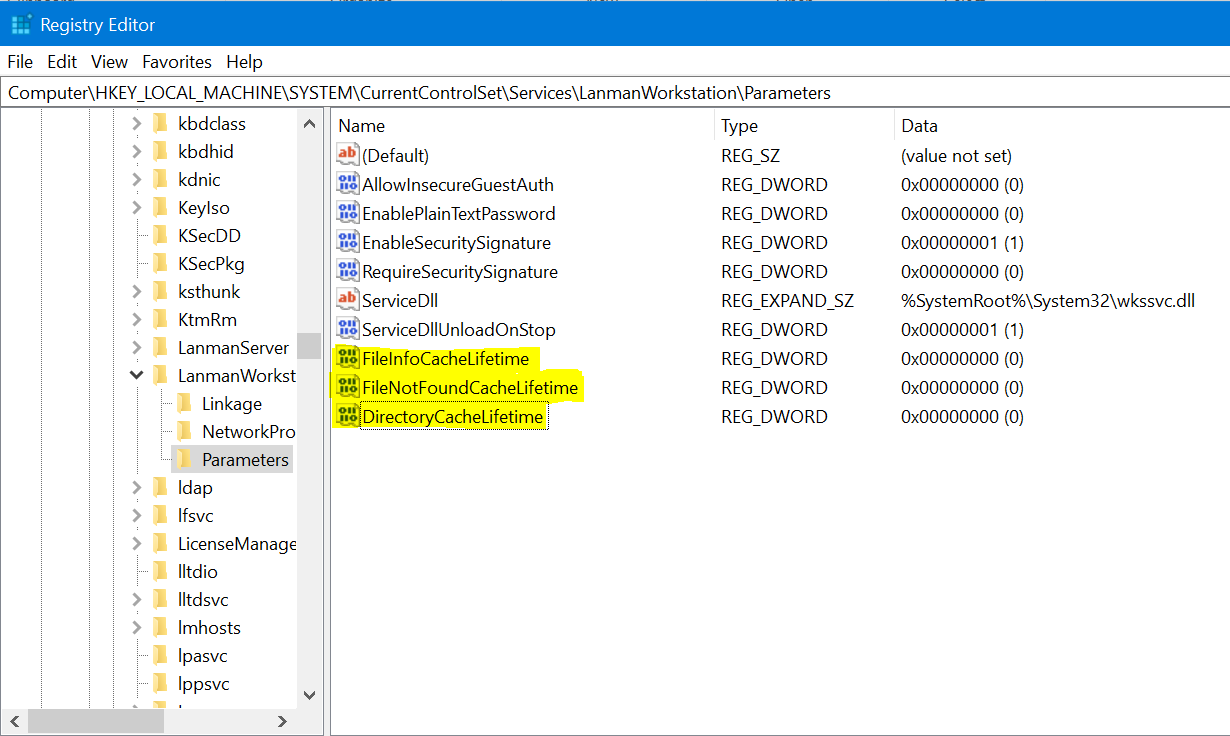
- Aşağıdaki konuma gidin: Computer\HKEY_LOCAL_MACHINE\SYSTEM\CurrentControlSet\Services\LanmanWorkstation\Parameters
- Yukarıdaki konuma girdikten sonra, yeni bir DWORD değeri oluşturun (Yeni > DWORD değerine sağ tıklayın>)
- Aşağıdaki kayıt adını verin. Yeni oluşturulan değer varsayılan olarak sıfırdır
FileNotFoundCacheLifetime Dword=0 >> The file not found cache timeout period.
Sorun paylaşım kökünde değil de bir alt dizindeyken bile devam ederse veya oluşursa yukarıdaki girişle birlikte aşağıdaki kayıt defterlerini ekleyin:
FileInfoCacheLifetime Dword=0                               >> The file information cache timeout period.
DirectoryCacheLifetime Dword=0                            >> This is the directory cache timeout.
Kayıt defteri girişleri aşağıdaki gibi görünür:
Additional Information
- Dosya bilgileri önbelleğini devre dışı bırakmak, istemci performansı üzerinde önemli bir etkiye sahip olabilir ve sunucuya gönderilen meta veri isteklerinin sayısında bir artış gösterebilir.
- Kayıt defteri değerleriyle ilgili ek ayrıntılar burada bulunabilir:
https://docs.microsoft.com/en-us/windows-server/administration/performance-tuning/role/file-server/
Affected Products
Isilon, PowerScale OneFSProducts
Storage, Enterprise Storage, Isilon, Isilon, PowerScale OneFSArticle Properties
Article Number: 000079025
Article Type: Solution
Last Modified: 16 Dec 2025
Version: 4
Find answers to your questions from other Dell users
Support Services
Check if your device is covered by Support Services.