Identyfikacja wersji trybu front-end serwera Dell Data Security Server/Dell Data Protection Server
Summary: Ważne jest, aby znać wersję trybu front-end serwera Dell Data Security (uprzednio Dell Data Protection) w celu:
This article applies to
This article does not apply to
This article is not tied to any specific product.
Not all product versions are identified in this article.
Instructions
Ważne jest, aby znać wersję trybu front-end serwera Dell Data Security (uprzednio Dell Data Protection) w celu:
- Identyfikowania znanych problemów
- Zrozumienie zmian przepływu pracy
- Weryfikacji wymagań systemowych
Dotyczy produktów:
- Dell Security Management Server
- Serwer Dell Data Protection | Enterprise Edition
Dotyczy systemów operacyjnych:
- Windows
ten artykuł określa wersję serwera typu front-end dla serwera Dell Security Management Server lub Dell Security Management Server Virtual. Informacje na temat identyfikacji wersji serwera typu back-end można znaleźć w artykule Identyfikacja wersji serwera Dell Data Security/Dell Data Protection.
Wersję można sprawdzić poprzez:
- Instalator
- Interfejs użytkownika systemu Windows
Kliknij odpowiedni proces, aby uzyskać więcej informacji.
Instalator
- Wyodrębnij pliki Security Management Server.zip.
- Przejdź do witryny
[LOCATION]\Security Management Server\x64.Uwaga:[LOCATION]= Lokalizacja wyodrębnionego pliku .zip - Kliknij prawym przyciskiem myszy
setup.exe, a następnie wybierz pozycję Właściwości.

- Kliknij kartę Szczegóły.
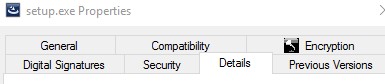
- Zapisz wersję produktu. W tym przykładzie wersja produktu to 9.9.2.
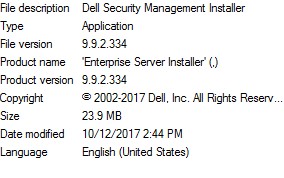 wersja pliku może różnić się od wersji widocznej na powyższym zrzucie ekranu.
Windows
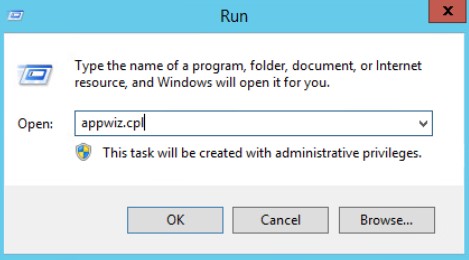
- Jako administrator, prawym przyciskiem myszy kliknij menu Start systemu Windows, a następnie kliknij opcję Uruchom.

- W oknie Uruchom wpisz
appwiz.cpli naciśnij OK.
- W oknie Programy i funkcje odszukaj Dell Security Management Server x64.
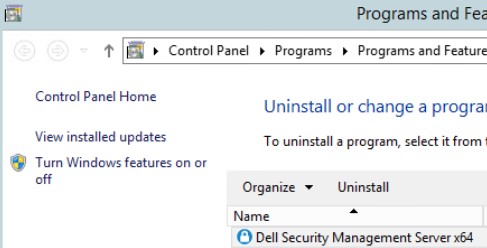 niektóre wersje serwera mogą nosić nazwę Dell Enterprise Server zamiast Dell Security Management Server.
 - Zapisz wersję. W tym przykładzie wersja produktu to 10.2.3.
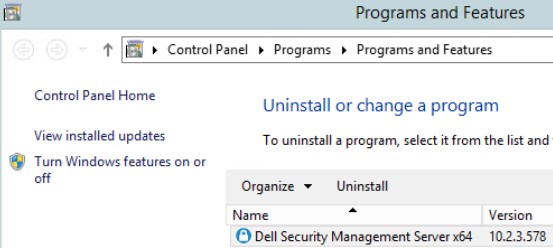 wersja może różnić się od tej przedstawionej na powyższym zrzucie ekranu.
Additional Information
Videos
Affected Products
Dell EncryptionArticle Properties
Article Number: 000130588
Article Type: How To
Last Modified: 10 Aug 2026
Version: 12
Find answers to your questions from other Dell users
Support Services
Check if your device is covered by Support Services.