Dell Networking OS9: SNMP를 사용하여 MAC 주소 테이블을 보는 방법
Summary: Dell Networking OS9 스위치에서 SNMP(Simple Network Management Protocol)를 사용하여 MAC 주소 테이블 항목을 보는 방법
This article applies to
This article does not apply to
This article is not tied to any specific product.
Not all product versions are identified in this article.
Symptoms
기본적으로, snmpwalk 의 dot1dTpFdbTable 의 Dell Networking OS9 스위치가 스위치의 MAC 주소 테이블(포워딩 데이터베이스)을 반환하지 않습니다.
참고: 이
dot1dTpFdbTable 는 dot1dBridge MIB에 포함되어 있습니다.
다음은 일반적인 트리인 dot1dBridge MIB 트리 예에 대한 링크입니다 https://www.cs.vsb.cz/grygarek/TPS/projekty/0405Z/SNMP/mib/dot1dbridge.html

단계:
Dell OS9 SNMP 에이전트가 다음에 응답할 수 있도록 snmpget 에 대한 dot1dTpFdbTable, 숨겨진 CLI 명령을 사용해야 합니다.
- Dell Force10 스위치의 CLI에 로그인합니다.
- "를 입력합니다.
enable", return 키를 누른 다음 privileged-exec enable 암호를 입력합니다. - "를 입력하여 스위치 구성 모드로 들어갑니다.
configure"로 이동되었습니다. - "를 입력합니다.
enable-dot1d-mibwalk", Enter 키를 누릅니다. - 구성을 종료합니다.
- "write"를 입력하여 구성을 저장하고 Enter 키를 누릅니다.
아래 예는 위의 단계에서 실행된 명령을 보여줍니다.
FTOS# configure
FTOS(conf)# enable-dot1d-mibwalk
FTOS(conf)# exit
FTOS# write
다음은 에 대한 mibwalk의 결과를 보여줍니다. dot1dTpFdbTable
이 예제는 iReasoning MIB 브라우저를 사용하여 작성되었습니다.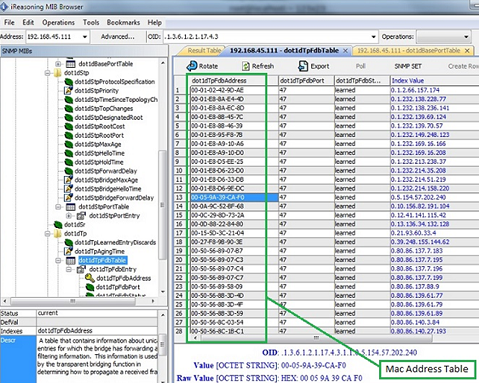
Cause
.
Resolution
.
Affected Products
Force10 S60-44T, PowerEdge M IO AggregatorArticle Properties
Article Number: 000140453
Article Type: Solution
Last Modified: 19 May 2025
Version: 4
Find answers to your questions from other Dell users
Support Services
Check if your device is covered by Support Services.