NetWorker Module for Databases and Applications:DB2 联机备份失败,并显示错误 “不允许SQL2413N联机备份,因为数据库不可恢复”
Summary: NMDA DB2 联机备份失败并显示错误 nsrdasv: 由于备份请求失败,无法备份示例数据库 SQLCODE:-2413,SQL2413N不允许联机备份,因为数据库不可恢复。
This article applies to
This article does not apply to
This article is not tied to any specific product.
Not all product versions are identified in this article.
Symptoms
从 NetWorker Management Console (NMC) 或从 DB2 服务器执行的 NetWorker 数据库和应用程序模块 (NMDA) DB2 备份失败,并显示以下错误:“
不允许SQL2413N联机备份,因为数据库不可恢复”。
不允许SQL2413N联机备份,因为数据库不可恢复”。
Cause
缺省情况下,安装的每个 DB2 数据库都采用循环日志记录。在循环日志记录中无法进行在线备份。
Resolution
启用 DB2 归档日志记录。
下面显示的示例步骤适用于名为“Db4”的 DB2 数据库。
下面显示的示例步骤适用于名为“Db4”的 DB2 数据库。
1. 在客户端上打开 DB2 命令窗口。
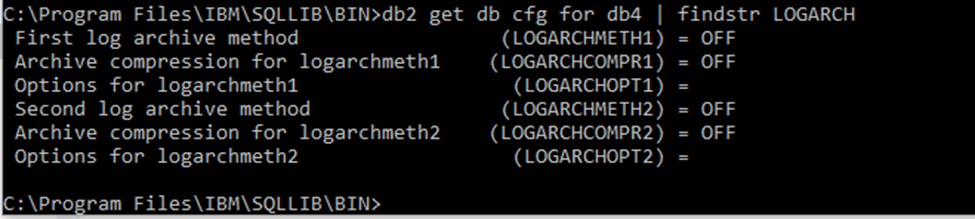
2. 使用命令检查 DB2 日志记录模式,如下面的屏幕截图所示:
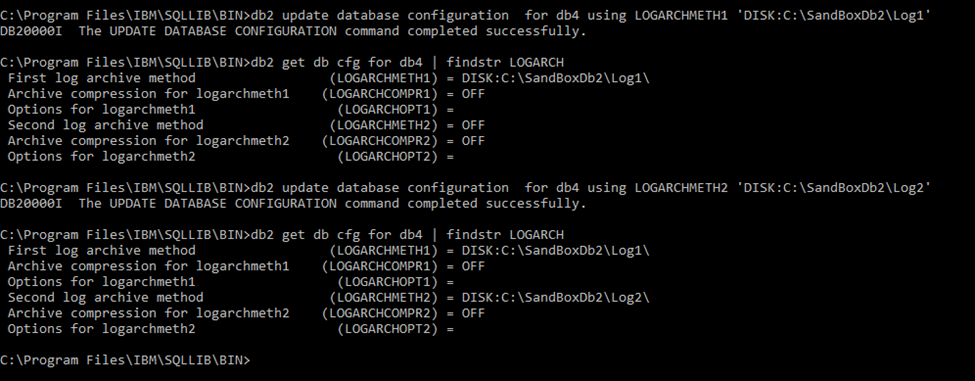
3.更新 logarchmeth 和 logarchopt ,而不是值“OFF”。例如:
4.使用 NMDA,DB2 事务日志可以自动归档到 Data Domain 存储。有关详细步骤,请参阅 NMDA 管理指南。
2. 使用命令检查 DB2 日志记录模式,如下面的屏幕截图所示:
3.更新 logarchmeth 和 logarchopt ,而不是值“OFF”。例如:
4.使用 NMDA,DB2 事务日志可以自动归档到 Data Domain 存储。有关详细步骤,请参阅 NMDA 管理指南。
Additional Information
可从戴尔支持网站获取 《NetWorker Module for Databases and Applications 管理指南 》,网址为:https://www.dell.com/support/home/product-support/product/networker-module-for-databases-and-applications/docs。
Article Properties
Article Number: 000191364
Article Type: Solution
Last Modified: 09 Mar 2022
Version: 1
Find answers to your questions from other Dell users
Support Services
Check if your device is covered by Support Services.