Windows 탐색기를 사용한 대용량 VHD 파일에 대한 ZIP 추출 실패
Summary:
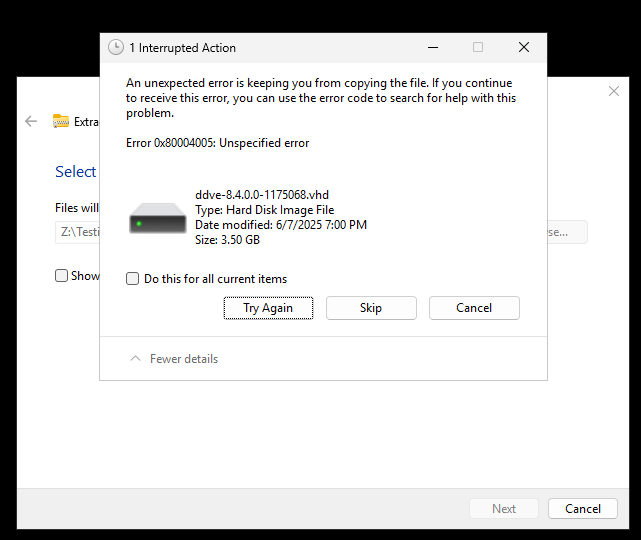
Windows 파일 탐색기를 사용하여 큰 ZIP 파일의 압축을 풀려고 하면 지정되지 않은 오류와 함께 추출 프로세스가 실패합니다. 오류 0x80004005: 지정되지 않은 오류
데이터 오류: .vhd
This article applies to
This article does not apply to
This article is not tied to any specific product.
Not all product versions are identified in this article.
Symptoms
-
파일 탐색기가 추출 프로세스를 완료하지만 프로세스 중에 "데이터 오류"가 표시됩니다.
-
이
.vhd(가상 하드 디스크) 파일을 올바르게 추출하거나 복사할 수 없습니다. -
ZIP 크기와 내용은 정상적으로 나타납니다.
-
PowerShell 또는 타사 압축 해제 툴을 사용하여 문제가 관찰되지 않았습니다.
Cause
Windows 파일 탐색기는 대용량을 처리할 때 제한이 있습니다. .ZIP 큰 VHD 파일(일반적으로 >3GB)이 포함된 아카이브. 이로 인해 다음과 같은 이유로 불완전한 추출 또는 복사 오류가 발생하는 경우가 많습니다.
-
통합 추출기의 파일 크기 제한
-
압축 불일치
-
추출 중 강력한 오류 수정 부족
Resolution
이러한 ZIP 파일을 성공적으로 추출하려면 다음 대체 방법 중 하나를 사용하십시오.
PowerShell 명령
예제
(Microsoft/타사 툴) PowerShell: Expand-Archive -Path "C:\8.4\ddve-hyperv-8.4.0.0-1175068.zip" -DestinationPath "C:\8.4\Extracted\"
기타 추출 도구
회사에서 승인한 전문 추출 유틸리티를 확인하여 파일을 추출/확장합니다.
타사 UI 및 CLI 툴
Affected Products
Storage Integrator, Data Domain Virtual Edition, PowerProtect Data Domain Management Center, PowerPath for WindowsArticle Properties
Article Number: 000334778
Article Type: Solution
Last Modified: 25 Jun 2025
Version: 1
Find answers to your questions from other Dell users
Support Services
Check if your device is covered by Support Services.