使用 Windows 檔案總管的大型 VHD 檔案 ZIP 解壓縮失敗
Summary:
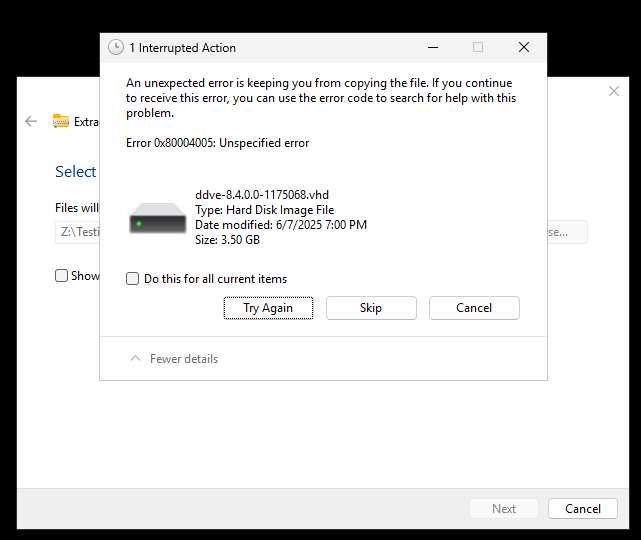
嘗試使用 Windows 檔案總管擷取大型 ZIP 檔案時,解壓縮程序會失敗,並出現未指定的錯誤:錯誤0x80004005:未指定的錯誤
資料錯誤: .vhd
This article applies to
This article does not apply to
This article is not tied to any specific product.
Not all product versions are identified in this article.
Symptoms
-
檔案總管會完成解壓縮程序,但在此過程中會顯示「資料錯誤」。
-
可使用
.vhd(虛擬硬碟) 檔案無法正確解壓縮或複製。 -
ZIP 大小和內容看起來正常。
-
使用 PowerShell 或第三方解壓縮工具時未發現任何問題。
Cause
Windows 檔案總管在處理大型檔案總管時有限制 .ZIP 包含 大型 VHD 檔(通常為 >3GB)的存檔。這通常會導致提取不完整或複製失敗,原因如下:
-
整合式解壓縮工具中的檔案大小限制
-
壓縮不一致
-
提取過程中缺乏強大的糾錯能力
Resolution
若要 成功解壓縮這些 ZIP 檔案,請使用下列替代方法之一:
PowerShell 命令
範例
(Microsoft/第三方工具) PowerShell: Expand-Archive -Path "C:\8.4\ddve-hyperv-8.4.0.0-1175068.zip" -DestinationPath "C:\8.4\Extracted\"
其他解壓縮工具
檢查公司核准的專業解壓縮公用程式,以解壓縮/展開檔案。
第三方 UI 和 CLI 工具
Affected Products
Storage Integrator, Data Domain Virtual Edition, PowerProtect Data Domain Management Center, PowerPath for WindowsArticle Properties
Article Number: 000334778
Article Type: Solution
Last Modified: 16 Feb 2026
Version: 2
Find answers to your questions from other Dell users
Support Services
Check if your device is covered by Support Services.