使用 Windows 资源管理器解压大型 VHD 文件的 ZIP 解压失败
Summary:
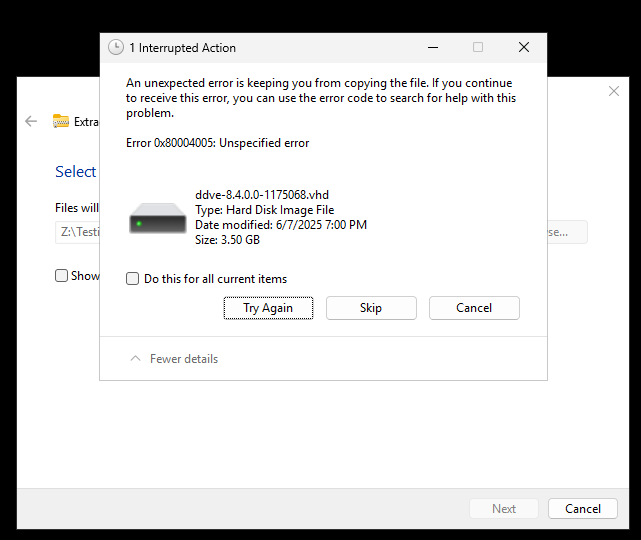
尝试使用 Windows 文件资源管理器解压大型 ZIP 文件时,解压过程失败,并显示未指定的错误:错误0x80004005:未指定的错误
数据错误: .vhd
This article applies to
This article does not apply to
This article is not tied to any specific product.
Not all product versions are identified in this article.
Symptoms
-
文件资源管理器完成解压过程,但在此过程中显示“数据错误”。
-
而
.vhd(虚拟硬盘)文件无法正确提取或复制。 -
ZIP 大小和内容显示正常。
-
使用 PowerShell 或第三方提取工具未观察到任何问题。
Cause
Windows 文件资源管理器在处理大型 .ZIP 包含 大型 VHD 文件(通常 >为 3GB)的存档。由于以下原因,这通常会导致提取不完整或复制失败:
-
集成解压器中的文件大小限制
-
压缩不一致
-
提取过程中缺乏强大的纠错功能
Resolution
要 成功解压这些 ZIP 文件,请使用以下备选方法之一:
PowerShell 命令
示例
(Microsoft/第三方工具) PowerShell: Expand-Archive -Path "C:\8.4\ddve-hyperv-8.4.0.0-1175068.zip" -DestinationPath "C:\8.4\Extracted\"
其他提取工具
检查是否有公司批准的专业解压实用程序来解压/扩展文件。
第三方 UI 和 CLI 工具
Affected Products
Storage Integrator, Data Domain Virtual Edition, PowerProtect Data Domain Management Center, PowerPath for WindowsArticle Properties
Article Number: 000334778
Article Type: Solution
Last Modified: 16 Feb 2026
Version: 2
Find answers to your questions from other Dell users
Support Services
Check if your device is covered by Support Services.