Alienware Command Center FX-indstillinger virker ikke på Alienware Area-51
Summary: Få mere at vide om, hvordan du løser problemet, når ændringer foretaget i fanen FX i Alienware Command Center ikke ses på Alienware Area-51-computerens lys.
This article applies to
This article does not apply to
This article is not tied to any specific product.
Not all product versions are identified in this article.
Symptoms
Ændringer i Alienware-computerens lys kan muligvis ikke ses, når der foretages ændringer i fanen FX i Alienware Command Center version 6.9.15.0. I nogle tilfælde mangler fanen FX muligvis i Alienware Command Center.
Berørte platforme:
- Alienware 18 Area-51 AA18250
- Alienware Area-51 AAT2250
- Alienware Area-51 AAT2265
Berørt software:
- Alienware Command Center version 6.9.15.0
Påvirkede operativsystemer:
- Windows 11
Cause
Problemet kan skyldes kompatibilitetsproblemer eller manglende afhængigheder under Alienware Command Center-installationen på den fabriksinstallerede afbildning.
Resolution
- Gå til Installerede apps i Indstillinger for at starte reparationsprocessen af Alienware Command Center.
- Vælg Alienware Command Center-programmet, og vælg indstillingen Rediger for at få adgang til reparationsfunktioner.
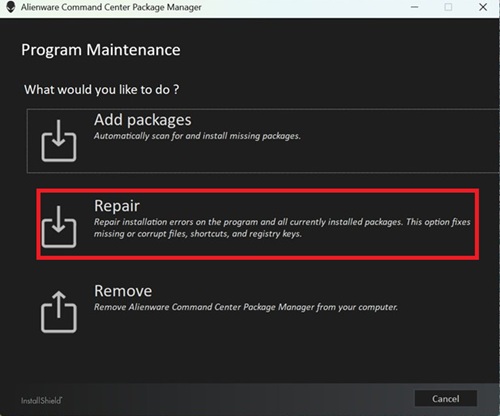
- Vælg Reparer , og vælg ALIENFX-komponenten for at gendanne lyseffektfunktionaliteten.
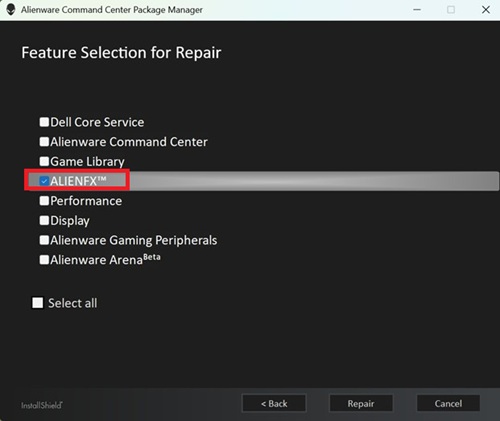
- Følg trinnene på skærmen for at afslutte reparationen.
- Genstart computeren, og kontroller, om fanen FX nu er synlig i Alienware Command Center.
- Hvis fanen FX stadig ikke er synlig, skal du opdatere til den nyeste version af Alienware Command Center. Du kan finde oplysninger om opdatering til den nyeste version af Alienware Command Center i brugervejledningen under Support til Alienware Command Center-manualer og -dokumenter.
Affected Products
Alienware 18 Area-51 AA18250, Alienware Area-51 AAT2250, Alienware Area-51 AAT2265Article Properties
Article Number: 000373023
Article Type: Solution
Last Modified: 29 Jul 2026
Version: 5
Find answers to your questions from other Dell users
Support Services
Check if your device is covered by Support Services.