Dell Display 和 Peripheral Manager 微型安装程序无法启动
Summary: 了解在连接新的受支持的戴尔设备时,Dell Display and Peripheral Manager (DDPM) 可能不显示微型安装程序提示的原因。
This article applies to
This article does not apply to
This article is not tied to any specific product.
Not all product versions are identified in this article.
Symptoms
在运行 Windows 的计算机上,当连接受支持的戴尔设备时,不会出现弹出消息来提示安装或更新 Dell Display 和 Peripheral Manager。
在以下情况下可能会观察到此行为:
- 在未安装 DDPM 的系统上首次连接受支持的戴尔设备。
- 连接了需要较新 DDPM 版本的受支持新设备,但未出现下载或更新 DDPM 的提示。
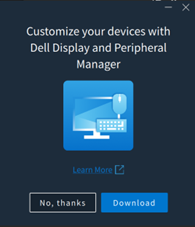
受影响的软件:
- Dell Display 和 Peripheral Manager(2.2.1 及更高版本)
受影响的外围设备:
- 戴尔 Pro 5 键盘及鼠标 KM526
- 戴尔 Pro 5 鼠标 MS526
- 戴尔 Pro 5 有线指纹 ESS 鼠标 MS526C
- 戴尔 Pro 7 静音鼠标 MS726
- 戴尔 Pro 7 轻薄键盘及鼠标 KM726
受影响的操作系统:
- Windows
Cause
这是预期的行为。以前的小型安装程序体验已被删除,并且在连接受支持的设备时不再显示。
Resolution
这是设计更改。小型安装程序已从 DDPM 版本 2.2.1 中删除。
Affected Products
Dell Display and Peripheral Manager, Dell Pro 5 Keyboard and Mouse KM526, Dell Pro 7 Slim Keyboard and Mouse KM726, Dell Pro 5 Mouse MS526, Dell Pro 5 Wired Fingerprint ESS Mouse MS526C, Dell Pro 7 Silent Mouse MS726Article Properties
Article Number: 000442074
Article Type: Solution
Last Modified: 24 May 2026
Version: 2
Find answers to your questions from other Dell users
Support Services
Check if your device is covered by Support Services.