安装 NVIDIA Geforce 驱动程序后 NVIDIA 控制面板无法安装
Summary: 了解 NVIDIA 正式宣布停用 NVIDIA 控制面板。
This article applies to
This article does not apply to
This article is not tied to any specific product.
Not all product versions are identified in this article.
Symptoms
NVIDIA 已正式宣布,经典的 NVIDIA 控制面板将正式停用。在此版本 32.0.16.1060 之后,NVIDIA 控制面板将从驱动程序安装包中删除。
从 NVIDIA 应用程序
如果您执行干净的 Windows 操作系统 (操作系统) 安装并安装 NVIDIA 驱动程序版本 32.0.16.1060 或更高版本,则 NVIDIA 控制面板将不再安装。
Cause
NVIDIA 正式宣布,经典的 NVIDIA 控制面板即将停用。
Resolution
如果计算机已安装 NVIDIA 控制面板,将驱动程序更新到版本 32.0.16.1060 或更高版本,NVIDIA 控制面板不会卸载,您可以继续使用 NVIDIA 控制面板。
如果您在计算机上执行全新 Windows 安装,则在安装驱动程序版本 32.0.16.1060 或更高版本时,NVIDIA 控制面板将不再安装。
对于消费者系统(例如:Alienware):
- 您可以通过 戴尔支持 网站上的 NVIDIA-GeForce-GTX-1xx0-RTX-x0x0-Graphics-Application_75KWV_WIN64_32.0.16.1060_A00.EXE 下载来安装 NVIDIA 应用程序 。
- 您可以从 Microsoft Store 下载 NVIDIA 应用程序 。
对于商用系统(例如:戴尔塔式机):
- 您可以从 Microsoft Store 下载 NVIDIA 控制面板 。
注意: 您可以右键单击桌面以打开 NVIDIA 应用程序。
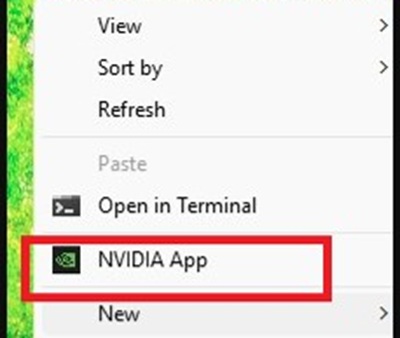
注意: NVIDIA 控制面板 在停用后仍将正常工作,但 NVIDIA 将不再修复或维护该应用程序。
Affected Products
Alienware Area-51 AAT2250, Alienware Area-51 AAT2265, Alienware Aurora ACT1250, Dell Tower Plus EBT2250Article Properties
Article Number: 000496650
Article Type: Solution
Last Modified: 14 Aug 2026
Version: 1
Find answers to your questions from other Dell users
Support Services
Check if your device is covered by Support Services.