Data Protection Advisor (DPA): NetWorker Workflow Configuration report missing some data
Summary: NetWorker Workflow Configuration report is missing data for fields like Auto-Start Enabled, Start Time, Interval, and Restart Window.
Symptoms
The NetWorker Workflow Configuration report returns no data for some fields including Auto-Start Enabled, Start Time, Interval, and Restart Window.
Cause
Resolution
To address the issue:
-
Configure NetWorker credentials in DPA to make the Rest API calls. Use NMC administrator user or create a new user using NMC or CLI in NetWorker with User role privileges.
-
Go to the DPA console > Inventory > Object Library > Applications and select the NetWorker node.
-
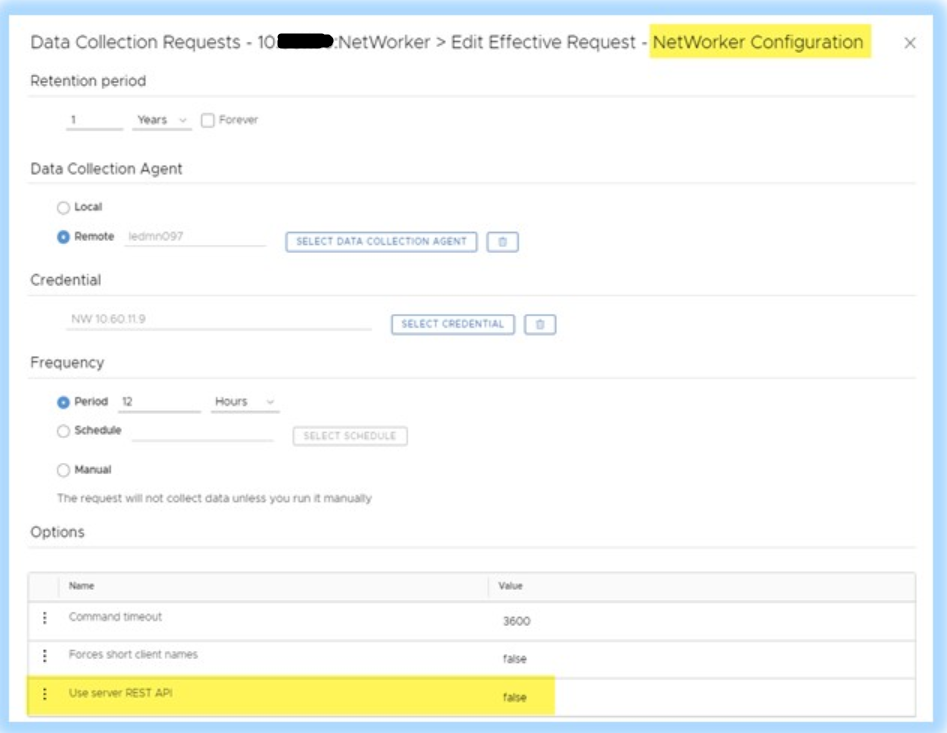
Select the Data Collection tab, highlight the NetWorker Configuration request and click Edit.
-
Set the request option Use server REST API to true (default is false). Also, set the Credentials to use the DPA credentials created in step 1 above.
- Run a manual data collection or wait for the schedule data collection to run and complete successfully. Once it completes, the missing fields should be populated in the report.
Contact DELL Technical Support for more information or if further assistance is needed.