PowerProtect statuscontrolescore beïnvloed door DNS-resolutie
Summary: De PowerProtect Data Manager appliance werd geïmplementeerd met de eerste omgevingsdetails. De statuscontrole toont een componentfout die aangeeft dat er een probleem is met de configuratie van de Domain Name Server (DNS). Er is een typefout opgetreden en de standaardnetwerkinstellingen worden mogelijk niet bijgewerkt. ...
Symptoms
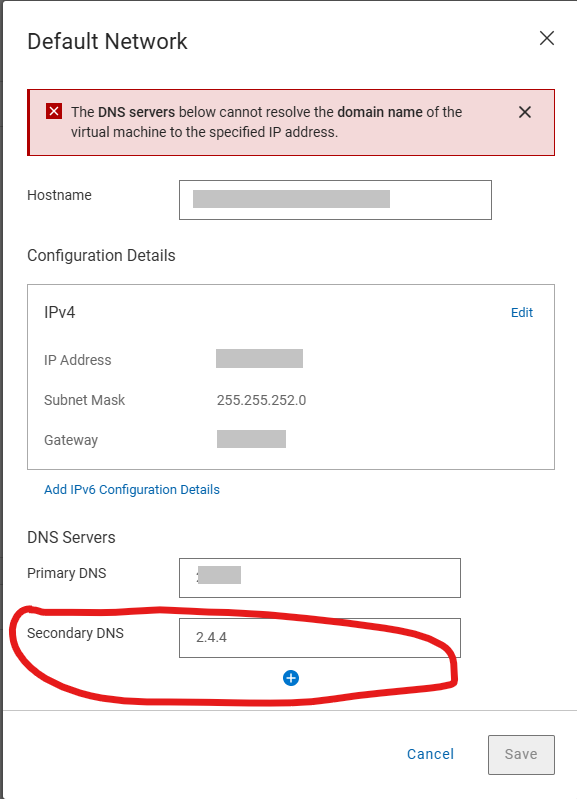
Op de pagina Standaardnetwerkinstellingen wordt het volgende weergegeven:
The DNS Servers below cannot resolve the domain name of the virtual machine to the specific IP address.
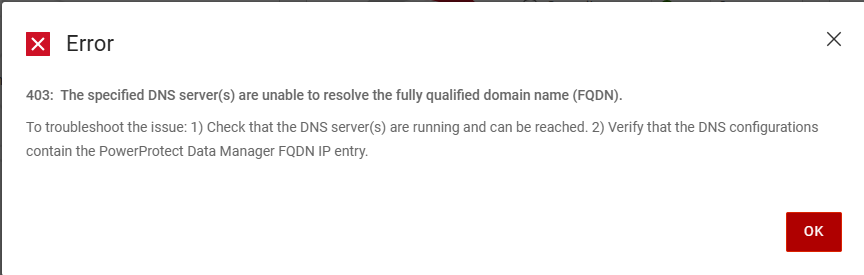
De volgende fout wordt gegenereerd bij een poging om de juiste DNS-servergegevens op te slaan op de pagina Standaardnetwerkinstellingen
Error
403: The specific DNS server(s) are unable to resolve the fully qualified domain name (FQDN).
To troubleshoot the issue: 1)Check that the DNS server(s) are running and can be reached. 2) Verify that the DNS configurations contain the PowerProtect Data manager FQDN IP entry.
De /var/log/brs/sysmgr/sysmgr-health-check.log Toont:
YYYY-MM-DD HH:MM:SS INFO [] [Health-Check] [][][][TRACE_ID:bbd731535f2a4450][] [c.e.b.s.s.h.CDRSHealthCheck.check(72)] -  Start CDRS health check
YYYY-MM-DD HH:MM:SS INFO [] [Health-Check] [][][][TRACE_ID:bbd731535f2a4450][] [c.e.b.s.s.h.CDRSHealthCheck.check(77)] -  CDRA is not enabled, will not perform CDRS health check.
YYYY-MM-DD HH:MM:SS INFO [] [Health-Check] [][][][TRACE_ID:bbd731535f2a4450][] [c.e.b.s.s.h.CDRSHealthCheck.check(97)] -  End CDRS health check
YYYY-MM-DD HH:MM:SS INFO [] [Health-Check] [][][][TRACE_ID:bbd731535f2a4450][] [c.e.b.s.s.h.DiskHealthCheck.check(61)] -  Start disk health check
YYYY-MM-DD HH:MM:SS INFO [] [Health-Check] [][][][TRACE_ID:bbd731535f2a4450][] [c.e.b.s.s.h.ESSettingsHealthCheck.check(40)] -  Start ES settings health check.
YYYY-MM-DD HH:MM:SS INFO [] [Health-Check] [][][][TRACE_ID:bbd731535f2a4450][] [c.e.b.s.s.h.DumpHealthCheck.check(45)] -  Start dump health check
YYYY-MM-DD HH:MM:SS INFO [] [Health-Check] [][][][TRACE_ID:bbd731535f2a4450][] [c.e.b.s.s.h.MemoryHealthCheck.check(73)] -  Start memory health check
YYYY-MM-DD HH:MM:SS INFO [] [Health-Check] [][][][TRACE_ID:bbd731535f2a4450][] [c.e.b.s.s.h.ESSettingsHealthCheck.check(42)] -  ES settings health check finished.
YYYY-MM-DD HH:MM:SS INFO [] [Health-Check] [][][][TRACE_ID:bbd731535f2a4450][] [c.e.b.s.s.h.OsAccountHealthCheck.check(70)] -  Start Os account health check
YYYY-MM-DD HH:MM:SS INFO [] [Health-Check] [][][][TRACE_ID:bbd731535f2a4450][] [c.e.b.s.s.h.NTPHealthCheck.check(62)] -  Start NTP Servers health check.
YYYY-MM-DD HH:MM:SS INFO [] [Health-Check] [][][][TRACE_ID:bbd731535f2a4450][] [c.e.b.s.s.h.ReportingHealthCheck.check(67)] -  Start Reporting health check
YYYY-MM-DD HH:MM:SS INFO [] [Health-Check] [][][][TRACE_ID:bbd731535f2a4450][] [c.e.b.s.s.h.DNSHealthCheck.check(57)] -  Start DNS Servers health check.
YYYY-MM-DD HH:MM:SS INFO [] [Health-Check] [][][][TRACE_ID:bbd731535f2a4450][] [c.e.b.s.s.h.SearchClusterHealthCheck.check(69)] -  Start Search Cluster health check
YYYY-MM-DD HH:MM:SS INFO [] [Health-Check] [][][][TRACE_ID:bbd731535f2a4450][] [c.d.p.c.c.h.e.s.i.ESCatalogHealthCheck.check(51)] -  Start ES Catalog cluster health check.
YYYY-MM-DD HH:MM:SS INFO [] [Health-Check] [][][][TRACE_ID:bbd731535f2a4450][] [c.d.p.c.c.h.e.d.ESHealthCheckDao.checkESShardsHealth(43)] -  es connection port is 14300
YYYY-MM-DD HH:MM:SS INFO [] [Health-Check] [][][][TRACE_ID:bbd731535f2a4450][] [c.d.p.c.c.h.e.s.i.ESCatalogInspector.inspect(54)] -  The cluster status is green
YYYY-MM-DD HH:MM:SS INFO [] [Health-Check] [][][][TRACE_ID:bbd731535f2a4450][] [c.d.p.c.c.h.e.s.i.ESCatalogHealthCheck.check(53)] -  ES Catalog cluster health check finished.
YYYY-MM-DD HH:MM:SS INFO [] [Health-Check] [][][][TRACE_ID:bbd731535f2a4450][] [c.e.b.s.s.h.DumpHealthCheck.check(59)] -  End dump health check
YYYY-MM-DD HH:MM:SS INFO [] [Health-Check] [][][][TRACE_ID:bbd731535f2a4450][] [c.e.b.s.s.h.ReportingHealthCheck.check(90)] -  End Reporting health check
YYYY-MM-DD HH:MM:SS INFO [] [Health-Check] [][][][TRACE_ID:bbd731535f2a4450][] [c.e.b.s.s.h.SearchClusterHealthCheck.check(97)] -  End Search Cluster health check
YYYY-MM-DD HH:MM:SS INFO [] [Health-Check] [][][][TRACE_ID:bbd731535f2a4450][] [c.e.b.s.s.h.OsAccountHealthCheck.check(89)] -  End Os account health check
YYYY-MM-DD HH:MM:SS INFO [] [Health-Check] [][][][TRACE_ID:bbd731535f2a4450][] [c.e.b.s.s.h.MemoryHealthCheck.check(112)] -  End memory health check
YYYY-MM-DD HH:MM:SS INFO [] [Health-Check] [][][][TRACE_ID:bbd731535f2a4450][] [c.e.b.s.s.h.DNSHealthCheck.check(81)] -  Cannot resolve the host my-ppdm.my-domain.com with dns server XXX.XXX.XXX.XXX.
YYYY-MM-DD HH:MM:SS INFO [] [Health-Check] [][][][TRACE_ID:bbd731535f2a4450][] [c.e.b.s.s.h.DNSHealthCheck.check(81)] -  Cannot resolve the host my-ppdm.my-domain.com with dns server XXX.XXX.XXX.
YYYY-MM-DD HH:MM:SS INFO [] [Health-Check] [][][][TRACE_ID:bbd731535f2a4450][] [c.e.b.s.s.h.DNSHealthCheck.check(84)] -  End DNS Servers health check.
YYYY-MM-DD HH:MM:SS INFO [] [Health-Check] [][][][TRACE_ID:bbd731535f2a4450][] [c.e.b.s.s.h.DiskHealthCheck.check(82)] -  End disk health check
YYYY-MM-DD HH:MM:SS INFO [] [Health-Check] [][][][TRACE_ID:bbd731535f2a4450][] [c.e.b.s.s.h.NTPHealthCheck.isNTPServersValid(93)] -  Specified ntp server is valid my-timeserver.my-domain.com
YYYY-MM-DD HH:MM:SS INFO [] [Health-Check] [][][][TRACE_ID:bbd731535f2a4450][] [c.e.b.s.s.h.NTPHealthCheck.check(75)] -  End NTP Servers health check.
YYYY-MM-DD HH:MM:SS INFO [] [Health-Check-Request] [][][][TRACE_ID:bbd731535f2a4450][] [c.d.p.c.c.h.s.i.HealthAlertService.handleResult(52)] -  health check total 11, success 10, failed 1
YYYY-MM-DD HH:MM:SS INFO [] [Health-Check-Request] [][][][TRACE_ID:bbd731535f2a4450][] [c.d.p.c.c.h.s.i.HealthAlertService.onEvent(38)] -  On event SYS0075 None of the specified DNS servers are accessible. []
YYYY-MM-DD HH:MM:SS INFO [] [Health-Check-Request] [][][][TRACE_ID:bbd731535f2a4450][] [c.d.p.c.c.h.s.i.HealthCheckPersistenceSubscriber.onComplete(66)] -  health check entity 02538bab-2ff8-4ee4-bc57-0a40c1061ca1 is completed and persisted
Cause
Er was een typefout en de standaard netwerkinstellingen tijdens de eerste implementatie. De post-configuratie voor het standaardnetwerk heeft validatie voor de DNS-serververmeldingen, maar de initiële implementatie voert geen validatie uit. De validatie mislukt door de typefout en staat niet toe dat de instellingen worden gewijzigd.
Resolution
De DNS-servers kunnen worden bijgewerkt met behulp van de PowerProtect /usr/local/brs/puppet/manifests/extdata/common.json configuratiebestand. Zorg ervoor dat er geen back-ups of hersteltaken worden uitgevoerd in de omgeving, omdat een PowerProtect apparaat opnieuw moet worden opgestart om de wijzigingen toe te passen.
- Controleer of er geen actieve back-ups of herstelsessies zijn.
- Open een SSH-sessie naar PowerProtect Data Manager en verifieer met het beheerdersaccount.
- Bevestig de huidige instellingen van de
common.jsonConfiguratiebestand:cat /usr/local/brs/puppet/manifests/extdata/common.json - Open de
common.jsonConfiguratiebestand en bewerk dednsServerswaarden:vi /usr/local/brs/puppet/manifests/extdata/common.json

- Bevestig de huidige instellingen van de
common.jsonConfiguratiebestand:cat /usr/local/brs/puppet/manifests/extdata/common.json - Start het PowerProtect apparaat opnieuw op:
sudo reboot - Laat het PowerProtect apparaat volledig initialiseren
- Controleer of de standaardnetwerkinstellingen correct zijn bijgewerkt.